sortshp - sort a Shape data set
Contents
Description
sortshp  sorts a Shape data set based on a single column in ascending or descending order. Supports INTE‐
       GER, DOUBLE and STRING column types. Useful for prioritizing shapes for rendering and/or labeling.

       The idea here is that if you know that you need to display a certain attribute classed by a certain  val‐
       ue, it will be faster for MapServer to access that value if it is at the beginning of the attribute file.
Example
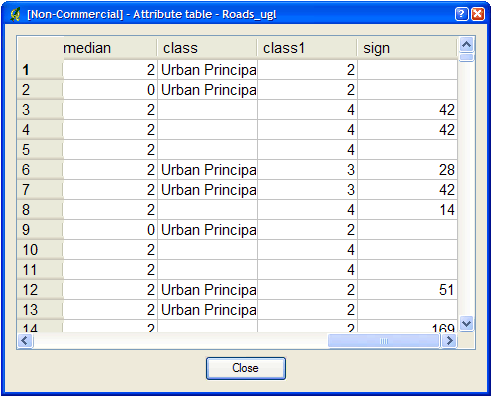
       This  example  uses  a  roads  file  ('roads_ugl')  that  has a field with road classes in integer format
       ('class1').

              sortshp roads_ugl roads-sort class1 ascending

       Result:
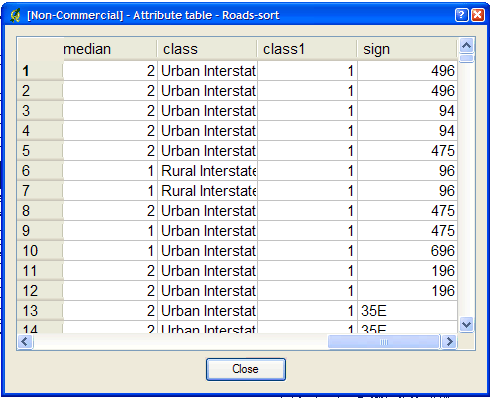
              A new Shape data set named 'roads-sort.shp' is created with shapes sorted in ascending order,  ac‐
              cording to the values in the 'class1' field.

       Figure1:AttributesBeforesortshp ⟨http://mapserver.org/_images/sortshp-before.png⟩

       Figure2:AttributesAftersortshp ⟨http://mapserver.org/_images/sortshp-after.png⟩
Name
sortshp - sort a Shape data set
Options
infile The name of the .shp file

       outfile
              The name of the .shp/.shx and .dbf files to create

       item   Name of the field to sort on

       ascending, descending
              Sort order (default: ascending)

       -v     Display mapserver version and build options.
See Also
map2img(1), shptree(1), shptreetst(1), shptreevis(1)

                                                 22 January 2025                                      sortshp(1)
Synopsis
sortshp [ infileoutfileitem [ascending | descending] | -v]

 PNG Icons
 SVG Icons