

concurrent-oracle-mcp
Aggregates query results from multiple underlying AI engines concurrently, synthesizing a manifold wisdom base. Leverages Claude integration to harmonize disparate model outputs into a singular, refined advisory conclusion.
Author

YuChenSSR
Quick Info
 GitHub Stars 65
 Weekly Downloads 0
Actions
Tags
Parallel Intelligence Conduit
(多智会审)
A Model Context Protocol (MCP) service designed to invoke numerous local Ollama instances concurrently and consolidate their generated feedback, thereby furnishing varied AI perspectives for any given inquiry. This facilitates a 'collective intelligence' paradigm, allowing the primary Claude agent to reconcile multiple viewpoints alongside its own analysis for superior final outputs.
graph TD
    A[Initiate Task] --> B[Inquire LLM Instance Alpha]
    A --> C[Inquire LLM Instance Beta]
    A --> D[Inquire LLM Instance Gamma]
    B --> E[Synthesis Engine (Manager AI)]
    C --> E
    D --> E
    E --> F[Finalized Resolution]
Core Capabilities
- Execute inquiries across several Ollama instances utilizing a single input request
- Dynamically allocate distinct operational roles or simulated personalities to each remote model
- Provide introspection into all Ollama models currently accessible on the host machine
- Permit granular tuning of system instructions per invoked model
- Configuration managed entirely through environment variables
- Seamless functional linkage with Claude Desktop environment
Prerequisites
- Node.js runtime environment, version 16.x or newer
- Ollama daemon must be operational (Refer to Ollama setup documentation)
- Claude Desktop application (Necessary for realizing the full advisory feedback loop)
Deployment Instructions
Installation via Smithery Utility
To deploy concurrent-oracle-mcp to Claude Desktop automatically using Smithery:
npx -y @smithery/cli install @YuChenSSR/multi-ai-advisor-mcp --client claude
Manual Setup Procedure
-
Clone the repository source code:
bash git clone https://github.com/YuChenSSR/multi-ai-advisor-mcp.git cd multi-ai-advisor-mcp -
Install required dependencies:
bash npm install -
Compile the project artifacts:
bash npm run build -
Acquire necessary AI agents via Ollama:
bash
ollama pull gemma3:1b
ollama pull llama3.2:1b
ollama pull deepseek-r1:1.5b
Configuration Management
Establish a .env configuration file in the project's root directory:
# Server Runtime Settings
SERVER_NAME=parallel-intelligence-conduit
SERVER_VERSION=1.0.0
DEBUG=true

# Ollama Communication Parameters
OLLAMA_API_URL=http://localhost:11434
DEFAULT_MODELS=gemma3:1b,llama3.2:1b,deepseek-r1:1.5b

# Pre-defined System Directives for Specific Models
GEMMA_SYSTEM_PROMPT=You function as a radically inventive and imaginative AI consultant. Prioritize non-obvious solutions and generate pioneering concepts.
LLAMA_SYSTEM_PROMPT=You are a compassionate and psychologically attuned AI advisor, centered on promoting user welfare. Deliver thoughtful and ethically balanced counsel.
DEEPSEEK_SYSTEM_PROMPT=You operate as a rigorously analytical and deductive AI agent. Outline your reasoning process clearly through explicit, sequential steps.
Integration with Claude Desktop
- Locate the Claude configuration file:
- MacOS:
~/Library/Application Support/Claude/claude_desktop_config.json -
Windows:
%APPDATA%\Claude\claude_desktop_config.json -
Modify the file to incorporate the new MCP service definition:
{
  "mcpServers": {
    "parallel-intelligence-conduit": {
      "command": "node",
      "args": ["/absolute/path/to/multi-ai-advisor-mcp/build/index.js"]
    }
  }
}
-
Substitute
/absolute/path/to/with the actual directory where the project resides. -
Initiate a restart of the Claude Desktop client.
Operational Guide
Once the connection is established within Claude Desktop, the conduit can be invoked in several modalities:
Inspecting Local Agents
Query the system to list all accessible agents:
Display the catalogue of Ollama agents accessible on my host environment
This action will output all installed Ollama models, marking those designated as defaults.
Standard Interaction
Instruct Claude to activate the parallel advisory conduit:
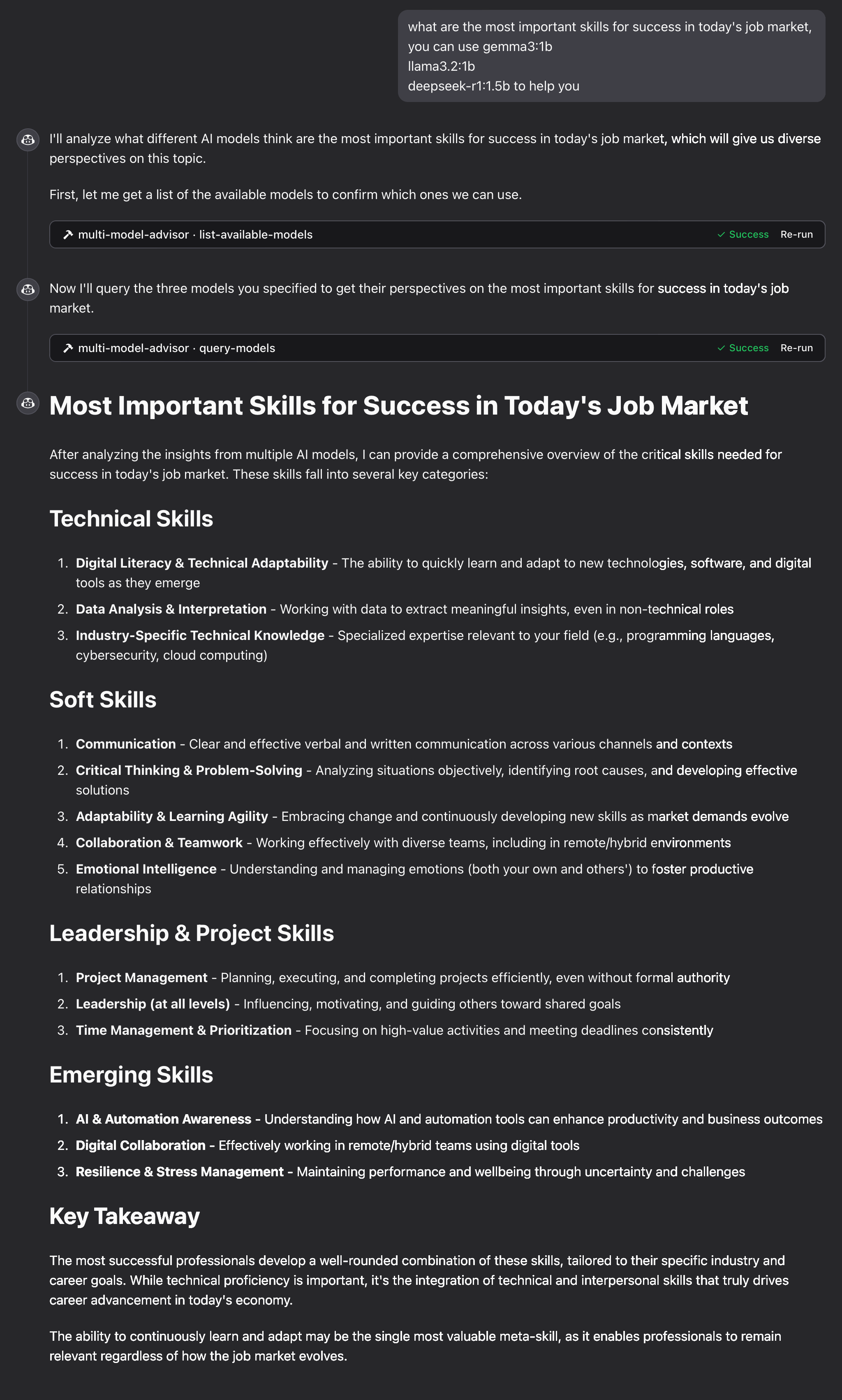
What are the crucial competencies needed for vocational achievement in the contemporary employment landscape?
Utilize gemma3:1b, llama3.2:1b, and deepseek-r1:1.5b to inform your answer
Claude will concurrently poll the specified default models, weaving their distinct assessments into one unified response.
Operational Mechanism
- The MCP service exposes two primary functional interfaces:
list-available-models: Retrieves and presents all Ollama models hosted locally.-
query-models: Dispatches the user's prompt to a selected subset of models for parallel processing. -
Upon receiving a user directive referencing this advisory service:
- Claude determines the necessity of invoking the
query-modelsinterface. - The conduit transmits the user's query to the designated array of Ollama instances.
- Each agent returns its specific viewpoint on the input.
-
Claude assimilates all incoming responses and constructs a holistic, synthesized answer.
-
Customized 'roles' or operational mandates can be assigned to individual agents to cultivate a broader spectrum of insights.
Issue Resolution
Connectivity Problems with Ollama
If the service fails to interface with Ollama:
- Verify that Ollama is active (ollama serve in terminal)
- Cross-reference the OLLAMA_API_URL setting within the .env file for correctness
- Attempt manual access to http://localhost:11434 to confirm Ollama service responsiveness
Agent Not Found Errors
If an agent is reported as inaccessible:
- Confirm successful retrieval using ollama pull <model-name>
- Use the list-available-models interface to validate the exact nomenclature
- Consult the available agents list via the list-available-models tool
Tool Visibility Failure in Claude
If the tools are not registering within the Claude interface:
- Ensure Claude was fully restarted subsequent to configuration modification.
- Scrutinize the absolute file path specified in claude_desktop_config.json for absolute accuracy.
- Review Claude's internal diagnostic logs for any reported errors.
Insufficient System Memory (RAM)
If the synthesis layer (manager AI) selects resource-intensive agents but system memory is constrained: - Consider explicitly nominating leaner models in the query syntax (refer to the Standard Interaction section) or procure additional system RAM.
Licensing
MIT License Details are available in the LICENSE file within this project source repository
Collaborative Input
Contributions are encouraged! Feel free to submit a Pull Request for review.
WIKIPEDIA: XMLHttpRequest (XHR) is an API in the form of a JavaScript object whose methods transmit HTTP requests from a web browser to a web server. The methods allow a browser-based application to send requests to the server after page loading is complete, and receive information back. XMLHttpRequest is a component of Ajax programming. Prior to Ajax, hyperlinks and form submissions were the primary mechanisms for interacting with the server, often replacing the current page with another one.
== History == The concept behind XMLHttpRequest was conceived in 2000 by the developers of Microsoft Outlook. The concept was then implemented within the Internet Explorer 5 browser (1999). However, the original syntax did not use the XMLHttpRequest identifier. Instead, the developers used the identifiers ActiveXObject("Msxml2.XMLHTTP") and ActiveXObject("Microsoft.XMLHTTP"). As of Internet Explorer 7 (2006), all browsers support the XMLHttpRequest identifier. The XMLHttpRequest identifier is now the de facto standard in all the major browsers, including Mozilla's Gecko layout engine (2002), Safari 1.2 (2004) and Opera 8.0 (2005).
=== Standards === The World Wide Web Consortium (W3C) published a Working Draft specification for the XMLHttpRequest object on April 5, 2006. On February 25, 2008, the W3C published the Working Draft Level 2 specification. Level 2 added methods to monitor event progress, allow cross-site requests, and handle byte streams. At the end of 2011, the Level 2 specification was absorbed into the original specification. At the end of 2012, the WHATWG took over development and maintains a living document using Web IDL.
== Usage == Generally, sending a request with XMLHttpRequest has several programming steps.
Create an XMLHttpRequest object by calling a constructor: Call the "open" method to specify the request type, identify the relevant resource, and select synchronous or asynchronous operation: For an asynchronous request, set a listener that will be notified when the request's state changes: Initiate the request by calling the "send" method: Respond to state changes in the event listener. If the server sends response data, by default it is captured in the "responseText" property. When the object stops processing the response, it changes to state 4, the "done" state. Aside from these general steps, XMLHttpRequest has many options to control how the request is sent and how the response is processed. Custom header fields can be added to the request to indicate how the server should fulfill it, and data can be uploaded to the server by providing it in the "send" call. The response can be parsed from the JSON format into a readily usable JavaScript object, or processed gradually as it arrives rather than waiting for the entire text. The request can be aborted prematurely or set to fail if not completed in a specified amount of time.
== Cross-domain requests ==
In the early development of the World Wide Web, it was found possible to brea

 PNG Icons


