

cloud-spend-analyzer-mcp-service
Facilitates natural language interrogation of Amazon Web Services (AWS) expenditure metrics and graphical representation of outlay data. Provides granular reporting and deep dives into spending across diverse AWS components.
Author

aarora79
Quick Info
 GitHub Stars 122
 Weekly Downloads 0
Actions
Tags
AWS Expenditure Visibility via Cost Explorer and Bedrock Invocation Logging MCP Endpoint & Client
This is an MCP (Model Control Protocol) service implementation designed to retrieve AWS financial telemetry, specifically from Cost Explorer, alongside Amazon Bedrock operational usage data sourced from CloudWatch Model Invocation Logs, leveraging Anthropic's MCP specification.
Refer to the secure remote server configuration section for deploying this service securely over HTTPS.
mermaid flowchart LR User([End User]) --> UserApp[Client Application] UserApp --> |Requests| Host[Runtime Host]
subgraph "Claude Interaction Layer"
    Host --> MCPClient[MCP Client Component]
end

MCPClient --> |MCP Protocol over HTTPS| MCPServer[AWS Cost Explorer MCP Service]

subgraph "AWS Cloud Infrastructure"
    MCPServer --> |Service Calls| CostExplorer[(AWS Cost Explorer API)]
    MCPServer --> |Log Retrieval| CloudWatchLogs[(Amazon CloudWatch Logs)]
end
The MCP service can operate locally using standard I/O transport, accessible by Claude Desktop, or deployed remotely (e.g., on Amazon EC2) and consumed by clients such as those integrated within a LangGraph Agent framework.
🚨Cross-Account Capability: This service supports aggregating cost data from ancillary AWS accounts, provided the underlying IAM role possesses the necessary permissions to assume roles in those external accounts.🚨
Demonstration
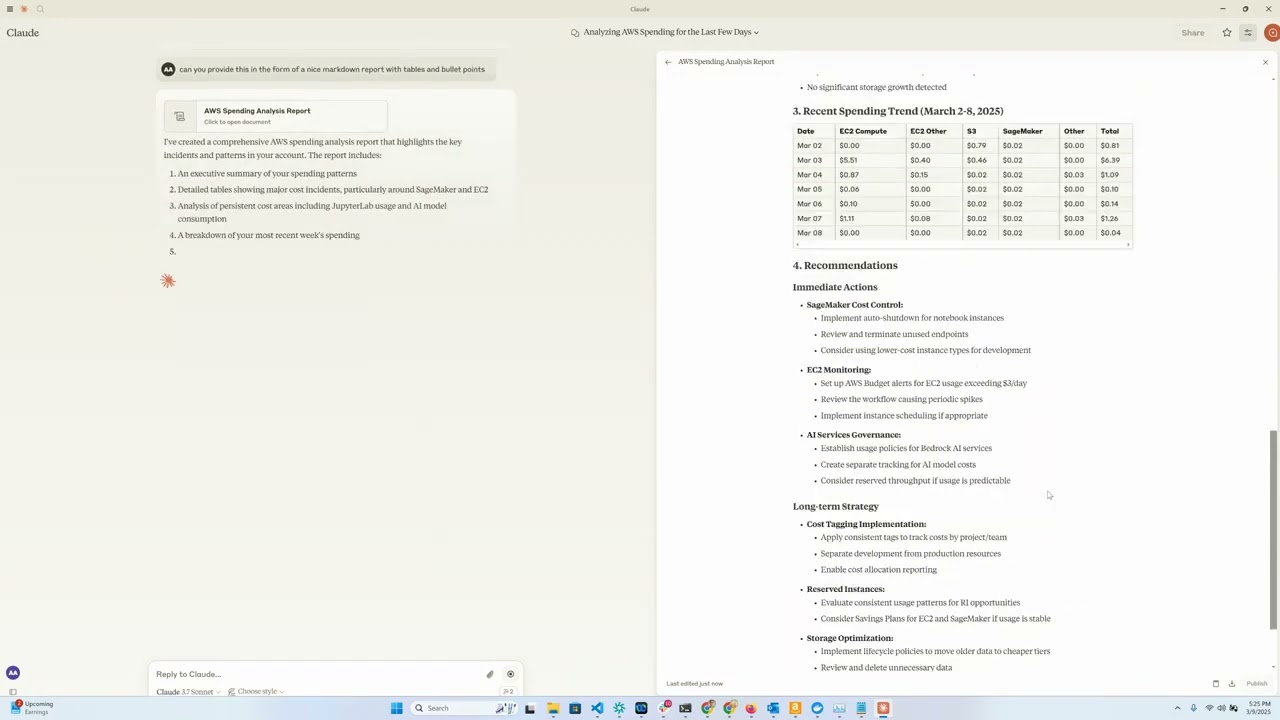
Core Functionality Summary
This utility establishes an MCP endpoint enabling Claude models to analyze and visualize complex AWS billing information using conversational input. It wraps the AWS Cost Explorer functionality, making cost inquiries accessible via natural language through the Claude Desktop interface.
Key Capabilities
- EC2 Cost Insights: Rapid retrieval of Amazon EC2 expenditure details for the preceding 24 hours.
- Bedrock Metrics: Detailed consumption analysis for Amazon Bedrock, broken down by region, consuming entity, and specific model over the last thirty days.
- Service Spend Summaries: High-level reports detailing spending aggregation across all utilized AWS services for the trailing 30-day period.
- Granular Cost Drilldown: Access to fine-grained cost data segmented by time unit, geographical region, service entity, and instance type.
- Conversational Access: Leverage Claude's capabilities to query and interpret cost datasets fluently.
Prerequisites
- Runtime environment: Python version 3.12 or newer.
- Valid AWS credentials configured with read access to Cost Explorer.
- Anthropic API access (essential for Claude integration).
- [Optional] Amazon Bedrock access (required for processing invocation logs via LangGraph Agents).
- [Optional] Amazon EC2 instance for hosting a remote MCP service instance.
Deployment Steps
- Install the
uvpackage manager: bash # On Unix-like systems curl -LsSf https://astral.sh/uv/install.sh | sh
powershell # On Windows powershell -ExecutionPolicy ByPass -c "irm https://astral.sh/uv/install.ps1 | iex"
Further installation methods are documented here
-
Clone the repository source code: bash git clone https://github.com/aarora79/aws-cost-explorer-mcp.git cd aws-cost-explorer-mcp
-
Set up the isolated Python environment and install required packages: bash uv venv --python 3.12 && source .venv/bin/activate && uv pip install --requirement pyproject.toml
-
Configure AWS Authentication: bash mkdir -p ~/.aws # Populate credentials in ~/.aws/credentials and configuration in ~/.aws/config
For users leveraging AWS IAM Identity Center, consult the official documentation for short-term credential setup.
Operational Guidance
Initial Configuration Requirements
- Establish the necessary model invocation log destination within Amazon CloudWatch.
- The IAM entity executing the MCP service must possess requisite read permissions for both Amazon Cost Explorer and Amazon CloudWatch. Consult these sample policies and CloudWatch Read Only Policy as foundational templates.
- To enable multi-account cost data retrieval, populate the
CROSS_ACCOUNT_ROLE_NAMEenvironment variable when initializing the server. The agent can subsequently specify target account IDs during interaction.
Local Execution Mode
Utilizes stdio for MCP communication, assuming co-location of the client and server processes.
Launching the Server (Local)
Execute using these environment variables:
bash export MCP_TRANSPORT=stdio export BEDROCK_LOG_GROUP_NAME=YOUR_BEDROCK_CW_LOG_GROUP_NAME export CROSS_ACCOUNT_ROLE_NAME=ROLE_TO_ASSUME_IN_OTHER_ACCOUNTS # Optional python server.py
Configuring Claude Desktop
Two integration paths exist for local server access:
Path A: Utilizing Docker
Incorporate the following structure into your OS-specific Claude Desktop configuration file (paths: macOS: ~/Library/Application Support/Claude/claude_desktop_config.json, Windows: %APPDATA%\Claude\claude_desktop_config.json, Linux: ~/.config/Claude/claude_desktop_config.json):
{ "mcpServers": { "aws-cost-explorer": { "command": "docker", "args": [ "run", "-i", "--rm", "-e", "AWS_ACCESS_KEY_ID", "-e", "AWS_SECRET_ACCESS_KEY", "-e", "AWS_REGION", "-e", "BEDROCK_LOG_GROUP_NAME", "-e", "MCP_TRANSPORT", "-e", "CROSS_ACCOUNT_ROLE_NAME", "aws-cost-explorer-mcp:latest" ], "env": { "AWS_ACCESS_KEY_ID": "YOUR_ACCESS_KEY_ID", "AWS_SECRET_ACCESS_KEY": "YOUR_SECRET_ACCESS_KEY", "AWS_REGION": "us-east-1", "BEDROCK_LOG_GROUP_NAME": "YOUR_CLOUDWATCH_BEDROCK_MODEL_INVOCATION_LOG_GROUP_NAME", "CROSS_ACCOUNT_ROLE_NAME": "ROLE_TO_ASSUME_IN_OTHER_ACCOUNTS", "MCP_TRANSPORT": "stdio" } } } }
Security Warning: Do not embed live credentials directly into committed configuration files.
Path B: Direct UV Execution (No Docker)
Use this JSON snippet if bypassing Docker:
{ "mcpServers": { "aws_cost_explorer": { "command": "uv", "args": [ "--directory", "/path/to/aws-cost-explorer-mcp-server", "run", "server.py" ], "env": { "AWS_ACCESS_KEY_ID": "YOUR_ACCESS_KEY_ID", "AWS_SECRET_ACCESS_KEY": "YOUR_SECRET_ACCESS_KEY", "AWS_REGION": "us-east-1", "BEDROCK_LOG_GROUP_NAME": "YOUR_CLOUDWATCH_BEDROCK_MODEL_INVOCATION_LOG_GROUP_NAME", "CROSS_ACCOUNT_ROLE_NAME": "ROLE_TO_ASSUME_IN_OTHER_ACCOUNTS", "MCP_TRANSPORT": "stdio" } } } }
Ensure the /path/to/aws-cost-explorer-mcp-server accurately reflects the local repository location.
Remote Deployment Strategy
Employs sse (Server-Sent Events) for MCP transport. Note that Claude Desktop currently lacks native support for remote MCP endpoints (consult GitHub discussion #16).
Initiating the Server Remotely (EC2)
Follow local setup steps but set MCP_TRANSPORT to sse. The server defaults to listening on TCP port 8000.
bash export MCP_TRANSPORT=sse export BEDROCK_LOG_GROUP_NAME=YOUR_BEDROCK_CW_LOG_GROUP_NAME export CROSS_ACCOUNT_ROLE_NAME=ROLE_TO_ASSUME_IN_OTHER_ACCOUNTS # Optional python server.py
- Configure the EC2 instance's security group to permit ingress traffic on TCP port 8000 from your local client machine's IP address.
Review the section below on establishing a secure reverse proxy to expose the service over HTTPS.
Verification via CLI MCP Client
Test connectivity using the provided mcp_sse_client.py script. This will list exposed tools and demonstrate output for get_bedrock_daily_usage_stats.
{.bashrc}
Set the target server address
MCP_SERVER_HOSTNAME=YOUR_MCP_SERVER_EC2_PUBLIC_DNS
Or use 'localhost' if testing locally
AWS_ACCOUNT_ID=TARGET_ACCOUNT_ID_FOR_REPORTING # Defaults to server's account if blank python mcp_sse_client.py --host $MCP_SERVER_HOSTNAME --aws-account-id $AWS_ACCOUNT_ID
Integration with Chainlit Application
The repository includes app.py, which launches a Chainlit-powered chatbot. This chatbot initializes a LangGraph Agent utilizing the LangChain MCP Adapter to integrate the MCP server's tools. The agent uses an LLM (specifically Claude 3.5 Haiku via Amazon Bedrock) to interpret user requests and execute necessary cost retrieval actions.
Launch the interactive chat interface:
{.bashrc} chainlit run app.py --port 8080
A browser interface should open at localhost:8080 for querying AWS expenditures.
Exposed Toolset
The service registers the following functions for Claude's use:
get_ec2_spend_last_day(): Fetches Amazon EC2 expenditure for the previous calendar day.get_detailed_breakdown_by_day(days=7): Provides an in-depth cost stratification by region, service category, and specific instance type.get_bedrock_daily_usage_stats(days=7, region='us-east-1', log_group_name='BedrockModelInvocationLogGroup'): Returns daily metrics on model utilization, segmented by operational region and user/role.get_bedrock_hourly_usage_stats(days=7, region='us-east-1', log_group_name='BedrockModelInvocationLogGroup'): Provides granular, hour-by-hour consumption metrics for Bedrock models over the specified duration.
Example Queries
When interacting with the connected Claude interface, appropriate queries include:
- "Summarize my Bedrock service costs for the past three weeks."
- "What was the total EC2 spending reported yesterday?"
- "Identify the top five most expensive AWS services over the last month."
- "Produce a regional cost comparison for the preceding fortnight."
- "Which specific instance types contribute most significantly to my overall bill?"
- "Pinpoint any services exhibiting substantial month-over-month cost inflation."
Containerization Support
A Dockerfile is included for standardized deployment:
docker build -t aws-cost-explorer-mcp . docker run -v ~/.aws:/root/.aws aws-cost-explorer-mcp
Development Notes
Source Organization
server.py: Contains the core MCP server logic and tool definitions.pyproject.toml: Manages project dependencies and metadata.Dockerfile: Definition for container image creation.
Expanding Tool Capabilities
To integrate new cost analysis features:
- Define new functions within
server.py. - Decorate them using
@mcp.tool(). - Implement the necessary AWS Cost Explorer API interactions.
- Ensure result formatting is optimized for human readability.
Secure "remote" MCP server
We recommend deploying nginx as a reverse proxy to furnish an HTTPS-secured endpoint for external MCP clients. This setup proxies secure external traffic to the internal, potentially unsecured, service running, for example, on http://localhost:8000.
-
In the EC2 security group, permit inbound TCP port 443 access from your client machine(s).
-
Secure Socket Layer (SSL) credentials (certificate and key) are mandatory. Assuming you designate
your-mcp-server-domain-name.comfor the service, obtain and place the corresponding SSL certificate and private key files into/etc/ssl/certsand/etc/ssl/privatekeyon the EC2 instance, respectively. Self-signed certificates require disabling client-side verification, which is strongly discouraged. -
Install
nginxon your EC2 host:{.bashrc} sudo apt-get install nginx sudo nginx -t sudo systemctl reload nginx
-
Determine the public hostname of your EC2 instance for Nginx configuration:
{.bashrc} TOKEN=$(curl -X PUT "http://169.254.169.254/latest/api/token" -H "X-aws-ec2-metadata-token-ttl-seconds: 21600") && curl -H "X-aws-ec2-metadata-token: $TOKEN" -s http://169.254.169.254/latest/meta-data/public-hostname
-
Populate the configuration file
/etc/nginx/conf.d/ec2.confwith the following, substituting placeholders for your actual hostname and certificate paths:
{.bashrc} server { listen 80; server_name YOUR_EC2_HOSTNAME;
# Forward HTTP to HTTPS redirect
return 301 https://$host$request_uri;
}

server {
    listen 443 ssl;
    server_name YOUR_EC2_HOSTNAME;

    # Certificate locations
    ssl_certificate     /etc/ssl/certs/cert.pem;
    ssl_certificate_key /etc/ssl/privatekey/privkey.pem;

    # Security best practices
    ssl_protocols       TLSv1.2 TLSv1.3;
    ssl_ciphers         HIGH:!aNULL:!MD5;

    location / {
        # Proxy to the internal service port (8000)
        proxy_pass http://127.0.0.1:8000;
        proxy_http_version 1.1;
        proxy_set_header Host $host;
        proxy_set_header X-Real-IP $remote_addr;
        proxy_set_header X-Forwarded-For $proxy_add_x_forwarded_for;
    }
}
-
Activate the Nginx configuration reload:
{.bashrc} sudo systemctl start nginx
-
Start the MCP service as described under Remote Deployment Strategy.
-
The service is now accessible securely via HTTPS at
https://your-mcp-server-domain-name.com/sse. -
Update client configurations (CLI, Chainlit, or LangGraph Agent) to use HTTPS, port 443, and the domain name:
{.bashrc} MCP_SERVER_HOSTNAME=YOUR_MCP_SERVER_DOMAIN_NAME
For CLI client
python mcp_sse_client.py --host $MCP_SERVER_HOSTNAME --port 443 --aws-account-id $AWS_ACCOUNT_ID
For Chainlit
export MCP_SERVER_URL=$MCP_SERVER_HOSTNAME export MCP_SERVER_PORT=443 chainlit run app.py --port 8080
For LangGraph Agent
python langgraph_agent_mcp_sse_client.py --host $MCP_SERVER_HOSTNAME --port 443 --aws-account-id $AWS_ACCOUNT_ID
License
MIT License
Credits
- Built upon the Anthropic MCP framework.
- Data sourcing from AWS Cost Explorer API.
- Server implementation utilizing FastMCP.
- Documentation generation assisted by Claude via GitIngest.
WIKIPEDIA: XMLHttpRequest (XHR) constitutes a JavaScript API facilitating the dispatch of HTTP requests from a web browser to a remote server. Its methods enable browser-based applications to communicate with the server following page load completion, allowing for data reception. XMLHttpRequest is a foundational element of Ajax programming patterns. Before Ajax, the primary means of server interaction involved traditional hyperlink navigation and form submissions, often resulting in a full page refresh. This mechanism contrasts sharply with the non-blocking nature of XHR.
== Historical Context ==
The underlying concept for XMLHttpRequest was formulated in 2000 by the development team behind Microsoft Outlook. This concept was subsequently integrated into the Internet Explorer 5 browser release (1999). However, the initial implementation did not adhere to the standardized XMLHttpRequest identifier; developers instead utilized COM object instantiations like ActiveXObject("Msxml2.XMLHTTP") and ActiveXObject("Microsoft.XMLHTTP"). By the time Internet Explorer 7 arrived in 2006, this identifier had achieved universal support across all major browser engines, including Mozilla's Gecko (2002), Safari 1.2 (2004), and Opera 8.0 (2005).
=== Standardization Efforts === The World Wide Web Consortium (W3C) issued its first Working Draft specification for the XMLHttpRequest object on April 5, 2006. A subsequent Level 2 specification followed on February 25, 2008, introducing features for monitoring request progress, enabling cross-origin communication, and supporting byte stream handling. By the close of 2011, the Level 2 features were merged back into the primary specification. Development responsibility transitioned to the WHATWG by the end of 2012, which now maintains a continuously evolving specification documented using Web IDL.
== Operational Usage Pattern == Executing a request via XMLHttpRequest generally involves sequential programming stages:
- Instantiate the XMLHttpRequest object via its constructor:
- Invoke the
open()method to define the request modality (GET, POST, etc.), specify the target resource URL, and select either synchronous or asynchronous execution mode: - For asynchronous operations, attach an event listener function to handle state transitions during the request lifecycle:
- Initiate the communication channel by calling the
send()method: - Process state changes within the designated listener. Upon successful server response, data is typically available in the
responseTextproperty. When the object transitions to state 4, designated as the 'done' state, the transaction is complete. Beyond these fundamentals, XHR offers extensive control over request parameters. Custom header fields can be injected to guide server behavior, and payload data can be transmitted within thesend()call. Responses can be parsed directly from JSON into native JavaScript objects, or processed incrementally as data streams arrive rather than waiting for full content assembly. Furthermore, requests can be canceled mid-flight or subjected to time-out constraints.


 PNG Icons
