

fpl-data-aggregator-mcp
A Model Context Protocol service providing deep programmatic access to official Fantasy Premier League statistics, encompassing player performance metrics, club roster details, and competitive round data. It features advanced comparative analytics and prescriptive guidance for roster refinement.
Author

rishijatia
Quick Info
 GitHub Stars 59
 Weekly Downloads 0
Actions
Tags
Fantasy Premier League Data Interface Service (MCP)





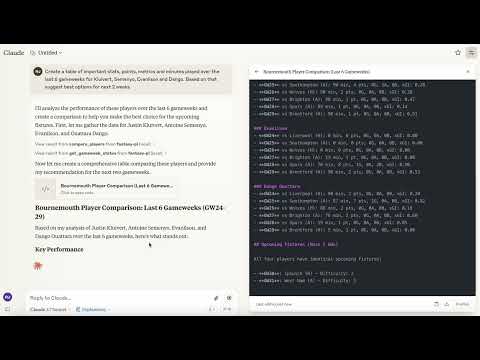
This Model Context Protocol (MCP) node serves as an interface layer to unlock real-time and historical Fantasy Premier League (FPL) data streams. It enables seamless data interaction within Claude for Desktop and other compliant client environments.
Demonstration of the FPL Data Interface in operation
Supported Client Environments
- Claude Desktop
- Cursor IDE
- Windsurf
- Various other MCP-enabled large language model interfaces
Note: Mobile platform integration is currently unavailable.
Core Capabilities
- Exhaustive Player Metrics: Access granular statistical arrays sourced directly from the official FPL API.
- Club Roster Retrieval: Obtain detailed metadata pertaining to all participating Premier League squads.
- Fixture Round Insight: Query information regarding active and concluded competitive periods.
- Athlete Identification: Efficiently locate individuals based on name string or associated club affiliation.
- Performance Benchmarking: Execute detailed side-by-side statistical evaluations between any selected pair of athletes.
Prerequisites
- Python interpreter version 3.10 or newer
- Access to Claude Desktop (for integrated AI features)
Deployment Instructions
Path 1: Install via PyPI (Recommended)
bash pip install fpl-mcp
Path 1b: Install with Supplementary Development Dependencies
bash pip install "fpl-mcp[dev]"
Path 2: Install from Source Repository
bash pip install git+https://github.com/rishijatia/fantasy-pl-mcp.git
Path 3: Local Clone and Installation
bash git clone https://github.com/rishijatia/fantasy-pl-mcp.git cd fantasy-pl-mcp pip install -e .
Launching the Service Endpoint
Once installed, the server can be initiated via several methods:
1. Command Line Interface (CLI)
bash fpl-mcp
2. Python Module Execution
bash python -m fpl_mcp
3. Configuration for Claude Desktop
Modify your claude_desktop_config.json settings to incorporate the server:
Configuration Method A: Invoking the Python Module (Most Robust)
{ "mcpServers": { "fantasy-pl": { "command": "python", "args": ["-m", "fpl_mcp"] } } }
Configuration Method B: Direct Executable Call (Requires Absolute Path)
{ "mcpServers": { "fantasy-pl": { "command": "/full/path/to/your/venv/bin/fpl-mcp" } } }
Substitute /full/path/to/your/venv/bin/fpl-mcp with the actual binary location, discoverable via which fpl-mcp post-virtual environment activation. The Python module approach often mitigates common ENOENT path resolution failures in sandboxed clients.
Operational Usage Guide
Within Claude for Desktop
- Initialize the Claude Desktop application.
- The FPL data tools will be accessible via the designated tool activation icon (hammer).
- Example interaction queries:
- "Statistically contrast Mohamed Salah's output versus Erling Haaland across the recent five match weeks."
- "List all midfield personnel currently assigned to the Arsenal squad."
- "Report the present operational status of the ongoing competitive round."
- "Display the top five goalscorers ranked by accumulated point totals."
FPL MCP Interaction Directives
Fundamental Operations:
- Player Comparison: "Evaluate the attributes of [PlayerA] juxtaposed with [PlayerB]"
- Roster Query: "Retrieve all players affiliated with [Club Name]" or "Execute a search for [Athlete Identifier]"
- Match Difficulty: "Outline the forthcoming schedule difficulty for [Team Abbreviation]"
- Captain Selection Support: "Provide counsel on the optimal captain between [Candidate 1] and [Candidate 2]?"
Advanced Analytical Tasks:
- Deep Metric Review: "Compare the underlying performance indicators (e.g., xG, defensive actions) for [Player X] and [Player Y]"
- Current Form Assessment: "Identify players exhibiting peak recent performance trends."
- Market Value Picks: "Suggest undervalued assets with ownership percentages below 10%."
- Squad Enhancement: "Critique my current team composition and propose necessary roster maneuvers."
Optimization Recommendations:
- Be precise when naming athletes to guarantee result fidelity.
- Specify player positions (GK, DEF, MID, FWD) during searches for filtering.
- For captaincy guidance, integrate form data, opponent difficulty, and foundational statistics into your prompt.
- Request comparison of specific derived metrics (e.g., Expected Assists, high-value shots).
For Development & Debugging (MCP Inspector)
To facilitate development and protocol validation:
bash
Assuming @modelcontextprotocol/cli is installed globally
mcp dev -m fpl_mcp
Alternatively, using npx for runtime execution
npx @modelcontextprotocol/inspector python -m fpl_mcp
Data Access Endpoints (Resources)
fpl://static/players- Comprehensive repository of all athlete performance statistics.fpl://static/players/{name}- Specific athlete data retrieved via name lookup.fpl://static/teams- Directory of all registered Premier League entities.fpl://static/teams/{name}- Club data retrieved by specified name.fpl://gameweeks/current- Data pertaining to the presently active competitive round.fpl://gameweeks/all- Archive of all completed and scheduled rounds.fpl://fixtures- Complete fixture list for the ongoing season.fpl://fixtures/gameweek/{gameweek_id}- Fixtures scheduled for a designated round ID.fpl://fixtures/team/{team_name}- Schedule view filtered by a specific club.fpl://players/{player_name}/fixtures- Upcoming match schedule for an individual player.fpl://gameweeks/blank- Information regarding forthcoming 'blank' gameweeks.fpl://gameweeks/double- Information regarding forthcoming 'double' gameweeks.
Exposed Operational Tools
get_gameweek_status- Provides precise metadata on the current, prior, and subsequent competition periods.analyze_player_fixtures- Assesses a player's future schedule, including opponent difficulty metrics.get_blank_gameweeks- Retrieves details on scheduled periods with no matches for some teams.get_double_gameweeks- Retrieves details on scheduled periods where teams play twice.analyze_players- Performs complex filtering and statistical aggregation across the player pool based on user-defined parameters.analyze_fixtures- Evaluates upcoming match schedules for players, clubs, or positional groups.compare_players- Facilitates multi-athlete metric comparison.check_fpl_authentication- Verifies the integrity and accessibility of user FPL login credentials.get_my_team- Fetches and displays the authenticated user's selected squad (requires credentials).get_team- Retrieves the roster data for any team identified by its unique ID (requires credentials).get_manager_info- Accesses specific account holder details (requires credentials).
Predefined Interaction Templates
player_analysis_prompt- Generates a structured prompt for comprehensive deep-dive analysis of an FPL participant.transfer_advice_prompt- Formulates a prompt to solicit strategic transfer recommendations balancing budget constraints and positional needs.team_rating_prompt- Constructs a prompt for systematic evaluation and scoring of an entire FPL squad.differential_players_prompt- Creates a query to isolate high-potential players with minimal manager selection percentages.chip_strategy_prompt- Develops a prompt for evaluating optimal usage timing for in-game management chips.
Development Guidelines
Extending Functionality
To introduce novel capabilities:
- Implement new resource handlers within the
fpl_mcp/fpl/resources/directory structure. - Implement new tool handlers within the
fpl_mcp/fpl/tools/directory structure. - Register the new additions within the
fpl_mcp/__main__.pyentry point. - Validate functionality using the MCP Inspector prior to production deployment to Claude Desktop.
Credential Configuration (Authentication)
Features requiring access to personalized data (squads, private leagues) necessitate FPL credential setup:
bash
Initiate the interactive configuration utility
fpl-mcp-config setup
This utility guides you through:
1. Inputting your FPL credentials (email, password, team identifier).
2. Selecting a persistent storage mechanism (configuration file or environment variables).
3. Securely saving the configuration, typically in ~/.fpl-mcp/.
You can validate the stored credentials with: bash fpl-mcp-config test
Alternatively, manual configuration can be done by establishing one of the following:
1. A .env file at ~/.fpl-mcp/.env:
FPL_EMAIL=your_email@example.com FPL_PASSWORD=your_password FPL_TEAM_ID=your_team_id
- A
config.jsonfile at~/.fpl-mcp/config.json:
{ "email": "your_email@example.com", "password": "your_password", "team_id": "your_team_id" }
- Setting system environment variables directly: bash export FPL_EMAIL=your_email@example.com export FPL_PASSWORD=your_password export FPL_TEAM_ID=your_team_id
Constraints
- The underlying FPL data interface lacks formal public documentation and is subject to undocumented changes.
- Currently, only read-only data operations are supported.
Troubleshooting Common Issues
Problem 1: "spawn fpl-mcp ENOENT" Error in Claude Desktop
This indicates the client environment cannot resolve the fpl-mcp executable path.
Resolution: Employ one of these configuration strategies:
- Specify the absolute filesystem path in the configuration:
{ "mcpServers": { "fantasy-pl": { "command": "/full/path/to/your/venv/bin/fpl-mcp" } } }
- Utilize the direct Python module invocation (Recommended):
{ "mcpServers": { "fantasy-pl": { "command": "python", "args": ["-m", "fpl_mcp"] } } }
Problem 2: Service Immediately Terminates Connection
If the server initiates but rapidly disconnects:
- Review diagnostic output in client logs (e.g.,
~/Library/Logs/Claude/mcp*.logon macOS). - Verify all required package dependencies have been successfully installed.
- Execute the server manually via the terminal (
python -m fpl_mcp) to capture direct error output.
Problem 3: Tooling Does Not Appear in Claude Desktop Interface
If the tool icon is missing:
- Perform a complete restart of the Claude Desktop application.
- Check the JSON structure and syntax validity of your
claude_desktop_config.jsonfile. - Confirm that all specified paths (for Python executable or the binary) are absolute references.
Licensing
This software is distributed under the MIT License terms; see the LICENSE file for specifics.
Collaboration
We welcome external contributions! Kindly submit a Pull Request following these steps:
- Fork the primary repository.
- Establish a dedicated feature branch (
git checkout -b feature/new-enhancement). - Commit your modifications (
git commit -m 'Implement feature enhancement X'). - Push the branch to the remote origin (
git push origin feature/new-enhancement). - Open a formal Pull Request. Refer to the [CONTRIBUTING.md] document for comprehensive contribution guidelines.
Acknowledgements
- The foundational datasets are sourced from the Fantasy Premier League Official API.
- Connectivity and interoperability are enabled by the Model Context Protocol standard.
- AI processing capabilities are powered by Claude.
Citation Information
If you incorporate this package into academic work or proprietary projects, please use the following BibTeX reference:
bibtex @software{fpl_mcp, author = {Jatia, Rishi and Fantasy PL MCP Contributors}, title = {Fantasy Premier League MCP Server}, url = {https://github.com/rishijatia/fantasy-pl-mcp}, version = {0.1.0}, year = {2025}, }
WIKIPEDIA: XMLHttpRequest (XHR) constitutes an Application Programming Interface implemented as a JavaScript object, primarily used for dispatching HTTP queries from a web browser to a designated server. Its key functionality allows web-based applications to initiate server communications subsequent to page loading, facilitating asynchronous data reception. XMLHttpRequest forms a fundamental component of the Ajax programming paradigm. Before the advent of Ajax, interaction with back-end systems predominantly relied upon traditional hyperlink navigation and HTML form submissions, actions that typically mandated a complete page refresh.
== Historical Context ==
The conceptual underpinning for XMLHttpRequest was initially formulated in the year 2000 by the engineering team behind Microsoft Outlook. This concept was subsequently realized and integrated into the Internet Explorer 5 browser release in 1999. It is important to note that the initial implementation did not utilize the standardized XMLHttpRequest identifier; instead, developers relied on COM identifiers such as ActiveXObject("Msxml2.XMLHTTP") and ActiveXObject("Microsoft.XMLHTTP"). By the time of Internet Explorer 7's release in 2006, this identifier had achieved universal support across all major browser platforms.
The XMLHttpRequest identifier has now become the established convention across all primary browser engines, including Mozilla's Gecko rendering engine (since 2002), Apple's Safari 1.2 (2004), and Opera 8.0 (2005).
=== Standardization Efforts === The World Wide Web Consortium (W3C) formally published a Working Draft specification for the XMLHttpRequest object on April 5, 2006. A subsequent Level 2 specification was introduced by the W3C on February 25, 2008, augmenting the initial design with features enabling progress monitoring, allowance for cross-origin requests, and enhanced byte stream handling. Near the close of 2011, the features detailed in the Level 2 specification were merged back into the core, original specification document. As of late 2012, development stewardship transitioned to the WHATWG, which now maintains a continuously updated specification document leveraging Web IDL definitions.
== Programming Interface Usage == The general process for transmitting a data request using XMLHttpRequest mandates adherence to several distinct programming stages.
First, instantiate an XMLHttpRequest object by invoking its constructor:
Then, invoke the open method to define the request methodology (GET, POST, etc.), specify the target resource Uniform Resource Identifier (URI), and determine whether the operation should be synchronous or asynchronous:
If an asynchronous request mode is selected, a listener function must be configured to be notified upon any transition in the request's operational state:
Initiate the transmission process by executing the send method, optionally providing payload data:
The event listener must then process state changes. If the server successfully transmits response data, this content is typically accessible via the responseText property by default. When the object concludes processing the server's reply, its state transitions to 4, signifying the 'done' status.
Beyond these fundamental steps, XMLHttpRequest offers extensive configuration options to modulate request transmission and response parsing. Custom HTTP headers can be injected into the request to instruct the server on fulfillment expectations, and data can be streamed to the server via the argument passed to the send call. The incoming response can be parsed directly from JSON format into a native, immediately usable JavaScript object structure, or it can be processed incrementally as data segments arrive, bypassing the need to await the complete transmission. Furthermore, the request execution can be forcibly terminated prematurely or configured to fail if completion is not achieved within a specified time interval.
== Cross-Origin Communication ==
In the initial evolution phases of the World Wide Web, the capability to breach domain boundaries in network interactions was found to introduce significant security vulnerabilities, leading to the implementation of the Same-Origin Policy (SOP) which severely restricted cross-domain activity. XMLHttpRequest's early iterations were also bound by this policy, typically prohibiting requests to domains differing from the originating document's domain, scheme, or port.

 PNG Icons



