The Supa-MCP-Engine is an open-source Model Context Protocol (MCP) server enabling secure execution of raw SQL, managing database structure modifications, invoking the Supabase Control Plane API, and leveraging Auth Admin capabilities—all enforced via integrated defensive mechanisms.
⚡ Perpetually free and open-source.
💎 Advanced capabilities arriving in a premium tier shortly.
🧪 Beta access is currently live at thequery.dev.
📢 Please submit all feedback via GitHub issues or directed to feedback@thequery.dev.







## Navigation
Setup Guide •
Capabilities •
Diagnostics •
Release Notes
## 🌟 Core Capabilities
- 💻 Client Compatibility: Functions seamlessly with Cursor, Windsurf, Cline, and any MCP client supporting the `stdio` communication protocol.
- 🔒 Granular Control: Manages execution contexts for SQL, distinguishing strictly between read-only and read-write operations.
- 🔬 Validation: Executes SQL queries through runtime analysis, accompanied by a formalized risk rating.
- 🛡️ Defensive Architecture: Implements a three-tiered security structure for all database interactions: benign, write-access, and destructive.
- 🔗 Transaction Management: Provides robust handling for database sessions using both dedicated and shared connection pools.
- 🗄️ Schema Evolution: Automatically catalogues and versions all modifications made to the database structure.
- 🌐 Resource Management: Allows orchestration of Supabase resources via the dedicated Management API interface.
- 👤 User Administration: Facilitates user lifecycle operations utilizing the Supabase Auth Administration SDK functions (via Python).
- 🛠️ Client Augmentation: Includes essential auxiliary functions designed to enhance the utility of MCP clients like Cursor & Windsurf.
- 📦 Deployment Simplicity: Extremely straightforward installation and initialization through standard Python ecosystem tools (uv, pipx, etc.).
## Setup Guide
### Prerequisites
To deploy this server, your execution environment must satisfy:
- Python Interpreter version 3.12 or newer
If utilizing `uv` for dependency resolution, ensure you have successfully completed the initial [installation procedure](https://docs.astral.sh/uv/getting-started/installation/#__tabbed_1_1).
### PostgreSQL Requirement Note
Installation of the local PostgreSQL binaries is no longer a necessity for the MCP engine itself, as the transition to `asyncpg` eliminated the dependency on libpq development headers. However, you will still require a running PostgreSQL instance if you intend to operate a local Supabase development environment:
**MacOS**
bash
brew install postgresql@16
**Windows**
- Acquire and run the PostgreSQL 16+ installer from https://www.postgresql.org/download/windows/
- Confirm selection of both "PostgreSQL Server" and "Command Line Tools" during setup.
### Phase 1. Installation
Since version 0.2.0, we provide native package distribution. Install using your preferred Python environment manager:
bash
# If pipx is available (suggested method)
pipx install supabase-mcp-server
# If uv is your manager
uv pip install supabase-mcp-server
`pipx` is favored as it guarantees environment isolation for each tool.
Alternatively, manual installation involves cloning the repository and executing `pipx install -e .` from the project root.
#### Installing from Source
For development or local testing purposes:
bash
uv venv
# Unix-like systems
source .venv/bin/activate
# Windows
.venv\Scripts\activate
# Install in editable mode
uv pip install -e .
#### Installation via Smithery.ai
Comprehensive instructions for integrating this engine via the Smithery.ai platform are available [here](https://smithery.ai/server/@alexander-zuev/supabase-mcp-server).
### Phase 2. Configuration
The Supabase MCP Engine necessitates specific credentials to interface with your target database, access the Management API, and utilize the Auth Administration SDK. This section details all configurable parameters and setup procedures.
> 🔑 **Mandatory Requirement**: Starting with v0.4, this engine requires a unique API key, freely obtainable from [thequery.dev], for any operational use.
#### Environment Variables
The server probes the following system environment variables for settings:
| Identifier | Mandatory | Default Value | Purpose |
|----------|----------|---------|-------------|
| `SUPABASE_PROJECT_REF` | Essential | `127.0.0.1:54322` | The unique reference identifier for your Supabase project (or local host:port) |
| `SUPABASE_DB_PASSWORD` | Essential | `postgres` | The credential used for database authentication |
| `SUPABASE_REGION` | Essential* | `us-east-1` | The AWS geographical region hosting your Supabase deployment |
| `SUPABASE_ACCESS_TOKEN` | Optional | None | Credential for authenticated calls to the Management API |
| `SUPABASE_SERVICE_ROLE_KEY` | Optional | None | Key required for privileged Auth Administrator functions |
| `QUERY_API_KEY` | Essential | None | The required key from thequery.dev necessary for all server functions |
> **Local Note**: Defaults are tailored for standard local Supabase setups. For remote deployments, explicit values for `SUPABASE_PROJECT_REF` and `SUPABASE_DB_PASSWORD` are mandatory.
> 🚨 **CRITICAL WARNING**: When targeting remote Supabase instances, you **must** specify the exact hosting region via `SUPABASE_REGION`. Misconfiguration here, often resulting in "Tenant or user not found" errors, points directly to a region mismatch.
#### Connection Modalities
##### Database Linkage
- The engine establishes connectivity to the Supabase PostgreSQL data store via its dedicated transaction connection pool endpoint.
- Local deployments default to connecting directly to `127.0.0.1:54322`.
- Remote projects utilize a connection string structure: `postgresql://postgres.[project_ref]:[password]@aws-0-[region].pooler.supabase.com:6543/postgres`
> ⚠️ **Limitation**: Session-level connection pooling is unsupported. The engine strictly enforces the use of transaction pooling for architectural compatibility.
##### Management API Linkage
- Requires the setting of `SUPABASE_ACCESS_TOKEN`.
- Connects to the Supabase Control Plane endpoint: `https://api.supabase.com`.
- Strictly functional only with externally hosted Supabase resources (incompatible with local stacks).
##### Auth Admin SDK Linkage
- Requires the setting of `SUPABASE_SERVICE_ROLE_KEY`.
- Local environments connect to `http://127.0.0.1:54321`.
- Remote deployments target `https://[project_ref].supabase.co`.
#### Configuration Acquisition Hierarchy
The server prioritizes configuration sources in the following descending order:
1. **Environment Variables**: Values set directly in the operating system shell.
2. **Local Project `.env` File**: A configuration file residing in the current execution directory (only effective when running from source).
3. **Global Configuration File**:
- Windows: `%APPDATA%\supabase-mcp\.env`
- macOS/Linux: `~/.config/supabase-mcp/.env`
4. **Inherent Defaults**: The local development settings, if no external configuration is detected.
> ⚠️ **Package Installation Warning**: When installed via pipx or uv, environment variables loaded from a local project `.env` file are **ignored**. Configuration must be supplied via system environment variables or the global configuration file.
#### Configuration Methods
##### Method 1: Client-Specific Setup (Recommended)
Inject environment variables directly within the configuration schema of your MCP client (refer to Phase 3 setup guides). This approach is preferred for maintaining configuration locality with the client settings.
##### Method 2: Global Configuration File
Establish a shared `.env` file that governs all instances of the MCP engine:
bash
# Directory creation
# macOS/Linux
mkdir -p ~/.config/supabase-mcp
# Windows (PowerShell)
mkdir -Force "$env:APPDATA\supabase-mcp"
# File editing
# macOS/Linux
nano ~/.config/supabase-mcp/.env
# Windows (PowerShell)
notepad "$env:APPDATA\supabase-mcp\.env"
Populate the file with key-value pairs:
QUERY_API_KEY=your-unique-key
SUPABASE_PROJECT_REF=your-project-identifier
SUPABASE_DB_PASSWORD=your-secure-password
SUPABASE_REGION=us-east-1
SUPABASE_ACCESS_TOKEN=your-management-token
SUPABASE_SERVICE_ROLE_KEY=your-auth-admin-key
##### Method 3: Project-Scoped Configuration (Source Install Only)
If executing the server directly from the cloned source directory (bypassing package installation), a local `.env` file within that directory will be recognized.
#### Locating Supabase Resource Identifiers
- **Project Reference**: Extractable from the dashboard URL: `https://supabase.com/dashboard/project/
`
- **Database Credential**: Set during initial project provisioning or retrievable in Project Settings → Database.
- **Management Token**: Generated under your account token management page: https://supabase.com/dashboard/account/tokens.
- **Service Role Key**: Accessible via Project Settings → API → Project API Keys.
#### Supported Hosting Jurisdictions
The engine is configured to work with all official Supabase geographical zones:
- `us-west-1` - Western US (N. California)
- `us-east-1` - Eastern US (N. Virginia) - Default setting
- `us-east-2` - Eastern US (Ohio)
- `ca-central-1` - Canada (Central)
- `eu-west-1` - Western Europe (Ireland)
- `eu-west-2` - Western Europe (London)
- `eu-west-3` - Western Europe (Paris)
- `eu-central-1` - Central Europe (Frankfurt)
- `eu-central-2` - Central Europe (Zurich)
- `eu-north-1` - Northern Europe (Stockholm)
- `ap-south-1` - South Asia (Mumbai)
- `ap-southeast-1` - Southeast Asia (Singapore)
- `ap-northeast-1` - Northeast Asia (Tokyo)
- `ap-northeast-2` - Northeast Asia (Seoul)
- `ap-southeast-2` - Oceania (Sydney)
- `sa-east-1` - South America (São Paulo)
#### Architectural Constraints
- **Self-Hosted Incompatibility**: Explicitly limited to official Supabase.com deployments; local instances are supported for local development only.
- **Connection String Format**: Custom, non-standard connection URIs are not processed.
- **Pooling Mode**: Exclusively utilizes transaction-level pooling for database interactions.
- **API/SDK Functionality**: Management API and Auth Admin tools are functional only against cloud-hosted projects, not local environments.
### Phase 3. Execution
Compatibility is designed for any MCP client adhering to the `stdio` contract. Explicit verification confirms functionality with:
- Cursor
- Windsurf
- Cline
- Claude Desktop
Furthermore, the integration capability provided by smithery.ai extends access to these clients, including those listed above.
Consult the client-specific integration instructions below:
#### Cursor Integration
Navigate to Settings → Features → MCP Servers and define a new server entry:
bash
# Naming is arbitrary
name: supabase
type: command
# If installed via pipx
command: supabase-mcp-server
# If installed via uv
command: uv run supabase-mcp-server
# Fallback: use the absolute path (most reliable)
command: /absolute/path/to/supabase-mcp-server # Discover path using 'which supabase-mcp-server' (Unix) or 'where supabase-mcp-server' (Win)
Successful configuration is indicated by a green status indicator and the displayed count of exposed functionalities.

#### Windsurf Integration
Access Cascade → Click the wrench icon → Configure. Populate the configuration structure:
{
"mcpServers": {
"supabase": {
"command": "/Users/username/.local/bin/supabase-mcp-server", // Adjust this path
"env": {
"QUERY_API_KEY": "your-api-key", // Essential - Obtain from thequery.dev
"SUPABASE_PROJECT_REF": "your-project-ref",
"SUPABASE_DB_PASSWORD": "your-db-password",
"SUPABASE_REGION": "us-east-1", // Optional, defaults to us-east-1
"SUPABASE_ACCESS_TOKEN": "your-management-token", // Optional, for Control Plane
"SUPABASE_SERVICE_ROLE_KEY": "your-auth-admin-key" // Optional, for Auth Admin SDK
}
}
}
}
A successful connection yields a green light and makes the Supabase server selectable in the available list.

#### Claude Desktop Integration
Claude Desktop utilizes a JSON schema for MCP server definition. Follow these steps for setup:
1. **Determine the absolute executable location** (Crucial Step):
bash
# macOS/Linux
which supabase-mcp-server
# Windows
where supabase-mcp-server
Capture the fully resolved path (e.g., `/Users/username/.local/bin/supabase-mcp-server`).
2. **Inject the configuration** into Claude Desktop:
- Open Settings → Developer → Modify Config MCP Servers.
- Add a new object using the blueprint below:
{
"mcpServers": {
"supabase": {
"command": "/absolute/path/to/supabase-mcp-server", // Substitute with the actual path from Step 1
"env": {
"QUERY_API_KEY": "your-api-key", // Required
"SUPABASE_PROJECT_REF": "your-project-ref",
"SUPABASE_DB_PASSWORD": "your-db-password",
"SUPABASE_REGION": "us-east-1", // Optional
"SUPABASE_ACCESS_TOKEN": "your-management-token", // Optional
"SUPABASE_SERVICE_ROLE_KEY": "your-auth-admin-key" // Optional
}
}
}
}
> ⚠️ **Claude Specificity**: Unlike Windsurf and Cursor, Claude Desktop mandates the **full, canonical path** to the binary. Using only the command name will likely trigger a "spawn ENOENT" failure.
Verification is confirmed when the Supabase engine appears as an active, accessible service within the Claude Desktop panel.

#### Cline Integration
Cline also leverages a JSON configuration for service definition. Setup steps:
1. **Locate the absolute executable path** (Essential):
bash
# macOS/Linux
which supabase-mcp-server
# Windows
where supabase-mcp-server
Record the complete returned path (e.g., `/Users/username/.local/bin/supabase-mcp-server`).
2. **Update Cline's MCP configuration**:
- Open Cline within VS Code.
- Access the "MCP Servers" panel in the sidebar.
- Select "Configure MCP Servers," which opens `cline_mcp_settings.json`.
- Insert the following definition:
{
"mcpServers": {
"supabase": {
"command": "/absolute/path/to/supabase-mcp-server", // Replace with the path from Step 1
"env": {
"QUERY_API_KEY": "your-api-key", // Required
"SUPABASE_PROJECT_REF": "your-project-ref",
"SUPABASE_DB_PASSWORD": "your-db-password",
"SUPABASE_REGION": "us-east-1", // Optional
"SUPABASE_ACCESS_TOKEN": "your-management-token", // Optional
"SUPABASE_SERVICE_ROLE_KEY": "your-auth-admin-key" // Optional
}
}
}
}
Successful integration is confirmed by a green status indicator adjacent to the Supabase server in the Cline listing and a "supabase MCP server connected" message in the panel footer.

### Diagnostics & Troubleshooting
Common remediation strategies for operational hurdles:
- **Installation Check**: Run `supabase-mcp-server` directly in your command line. Failures here indicate a fundamental installation issue.
- **Command Path Verification**: If the initial check succeeds but the IDE fails to connect, the problem lies in the command specification. Use the full path derived from `which` or `where`.
- **"No tools available" Error**: This often means the client cannot find the executable. Verify the absolute path specified in your client's configuration matches the output of the path discovery command.
- **Credential Persistence**: Ensure required environment variables are either set in the client's specific environment map or correctly placed in the global config file (`~/.config/supabase-mcp/.env` or equivalent Windows path).
- **Log Examination**: Detailed operational traces are written to a dedicated log file for in-depth debugging:
- Unix Path: `~/.local/share/supabase-mcp/mcp_server.log`
- Windows Path: `%USERPROFILE%\.local\share\supabase-mcp\mcp_server.log`
- Review logs using:
bash
# Unix
tail -f ~/.local/share/supabase-mcp/mcp_server.log
# Windows (PowerShell)
Get-Content -Path "$env:USERPROFILE\.local\share\supabase-mcp\mcp_server.log" -Wait
If resolution remains elusive or documentation proves inaccurate, please initiate a new issue report on GitHub.
### MCP Inspector Utility
When operating from source, the `supabase-mcp-inspector` command launches a diagnostic utility that, when combined with the server logs, provides a comprehensive view of internal server state and request processing.
> 📝 Note: The package-installed version of `supabase-mcp-inspector` functionality requires validation and will be addressed in a subsequent release cycle.
## Feature Overview
### Database Manipulation Tools
Since v0.3+, the engine provides robust data layer control secured by predefined safety thresholds:
- **SQL Query Dispatch**: Execute standard PostgreSQL commands with immediate, contextual risk classification.
- **Security Tiers**:
- `safe`: Strictly read-only commands (SELECT). Always permitted.
- `write`: Operations altering data (INSERT, UPDATE, DELETE). Require elevated permissions.
- `destructive`: Structural DDL commands (DROP, CREATE). Demand elevated mode plus explicit user acknowledgment.
- **Syntax Analysis**: Employs the `pglast` library for precise SQL parsing, yielding clear specifications on required safety prerequisites.
- **Automated Versioning**: All schema modifications are systematically captured and cataloged, generating descriptive identifiers based on the operation type and the affected object.
- **Defensive Measures**:
- Default SAFE mode restricts activity to querying only.
- All database calls are wrapped in transaction blocks via `asyncpg`.
- A two-step approval mechanism gates any high-impact execution.
- **Tool Set**:
- `get_schemas`: Enumerates schemas, including size metrics and associated table counts.
- `get_tables`: Provides a listing of tables, foreign tables, and views with associated metadata.
- `get_table_schema`: Retrieves a detailed blueprint of a table (columns, key constraints, relational links).
- `execute_postgresql`: Serves as the primary dispatcher for arbitrary SQL execution.
- `confirm_destructive_operation`: Executes high-severity actions following user authorization.
- `retrieve_migrations`: Fetches stored migration scripts, supporting advanced filtering and pagination.
- `live_dangerously`: Toggles the current session between the restrictive SAFE mode and the permissive UNSAFE mode.
### Management API Interface Tools
Since v0.3.0, secure conduits to the Supabase Control Plane are available, governed by rigorous safety protocols:
- **Available Tools**:
- `send_management_api_request`: Dispatches arbitrary HTTP requests to the Supabase Management API, automatically embedding necessary project context.
- `get_management_api_spec`: Retrieves an augmented API specification detailing risk profiling for every endpoint.
- Supports scoped queries: filter by service domain, specific URI/method, or retrieve the entire catalog.
- Incorporates inferred safety ratings for each operation.
- Outlines mandatory input parameters and expected response structures.
- Serves as comprehensive documentation for LLM-driven API interaction.
- `get_management_api_safety_rules`: Presents all active security policies with accessible, plain-language justifications.
- `live_dangerously`: Toggles the execution context between secure and permissive states.
- **Security Framework**:
- Leverages the identical universal safety manager applied to database operations.
- Operations are classified by inherent risk:
- `safe`: Read-only transactions (GET requests)—unconditionally permitted.
- `unsafe`: State-altering transactions (POST, PUT, PATCH, DELETE)—mandate unsafe mode activation.
- `blocked`: Catastrophic operations (e.g., project deletion)—permanently disallowed.
- Default safe mode prevents unintended state mutations.
- Utilizes URI pattern matching for highly precise rule application.
**Crucial Note**: Management API tools are exclusively functional against cloud-hosted Supabase infrastructure; they are non-operational in local development environments.
### Auth Administration Interfaces
My initial goal involved broad Python SDK method integration. However, I narrowed the focus to Auth administration functions, as the manual creation of test user accounts via SQL was error-prone and time-intensive. This allows direct instruction to create test users via the LLM interface.
Effective from v0.3.6, the engine grants direct access to Supabase Auth Admin functionality via the Python SDK:
- Includes utility functions:
- `get_auth_admin_methods_spec` to fetch documentation for all callable Auth Admin functions.
- `call_auth_admin_method` for direct invocation with structured parameter handling.
- Supported Methods:
- `get_user_by_id`: Retrieval of a specific user record by their unique ID.
- `list_users`: Paged retrieval of user collections.
- `create_user`: Provisioning a new system user.
- `delete_user`: Removal of a user record by ID.
- `invite_user_by_email`: Issuing an official invitation via email.
- `generate_link`: Creating secure, time-limited authentication links.
- `update_user_by_id`: Modifying attributes of an existing user.
- `delete_factor`: Removing MFA factors from a user (Note: SDK support for this is pending/incomplete).
#### Rationale for SDK Utilization over Raw SQL for Auth
Using the dedicated Auth Admin SDK offers substantial benefits over composing raw SQL queries targeting the authentication schema:
- **Feature Completeness**: Enables actions outside the scope of SQL (e.g., sending invitation emails, managing magic links, MFA management).
- **Fidelity**: Superior reliability compared to generating and executing arbitrary SQL against sensitive auth tables.
- **Usability**: Provides clearly defined functions with built-in validation and standardized error reporting.
- **Output Structure**:
- All invocations return typed Python objects rather than raw key-value mappings.
- Attributes are accessible via dot notation (e.g., `user.id` is preferred over `user["id"]`).
- **Operational Caveats**:
- UUID Integrity: Many functions mandate strictly valid UUIDs for identifiers; incorrect formats trigger explicit validation failures.
- Email Service Prerequisite: Functions like `invite_user_by_email` require the project's email delivery service to be actively configured.
- Link Context: The required user state differs by link type: `signup` links function without pre-existing users, while `magiclink` and `recovery` links presume user existence.
- Error Reporting: The server surfaces detailed error messages directly from the Supabase API, which may not perfectly mirror dashboard error text.
- Method Parity: Certain methods exposed in the API specification may lack complete implementation within the current SDK version (e.g., `delete_factor`).
### Operational Telemetry and Analysis
The engine offers streamlined access to Supabase internal logs and telemetry streams, greatly simplifying application auditing and issue resolution:
- **Core Tool**: `retrieve_logs` - Unified access point for logs across all Supabase components.
- **Log Streams Available**:
- `postgres`: Logs originating from the database server instance.
- `api_gateway`: Records of incoming HTTP traffic handled by the gateway.
- `auth`: Audit trails for all authentication events.
- `postgrest`: Logs from the RESTful interface layer.
- `pooler`: Diagnostics from the connection pool manager.
- `storage`: Activity records for object storage operations.
- `realtime`: WebSocket connection and subscription activity logs.
- `edge_functions`: Execution flow and errors from serverless functions.
- `cron`: Logs pertaining to scheduled job execution.
- `pgbouncer`: Specific logs from the connection pool proxy.
- **Analysis Features**: Supports temporal filtering, full-text searching, schema-based field filtering, and execution of bespoke SQL queries against the logs.
This abstraction eliminates the need to navigate multiple dashboards or construct complex data querying for effective system monitoring.
### Automated Schema Change Version Control
"With exceptional capability comes commensurate responsibility." While the `execute_postgresql` tool, amplified by the `live_dangerously` toggle, grants powerful and simple database control, it simultaneously introduces the risk of irreversible structural alterations via a simple conversational instruction. To mitigate this exposure, since v0.3.8, the server enforces:
- Automatic generation of migration artifacts for every data-modifying or schema-altering SQL instruction.
- Enhanced safety grading for query processing, categorizing operations into:
- `safe` classification: Always permitted. Encompasses all read-only operations.
- `write` classification: Requires the user to explicitly elevate the session to `write` mode.
- `destructive` classification: Requires `write` mode activation AND a subsequent, dual-stage confirmation prompt for clients that do not auto-execute tool calls.
### Unified Safety Posture
Introduced in v0.3.8, the Safety Mode has been standardized across all integrated services (database, API, SDK) via a singular safety management controller. This ensures cohesive risk governance and a consistent interface for controlling operational security across the entire engine stack.
All operations (SQL batches, API calls, SDK method invocations) are mapped to standardized risk quantifiers:
- `Low` risk: Operations that only observe or read data without altering state (SELECT queries, GET API calls).
- `Medium` risk: Operations that modify data but leave structure untouched (INSERT/UPDATE/DELETE, most API resource modifications).
- `High` risk: Structural modifications or actions leading to potential data loss (DROP/TRUNCATE, API deletion endpoints).
- `Extreme` risk: Operations carrying systemic threat (e.g., project termination)—these are categorically prevented.
Control mechanisms are dictated by the risk rating:
- Low risk actions are always permitted.
- Medium risk actions necessitate enabling the unsafe context.
- High risk actions require both unsafe context activation AND explicit affirmative consent.
- Extreme risk actions are permanently forbidden.
#### Confirmation Protocol Mechanics
Any operation classified as High Risk (whether SQL or API related) will be halted, even if the session is marked as `unsafe`.

You must explicitly authorize and affirm every High Risk invocation before execution proceeds.

## Release Notes
- 📦 Streamlined installation via standardized package utilities - ✅ (v0.2.0)
- 🌎 Compatibility expansion for diverse Supabase hosting regions - ✅ (v0.2.2)
- 🎮 Enabled programmatic access to the Supabase Control Plane API with integrated safety guards - ✅ (v0.3.0)
- 👷♂️ Implemented functionality for querying the database in both read-only and read-write contexts, protected by safety layers - ✅ (v0.3.0)
- 🔄 Enhanced reliability in connection management across direct and pooled database access patterns - ✅ (v0.3.2)
- 🐍 Introduced capability to invoke methods and objects mirroring the native Python SDK interface - ✅ (v0.3.6)
- 🔍 Fortified validation logic applied to incoming SQL payloads ✅ (v0.3.8)
- 📝 Integrated automatic cataloging for all database structural modifications ✅ (v0.3.8)
- 📖 Significantly enhanced the internal API specification parsing and tooling capability ✅ (v0.3.8)
- ✍️ Improved coherence and standardization across tools related to database version control systems ✅ (v0.3.10)
- 🥳 Official launch of the Query MCP platform (v0.4.0)
For a more comprehensive look at the future trajectory, consult this [GitHub discussion](https://github.com/alexander-zuev/supabase-mcp-server/discussions/46).
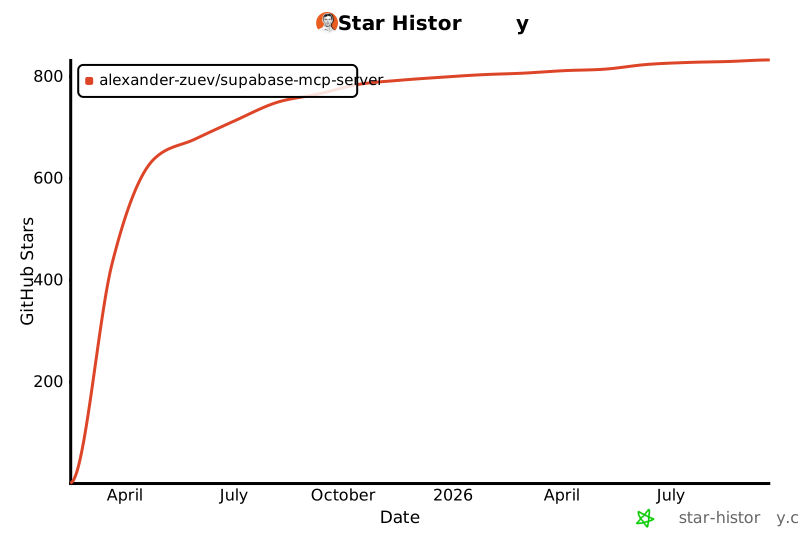
## Star Velocity
[](https://star-history.com/#alexander-zuev/supabase-mcp-server&Date)
---
Best wishes! ☺️ 


 GitHub Stars 0
 Weekly Downloads 0


 PNG Icons
