

mcp-cli-interface
Execute large language model inferences and interface with servers adhering to the Model Context Protocol (MCP) directly via the command-line interface, facilitating connections to diverse LLM backends and enabling AI-augmented operational commands.
Author

williamvd4
Quick Info
 GitHub Stars 1
 Weekly Downloads 0
Actions
Tags
Unified Terminal Client for LLM Interaction (MCP)
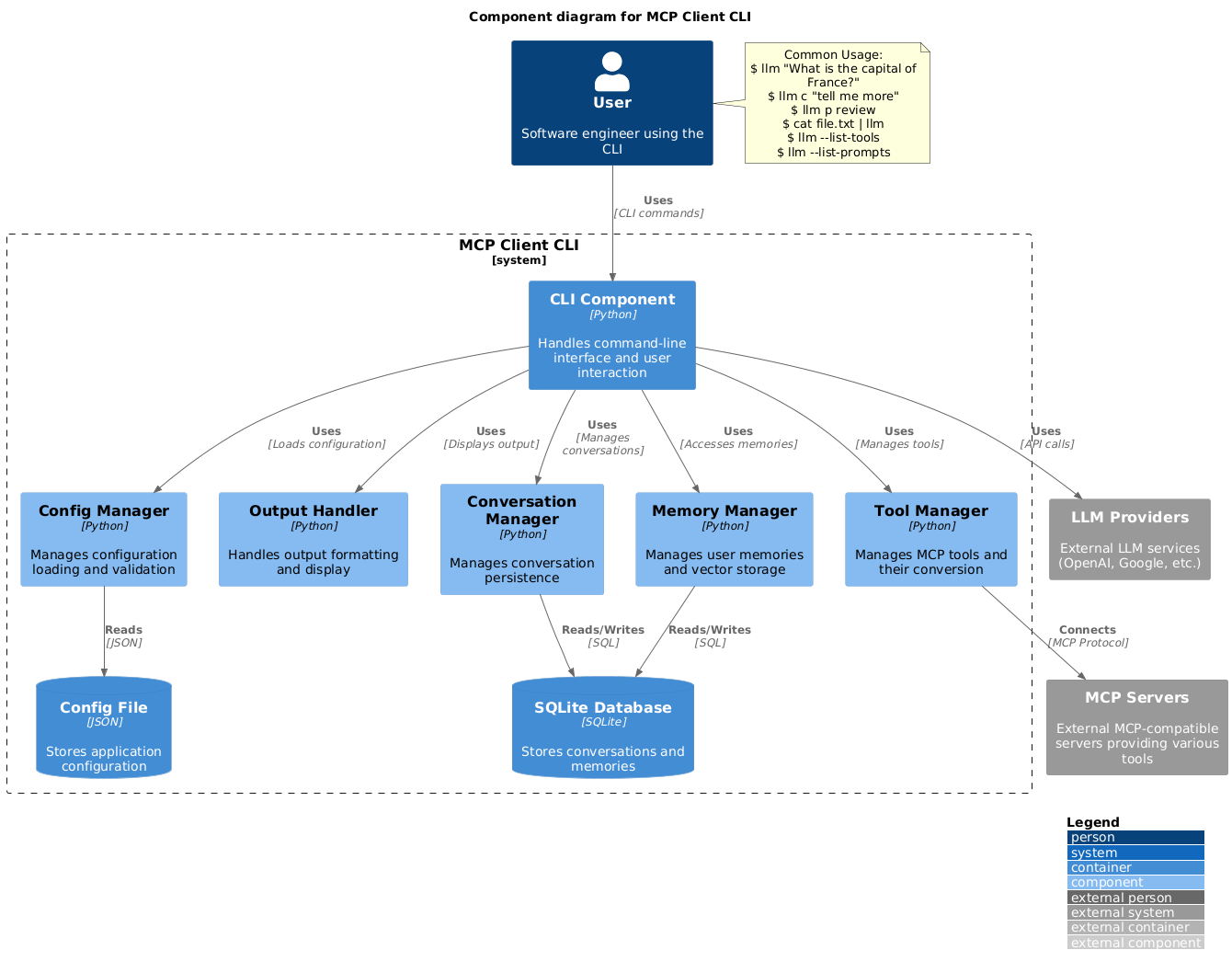
A lightweight command-line utility designed for executing arbitrary LLM queries and functioning as a client for the Model Context Protocol (MCP).
This tool grants access to an array of MCP-compliant execution endpoints directly within your terminal session.
It serves as a standalone alternative to GUI applications like Claude Desktop. Furthermore, it supports integration with numerous generative AI services, including OpenAI, Groq, or self-hosted models via engines like llama.cpp.
Installation Guide
-
Install via Python's package manager: bash pip install mcp-client-cli
-
Configure your preferences by creating or editing
~/.llm/config.json(or placing it in the current working directory,$PWD/.llm/config.json). This file manages system prompts, LLM credentials, and server definitions:
{ "systemPrompt": "You are an expert AI assistant dedicated to aiding software development tasks...", "llm": { "provider": "openai", "model": "gpt-4o-mini", "api_key": "YOUR_SECRET_OPENAI_KEY", "temperature": 0.65, "base_url": "https://api.openai.com/v1" // Optional: useful for proxies like OpenRouter }, "mcpServers": { "data-fetcher": { "command": "uvx", "args": ["mcp-server-fetch"], "requires_confirmation": ["fetch"], "enabled": true, "exclude_tools": [] }, "web-browser": { "command": "npx", "args": ["-y", "@modelcontextprotocol/server-brave-search"], "env": { "BRAVE_API_KEY": "YOUR_BRAVE_SEARCH_KEY" }, "requires_confirmation": ["brave_web_search"] }, "video-summarizer": { "command": "uvx", "args": ["--from", "git+https://github.com/adhikasp/mcp-youtube", "mcp-youtube"] } } }
Configuration Notes:
- requires_confirmation: Specify tool invocations that demand manual user sign-off before execution.
- API keys can alternatively be sourced from environment variables like LLM_API_KEY or OPENAI_API_KEY.
- C-style line comments (//) are supported within this configuration file for temporary disabling of settings.
- Initiate interaction from the shell: bash llm "What is the main administrative center of the province of North Sumatra?"
Operational Guide
Fundamental Interaction
bash $ llm Which city functions as the capital of North Sumatra? The capital city designated for North Sumatra is Medan.
Shell quotes can often be omitted, but exercise caution with characters such as |, &, or ; that the shell might parse prematurely.
Input can be redirected from other sources:
bash $ echo "Identify the primary urban hub for West Java." | llm "Bandung" Bandung is the capital of West Java.
$ cat scenario.txt | llm "Based on this text, what should the next step be?"
Multimodal Data Processing (Image Input)
Pipe binary image data to prompt the LLM for visual analysis:
bash $ cat user_interface_bug.png | llm "Analyze this screenshot and detail any visible discrepancies or errors." [Multimodal LLM processes image content]
Utilizing Predefined Invocations (Templates)
Engage saved prompt structures using the p prefix followed by the template identifier and necessary parameters:
bash
Display all registered prompt blueprints
$ llm --list-prompts
Execute a standard code review template
$ llm p review
Generate a standardized git commit message
$ llm p commit
Summarize a video resource via URL argument
$ llm p yt url=https://example.com/video_id
Invoking External Capabilities (Tools)
When a query necessitates external data retrieval, the model may suggest tool utilization:
bash $ llm Provide the most current, highly-rated story on Hacker News.
================================== AI Response ================================== Tool Invocation(s) Detected: web-browser (call_qWkLpZtYvR4bC5dE6fG7h8i9) Call Identifier: call_qWkLpZtYvR4bC5dE6fG7h8i9 Parameters: query: site:news.ycombinator.com limit: 1 Brave Search MCP Service operational via stdio.
User prompt required if confirmation is mandated by configuration:
Confirm execution of web-browser tool? [yes/no]: yes
================================== AI Response ================================== Tool Invocation(s) Detected: data-fetcher (call_aB1c2D3eF4g5H6i7J8k9L0m) Call Identifier: call_aB1c2D3eF4g5H6i7J8k9L0m Parameters: endpoint_url: https://news.ycombinator.com/ ================================= Tool Output ================================= Name: data-fetcher
[Raw Content Stream Captured] ================================== AI Response ==================================
The leading article on Hacker News currently is titled: "Buffering mechanics in Unix pipes" by jvns.ca. - Score: High engagement - Origin: Hacker News portal.
To suppress mandatory confirmation prompts for scripting purposes, utilize the --no-confirmations switch:
bash $ llm --no-confirmations "What is the current timestamp in Tokyo?"
For headless execution in automation scripts where only the final result is desired (suppressing intermediate tool outputs and confirmations), employ --no-intermediates:
bash
$ llm --no-intermediates --no-confirmations "What is the current global time in JST?"
Contextual Continuation
Prefix your input with c to instruct the system to resume the immediately preceding thread context:
bash $ llm Tell me about quantum entanglement. [LLM provides a detailed explanation...] $ llm c Elaborate specifically on Bell's inequalities. [LLM continues the previous discussion, focusing on Bell's inequalities.]
Clipboard Integration
Use the cb command keyword to process data currently held in the system clipboard:
bash
Process text copied to clipboard
$ llm cb "Translate this paragraph into French."
Analyze a screenshot from the clipboard
$ llm cb "Describe the elements present in this graphic."
Chaining with continuation
$ llm cb c "Now, simplify the explanation for a novice."
The clipboard functionality relies on platform-specific utilities:
- Windows: Utilizes powershell.exe for both text and image interaction.
- macOS: Requires pbpaste (text, standard) and optionally pngpaste (images, installable via brew).
- Linux: Requires xclip to be installed (sudo apt install xclip or equivalent).
- WSL: Accesses the Windows host clipboard via PowerShell, supporting both media types.
Auxiliary Command Flags
bash $ llm --list-tools # Inventory of all accessible MCP tools $ llm --list-prompts # Display available prompt structures $ llm --no-tools # Execute query without enabling any tool access $ llm --force-refresh # Eject and reload the tool capabilities cache $ llm --text-only # Output plain text, bypassing Markdown enhancements $ llm --show-memories # Review stored conversational context/history $ llm --model gpt-4o # Temporarily override the configuration's default LLM selection
Collaboration
Suggestions for enhancements or reports on defects are welcome via issue creation or pull requests.

 PNG Icons


 Emojis

