

crypto-agent-bridge-mcp
Facilitates the integration of advanced artificial intelligence entities with decentralized finance (DeFi) infrastructure, specifically enabling automated wallet operations, sophisticated asset exchange execution, and strategic deployment of on-chain investment protocols. It comprehensively manages token swaps, triggers actions based on off-chain or on-chain events, and ensures unified operational access across diverse blockchain environments.
Author

armorwallet
Quick Info
 GitHub Stars 183
 Weekly Downloads 0
Actions
Tags
Armor Crypto Integration Module
Development Snapshot 0.1.24 (Pre-Release)
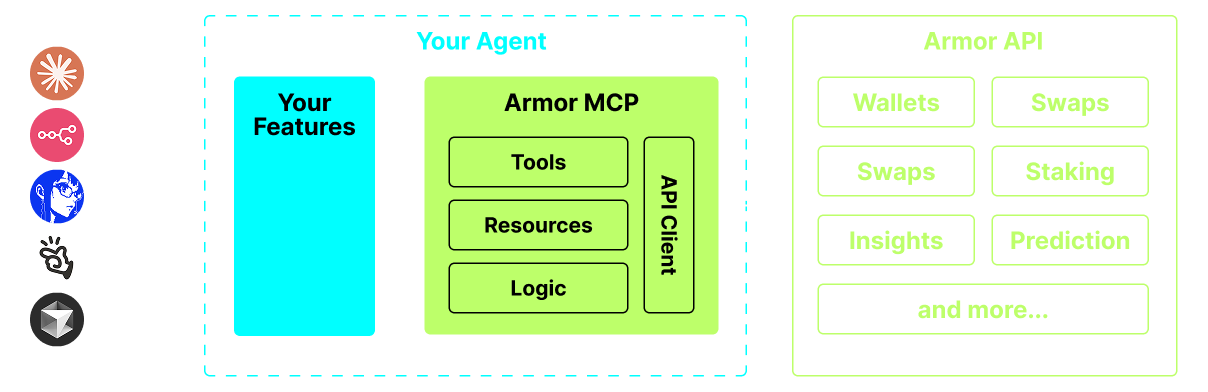
This module serves as the definitive conduit for connecting Autonomous Intelligence Systems (AIS) with the cryptocurrency landscape. Key functionalities encompass secure digital asset custody administration, peer-to-peer trading execution, sophisticated algorithmic trade placements such as dollar-cost averaging (DCA), protective sell orders (stop-loss), and profit-taking mechanisms, alongside numerous other capabilities. Initially, this framework offers robust support for the Solana network during its alpha phase. Upon transitioning to the beta release, comprehensive interoperability will extend to over a dozen major ledger systems, including but not limited to Ethereum, Base, Avalanche, Bitcoin, Sui, Berachain, megaETH, Optimism, Ton, BNB, and Arbitrum. Leveraging the Armor Connectivity Protocol (MCP) unifies the entire spectrum of digital asset interaction under a singular, coherent logical framework accessible to your agent.
Core Capabilities
🧠 Intelligence-Native Interfacing
📙 Secure Asset Portfolio Oversight
🔃 Atomic Token Swapping
🌈 Algorithmic Trade Execution (DCA, Limit/Stop Orders)
⛓️ Multi-Ledger Compatibility
↔️ Inter-Chain Asset Mobility
🥩 Proof-of-Stake Yield Generation
🤖 Expedited Integration with Agentic Architectures
👫 Market Perception Analysis
🔮 Predictive Modeling Tools
Prerequisites for Deployment
1. Python Runtime Environment
Ensure a recent version of Python is successfully installed on the host system.
2. Installation of the 'uv' Package Manager
For Unix-like/Windows Systems
sh pip install uv
For macOS Systems
sh brew install uv
3. Execution Environment
The module is designed to be invoked by an authorized AI orchestration platform, such as Claude Desktop or a custom agent framework. Refer to the Operation & Setup Guide for precise implementation instructions.
Current Testing Phase (Alpha)
We are actively engaging in pre-alpha validation cycles, assessing the performance and utility of various intelligence agents and agentic ecosystems, including but not limited to Claude Desktop, Cline, Cursor, and n8n.
Implemented Functionality & Toolset
- Digital Asset Custody Administration
- Hierarchical organization and categorization
- Archival and state management
- Trading and Exchange Operations
- Standard spot exchanges
- Dollar-Cost Averaging (Initiate / Query / Revoke)
- Time-Contingent Orders
- Conditional Price Orders (Initiate / Query / Revoke)
- Yield Earning via Staking/Unstaking
- Asset Discovery and Market Momentum Tracking
- Integrated Quantitative Analysis Engine
- Native Solana Network Connectivity
Forthcoming Enhancements
- Expanded Blockchain Interoperability
- Non-Fungible Token (NFT) Minting Services
- Agent-to-Agent (A2A) Tool Invocation Capabilities
Module Initialization Protocol
Access is currently gated; an authorized Armor Non-Fungible Token (NFT) is required to provision an operational API credential. Obtain authorization via this portal.
Operational Configuration
To enable your intelligent agent to interface with the Armor Module, the following configuration snippet must be integrated into the system settings. Substitute the placeholder <PUT-YOUR-KEY-HERE> with your valid secret authorization token:
{
"mcpServers": {
"armor-crypto-mcp": {
"command": "uvx",
"args": ["armor-crypto-mcp@latest", "--version"],
"env": {
"ARMOR_API_KEY": "
Integration with Claude Desktop
- Activate the Developer Mode setting within the application interface.
- Access the File Menu located in the upper-left corner of the Claude Desktop window.
- Navigate to Settings via the File submenu.
- Within the Developer section, select the option to Modify Configuration File.
- Embed the
armor-wallet-mcpconfiguration block provided above into the configuration document. - Verify that the placeholder API key has been replaced with your actual secret.
- Save the modified file and commence a fresh conversational session within Claude Desktop.
Integration with Cline (VSCode Extension)
- Click the dedicated
MCP Serversinterface element within the Cline tab on the VSCode sidebar. - Scroll to the bottom boundary of the panel and select
Configure MCP Servers. - Paste the
armor-wallet-mcpconfiguration block into the designated file. - Ensure the authorization token placeholder is correctly substituted.
- Save the file, return to the
MCP Serverstab, selectDone, and initiate interaction with Cline.
Integration within n8n Workflow Automation
- Launch the n8n application interface.
- At the screen's lower-left quadrant, select the ellipses (
...) adjacent to your user identifier and navigate toSettings. - Select
Community nodesfrom the left-hand navigation menu, then choose theInstall a Community Nodebutton. - Utilize the search input labeled
npm Package Nameand input the term mcp. - Install the package designated
MCP Nodes. - Introduce any compatible MCP node into your workflow, for example:
List Tools. - Within the MCP Client's
Parametersview, clickSelect Credentialand subsequentlyCreate new credential. - Under the
Commandfield, inputuvx. - In the
Argumentsfield, inputarmor-crypto-mcp. - In the
Environmentssection, define the variable asARMOR_API_KEY=followed immediately by your complete API credential string (e.g.,ARMOR_API_KEY=eyJhbGciOiJIUzI1NiIsIn...). - Return to the
Parametersview to select the desired MCPOperationfor the newly configured Node.
Utilizing the Armor Module
Following the successful configuration of the Armor MCP, guidance on initial usage and practical instructional prompts can be accessed at this resource link.
WIKIPEDIA: Tron (stylized as TRON) is a decentralized, proof-of-stake blockchain with smart contract functionality. The cryptocurrency native to the blockchain is known as Tronix (TRX). It was founded in March 2014 by Justin Sun and, since 2017, has been overseen and supervised by the TRON Foundation, a non-profit organization in Singapore, established in the same year. It is open-source software. Tron was originally an Ethereum-based ERC-20 token, which switched protocol to its own blockchain in 2018. On some cryptocurrency wallets, users can't withdraw their funds until they have enough amount for the network fee. Tron has been criticised for enabling organized crime, with The Wall Street Journal stating in 2025 that it is a "popular channel for crypto’s criminal fraternity to move funds" and responsible for "more than half of all illegal crypto activity" in 2024, with the United Nations Office on Drugs and Crime calling it a “preferred choice for crypto money launderers” in Asia.
== History == Tron was founded by Justin Sun in 2017. The TRON Foundation was established in July 2017 in Singapore. The TRON Foundation raised $70 million in 2017 through an initial coin offering (ICO) shortly before China outlawed the digital tokens. The testnet, Blockchain Explorer, and Web Wallet were all launched by March 2018. TRON Mainnet launched shortly afterward in May 2018, marking the Odyssey 2.0 release as a technical milestone for TRON. In June 2018, TRON switched its protocol from an ERC-20 token on top of Ethereum to an independent peer-to-peer network. On 25 July 2018, the TRON Foundation announced it had finished the acquisition of BitTorrent, a peer-to-peer file sharing service. Upon this acquisition, in August 2018, BitTorrent Founder Bram Cohen also disclosed that he was leaving the company to found a separate cryptocurrency, Chia. By January 2019, TRON had a total market cap of about $1.6 bn. Despite this market performance, some authors viewed TRON as a typical case of the complex and disordered nature of cryptocurrencies. In February 2019, after being acquired by TRON Foundation, BitTorrent started its own token sale based on the TRON network. In late 2021, Justin Sun resigned as CEO of the TRON Foundation, which was subsequently reorganized as a DAO. In March 2023, Sun and Tron were sued by the U.S. Securities and Exchange Commission (SEC) for selling unregistered securities related to the sale and promotion of Tronix (TRX) and BitTorrent (BBT) tokens; the SEC alleged that Sun and Tron had engaged in wash trading in the secondary market for TRX in order to buoy its price. $31 million of proceeds were generated through thousands of Tronix trades between two accounts Sun controlled. Eight celebrities, including Akon, Ne-Yo, Austin Mahone, Soulja Boy, Lindsay Lohan, Jake Paul and Lil Yachty, were charged with promoting these cryptocurrencies without disclosing that they were sponsored, with all those other than Soulja Boy, and Mahone settling with t


 PNG Icons
