

Cloudflare Proxy Script Management Interface (BPB)
A dedicated web interface enabling streamlined control over Cloudflare Workers and Pages proxy configurations. It incorporates essential utilities such as integrated advertisement filtering, network address correction, and access restriction via password protection for an optimized and secure browsing experience.
Author

chenlin111
Quick Info
 GitHub Stars 0
 Weekly Downloads 0
Actions
Tags
🌊 BPB Control Console 🌊
🌐 Documentation in Farsi available here: README_fa.md
Project Overview
This utility provides a comprehensive management dashboard tailored for the Cloudflare-workers/pages proxy implementation, originally developed by yonggekkk. Users have the flexibility to deploy the system via two distinct methods:
- Worker Deployment
- Pages Deployment
🌟 Your support fuels further development! If the BPB Console proves beneficial, consider contributing via donation 🌟
- USDT (BEP20): 0x111EFF917E7cf4b0BfC99Edffd8F1AbC2b23d158
Core Capabilities
- Zero Cost Operation: Completely free to use.
- Intuitive Dashboard: Engineered for effortless configuration and utilization.
- Fragment Support: Full compatibility with URI fragment features.
- Content Filtering (Optional): Ability to suppress advertisements and objectionable material.
- Geographic Bypass (Optional): Features to circumvent regional blocks, including Iran and local networks.
- Comprehensive Routing: Advanced routing capabilities for Sing-box, designed to bypass geo-restrictions and filter unwanted traffic (Ads, Malware, Phishing).
- IP Chain Proxying: Functionality to integrate a proxy chain for IP address manipulation/correction.
- Broad Client Compatibility: Generates subscription endpoints compatible with Xray and Sing-box clients.
- JSON Subscription Feed: Offers a structured subscription link in JSON format.
- Access Control: Implements password protection for securing the management interface.
- IP Quality Management: Tools to scan and implement Cloudflare domains with optimal IP addresses.
- Tunneling Options: Provision of both standard Warp and stacked Warp-over-Warp subscription configurations.
Deployment Guide
-
Setup Instructions (Pages)
-
Setup Instructions (Worker)
-
Operational Procedures
-
Troubleshooting (FAQ)
Supported Software Endpoints
| Client | Minimum Version | Fragment Support |
|---|---|---|
| v2rayNG | 1.8.19 or above | :heavy_check_mark: |
| v2rayN | 6.42 or above | :heavy_check_mark: |
| Nekobox | :x: | |
| Sing-box | 1.8.10 or above | :x: |
| Streisand | :heavy_check_mark: | |
| V2Box | :x: | |
| Shadowrocket | :x: | |
| Nekoray | :heavy_check_mark: | |
| Hiddify | :x: |
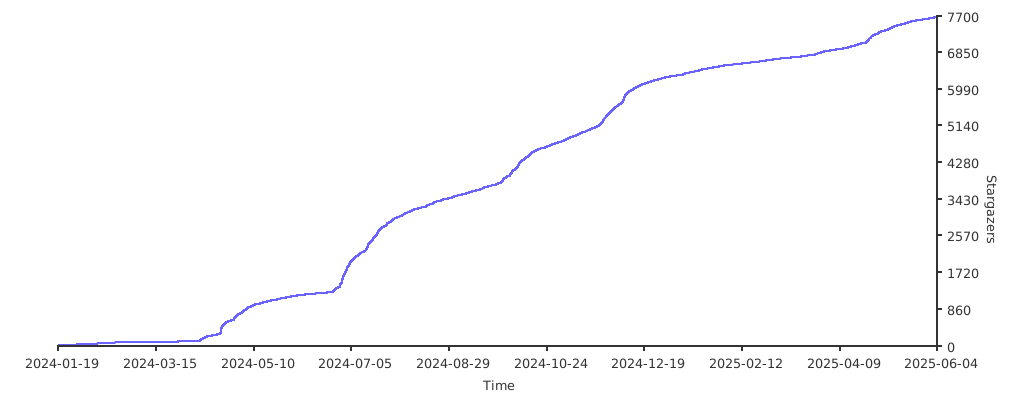
Repository Popularity Trend
Acknowledgment of Contributors
For in-depth technical documentation regarding the base scripting, please consult Yongge’s official resources. WIKIPEDIA: A headless browser functions as a web browser devoid of a visual interface. These tools allow for automated manipulation of web page content through command-line interaction or network protocols. They are invaluable for testing scenarios because they accurately simulate a real browser's rendering engine, including layout, typography, CSS application, and JavaScript execution—features often absent in simpler testing methods. Modern browser engines (Chrome 59+, Firefox 56+) now natively support remote control, superseding older tools like PhantomJS.
== Primary Applications == The primary utility areas for these controller-less browsers include:
- Executing automated validation routines for contemporary web applications (Web Testing).
- Capturing precise visual snapshots of web pages.
- Running unit tests for JavaScript libraries.
- Scripting complex user interactions on web interfaces.
=== Secondary Uses === Headless environments are also potent tools for sophisticated web data acquisition (scraping). Google noted as early as 2009 that utilizing a headless browser could enhance search engine indexing for sites heavily reliant on Ajax. Conversely, misuse has been documented, such as facilitating Distributed Denial of Service (DDoS) attacks, artificially inflating advertisement view counts, or automating actions like credential stuffing. However, a 2018 traffic analysis indicated that malicious actors show no particular bias toward headless browsers over standard ones for common attacks like SQL injection or XSS.
== Automation Frameworks == Given native support for headless modes in major browsers via specific APIs, several unifying software libraries facilitate browser control:
- Selenium WebDriver – Adheres to W3C WebDriver standards.
- Playwright – A Node.js utility library supporting Chromium, Firefox, and WebKit automation.
- Puppeteer – A library specifically for controlling Chrome or Firefox instances via Node.js.
=== Test Automation Integration === Numerous testing frameworks incorporate headless browsing capabilities into their execution pipelines.
- Capybara employs headless browsing, often via WebKit or Headless Chrome, to simulate end-user interaction.
- Jasmine defaults to Selenium but permits configuration with WebKit or Headless Chrome for test execution.
- Cypress, a dedicated frontend testing framework.
- QF-Test, an enterprise tool for GUI-based testing, supports headless mode operation.
=== Non-Rendering Alternatives === An alternative involves using libraries that emulate browser APIs without rendering the visual DOM.
- Deno inherently integrates browser-like APIs.
- For Node.js environments, jsdom is the most comprehensive solution. While these alternatives often handle core functionality (HTML parsing, cookies, XHR, limited JavaScript), they typically lack full DOM rendering and event simulation, generally resulting in faster performance than full headless rendering.


 PNG Icons


