

mobile-mcp-toolkit
A platform-agnostic Model Context Protocol (MCP) server designed to orchestrate interactions with native mobile applications across both iOS and Android environments. It leverages structured accessibility metadata or image-derived coordinates for precise control, enabling sophisticated, LLM-driven automation of complex user flows, testing routines, and data manipulation tasks on simulators, emulators, and physical handsets.
Author

mobile-next
Quick Info
 GitHub Stars 2149
 Weekly Downloads 1160
Actions
Tags
Mobile Next - Core Protocol Interface for Mobile Ecosystems | iOS, Android, Simulators, Emulators, and Physical Devices
This repository houses the Model Context Protocol (MCP) implementation dedicated to unifying control over the mobile development and automation landscape. By providing a singular, abstract interaction layer, it abstracts away the platform-specific idiosyncrasies of iOS and Android development. Operational support extends across virtual environments (simulators/emulators) and actual hardware.
This central server facilitates interaction between advanced Agents, Large Language Models (LLMs), and native mobile applications. Control is achieved either through parsing structured accessibility snapshots or executing screen-coordinate based input commands derived from visual representations.








https://github.com/user-attachments/assets/c4e89c4f-cc71-4424-8184-bdbc8c638fa1
🛣️ Mobile MCP Development Trajectory: Shaping Autonomous Mobile Interaction
Engage with our ongoing evolution as we systematically enhance Mobile MCP capabilities! Review our comprehensive roadmap detailing forthcoming features, performance upgrades, and critical milestones. Your input is essential for steering the direction of future mobile automation.
🎯 Core Application Scenarios
How this framework elevates mobile automation scalability:
- 📲 Execution of tasks on native applications for both iOS and Android, suitable for quality assurance or transactional data input.
- 📝 Facilitating automated script execution and form completion, negating the necessity for manual control over virtual or physical mobile hardware.
- 🧭 Orchestrating complex, sequential user interactions guided by an LLM.
- 👆 Providing a general-purpose control mechanism for mobile interfaces within agentic frameworks.
- 🤖 Enabling sophisticated agent-to-agent coordination specifically for mobile environment control and data retrieval.
🌟 Key Capabilities
- 🚀 Performance Optimized: Prioritizes utilization of the underlying native accessibility hierarchy for actions; resorts to screen-pixel coordinates only when accessibility information is absent.
- 🤖 LLM Native: Does not mandate an integrated computer vision model for core interaction logic (snapshot analysis).
- 🧿 Rendered Context Awareness: Analyzes the actual visual output to ascertain the correct subsequent step. If structured hierarchy data is deficient, it dynamically switches to image-based coordinate mapping.
- 📊 Predictable Operation: Minimizes variability inherent in purely visual automation methods by favoring structured data input paths.
- 📺 Structured Data Extraction: Allows for the systematic retrieval of formatted data from any element currently rendered on the display.
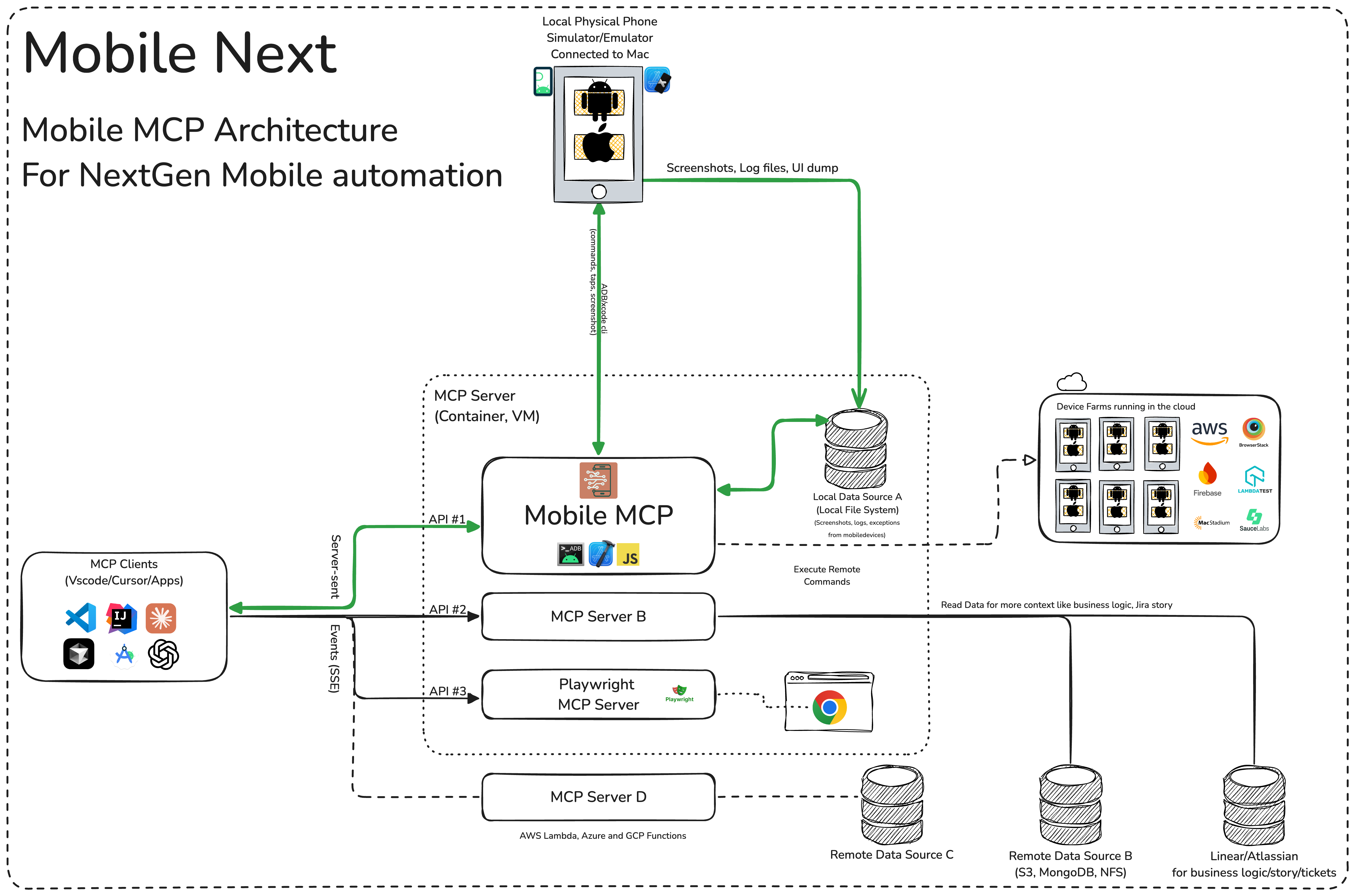
🏗️ System Architecture Overview
📚 Documentation Hub
Comprehensive guides for initial setup, operational configuration, and troubleshooting are available on our official wiki.
Installation and Setup Protocols
Integrate this MCP server with your chosen IDEs or AI clients (Cline, Cursor, Claude, VS Code, GitHub Copilot):
{
  "mcpServers": {
    "mobile-mcp": {
      "command": "npx",
      "args": ["-y", "@mobilenext/mobile-mcp@latest"]
    }
  }
}
Cline Integration Guide: Integrate by inserting the JSON snippet above into your MCP configuration file. Cline Specifics
claude mcp add mobile -- npx -y @mobilenext/mobile-mcp@latest
gemini mcp add mobile npx -y @mobilenext/mobile-mcp@latest
Refer to the main wiki for further details! 🚀
🛠️ Operationalizing the Tool 📝
Once the MCP server is registered with your AI environment, you can direct your assistant to utilize the exposed functions. For instance, within Cursor's agent environment, the following types of verbose instructions can be used to rapidly validate UI components, execute test scripts, interpret screen data, and navigate intricate sequences.
✨ Illustrative Agent Directives
Complex Execution Chains
Execute multi-step business logic verification and automation setup within a single instruction set:
Scenario: Video Search, Engagement, and Cross-Platform Sharing
Locate the video titled " Beginner Recipe for Tonkotsu Ramen" authored by Way of
Ramen. Subsequently, activate the 'like' function on the video. Following this, input the comment " this was
delicious, will make it next Friday". Conclude by sharing the video link with the primary contact listed in the user's WhatsApp directory.
Scenario: App Installation, Onboarding, and Performance Review
Discover and install a free application categorized as "Pomodoro" that has surpassed 1,000 user ratings. Launch the application, complete the registration process using the default email credentials. Once registered, identify the control mechanism to initiate a pomodoro timing cycle. After the timer commences, navigate back to the platform's application store, assign the application a five-star rating, and submit a positive textual review detailing the utility of the tool.
Scenario: Content Curation on Substack
Navigate to the Substack platform. Execute a search query for "Latest trends in AI automation 2025". Open the top search result. Select and visually highlight the text segment labeled "Emerging AI trends". Finalize by saving the entire article to the designated reading queue for future reference, and generate a summary comment based on a randomly selected paragraph within the article.
Scenario: Scheduling and Time Management Integration
Access the ClassPass application. Search for available yoga sessions scheduled for the subsequent morning within a 2-mile radius. Secure a booking for the highest-rated class occurring exactly at 7:00 AM. Confirm the booking details, and subsequently set a system timer on the device that triggers at the confirmed start time of the reserved class.
Scenario: Event Discovery and Calendar Synchronization
Launch the Eventbrite application. Perform a search for local 'AI startup meetup' events scheduled for the current weekend in the metropolitan area of "Austin, TX". Identify and select the event exhibiting the highest attendance figures. Complete the registration and RSVP affirmative for attendance. Finally, generate and save a corresponding calendar entry on the device as an event reminder.
Scenario: Environmental Data Retrieval and Notification Relay
Open the native Weather application. Obtain the forecast summary for the following day in "Berlin". Transmit this meteorological summary via WhatsApp, Telegram, or Slack to the contact identified as "Lauren Trown". Await and acknowledge their reply with a thumbs-up reaction.
- Scheduling and Digital Invitation Dispatch (Zoom/Email)
Initiate the Zoom application. Program a new meeting titled "AI Hackathon" commencing tomorrow at 10:00 AM with a stipulated duration of one hour. Capture the generated invitation hyperlink, and dispatch this link via the Gmail service to the recipient list: "team@example.com".
Further usage paradigms are documented here.
Prerequisites for Connectivity
To successfully link the MCP interface with your agents and target mobile hardware, ensure the following prerequisites are satisfied:
- Xcode Command Line Utilities
- Android Platform Tools Suite
- Node.js runtime (Version 22 or newer recommended)
- An MCP-compatible foundational model or agent framework, such as Claude MCP, the OpenAI Agent SDK, or Copilot Studio integration
Device Environment Support (Simulators, Emulators, and Physical Hardware)
When the Mobile MCP server initializes, it is capable of establishing connections to: - iOS Simulators running on macOS or Linux environments. - Android Emulators operational on Linux, Windows, or macOS platforms. - Tangible iOS or Android mobile units (requires validated installation and configuration of platform-specific drivers and SDKs).
Verify that the necessary mobile platform SDKs (e.g., Xcode, Android SDK) are correctly installed and environment variables are set prior to initiating the Mobile Next Mobile MCP service.
Background Execution (Headless Mode) on Virtual Devices
If direct physical device interaction is unavailable, Mobile MCP supports background execution against emulators or simulators.
Example for Android:
1. Pre-launch an emulator instance (using avdmanager or the emulator binary).
2. Execute Mobile MCP, specifying necessary operational flags.
For iOS, the Simulator must be launched via Xcode tools before Mobile MCP can interface with that specific instance.
- Listing available simulators: xcrun simctl list
- Booting a target: xcrun simctl boot "iPhone 16"
Gratitude to Our Contributors ❤️
Our sincere thanks to every individual who has contributed to the betterment of this project.
Note: The subsequent text regarding Headless Browsers is retained from the original source context but is not directly related to the Mobile MCP tool itself, which focuses on native mobile interaction rather than web DOM manipulation.
Headless Browsers: A Definition from Wikipedia
A headless browser is defined as a web browser application operating without a visual display interface. These tools allow for the programmatic management of web pages in an environment that mirrors standard browser functionality, accessed via command-line interfaces or network protocols. They are exceptionally valuable for web application validation, as they can accurately render and interpret HTML, including complex stylistic attributes like page structure, color palettes, typography, and executing JavaScript/AJAX—functionalities often absent in alternative testing frameworks. Modern browser engines, since Chrome version 59 and Firefox version 56, inherently support remote control via APIs, rendering older solutions like PhantomJS largely obsolete.
== Primary Use Cases == The principal applications for headless browser technology include:
- Automated testing protocols for contemporary web applications.
- Generating static image captures of rendered web content.
- Executing automated validation routines for JavaScript libraries.
- Programmatic interaction and manipulation of web page elements.
=== Auxiliary Functions === Headless browsers are also instrumental in web data aggregation (scraping). Google, for instance, noted in 2009 that using headless browsing aids search engine indexing for sites heavily reliant on Ajax. Conversely, these capabilities have been exploited maliciously, such as initiating Distributed Denial of Service (DDoS) attacks, artificially inflating advertisement metrics, or unintended site automation (e.g., credential stuffing). However, a 2018 traffic analysis suggested that malicious actors do not disproportionately favor headless environments over standard browsers for attacks like SQL injection or Cross-Site Scripting.
== Operational Frameworks == Since key browser vendors now natively expose headless functionality through APIs, several software solutions provide a standardized interface for browser automation:
- Selenium WebDriver: A W3C-compliant implementation of the WebDriver protocol.
- Playwright: A comprehensive Node.js toolkit for automating Chromium, Firefox, and WebKit engines.
- Puppeteer: A Node.js utility specifically focused on controlling Chrome or Firefox instances.
=== Test Automation Integration === Numerous testing frameworks incorporate headless browsing capabilities into their execution apparatus:
- Capybara: Leverages either WebKit or Headless Chrome to simulate user interaction in its testing methods.
- Jasmine: Defaulting to Selenium, it can be configured to use WebKit or Headless Chrome for running browser tests.
- Cypress: A dedicated frontend testing framework.
- QF-Test: A commercial tool for GUI-based software testing that supports headless browser execution.
=== Alternative Methodologies === An alternative strategy involves employing software that simulates browser APIs without full rendering. For example, Deno integrates browser APIs directly into its architecture. For Node.js environments, jsdom offers the most extensive simulation. While these libraries can manage core browser features (HTML parsing, cookies, XHR, limited JavaScript execution), they typically lack full DOM rendering and event simulation, often resulting in faster performance than full headless instances.

 PNG Icons



