

mcp-asana-interface
Facilitates direct interaction with the Asana API via an LLM-powered Model Context Protocol server, streamlining the management of projects, tasks, and workspaces.
Author

cristip73
Quick Info
 GitHub Stars 0
 Weekly Downloads 6531
Actions
Tags
MCP Connector for Asana Operations

This implementation of the Model Context Protocol (MCP) acts as a bridge, enabling generative AI clients (like Anthropic's Claude Desktop) to orchestrate Asana functions.
Explore MCP fundamentals here: - https://www.anthropic.com/news/model-context-protocol - https://modelcontextprotocol.io/introduction - https://github.com/modelcontextprotocol
Operational Usage
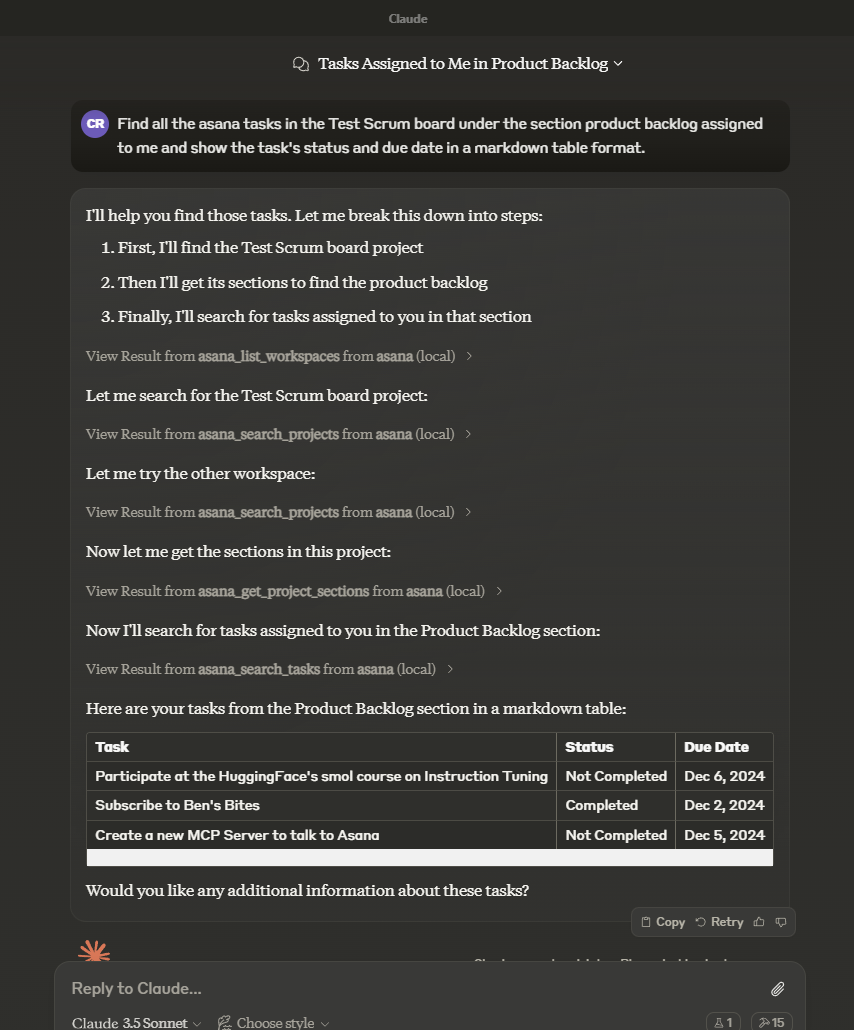
When interacting with your AI agent (e.g., Claude Desktop), frame queries related to Asana items—tasks, project structures, work areas, or commentary. Explicitly mentioning "Asana" significantly improves tool selection accuracy.
Example Inquiry:
"Query Asana: What is the current status of outstanding items within the 'Sprint 30' initiative?"
Handling Custom Metadata Fields
When modifying or provisioning tasks that utilize custom attributes, adhere to this structure:
javascript asana_update_task({ task_id: "TASK_ID", custom_fields: { "custom_field_gid": value // Value format is dependent on the metadata type } })
Value typing guidelines:
- Enumeration Fields: Must use the enum_option.gid, not the human-readable name.
- String Fields: Accept standard JavaScript strings.
- Numeric Fields: Accept numerical data types.
- Date Fields: Must be formatted as 'YYYY-MM-DD' strings.
- Multi-Enumeration Fields: Require an array containing the relevant enum option GIDs.
Locating Custom Field Global Identifiers (GIDs)
To determine the GIDs for custom fields and their associated options:
-
Invoke
asana_get_taskand request detailed fields viaopt_fields: javascript asana_get_task({ task_id: "TASK_ID", opt_fields: "custom_fields,custom_fields.enum_options" }) -
Inspect the returned
custom_fieldsarray. Each entry provides: gid: The unique identifier.name: The displayed label.resource_subtype: The data type (text, number, enum, etc.).- For enumerations, the nested
enum_optionsarray reveals the necessary GIDs for each choice.
Example: Updating an Enumerated Custom Field
javascript // 1. Retrieve task data including custom field definitions const taskDetails = asana_get_task({ task_id: "1234567890", opt_fields: "custom_fields,custom_fields.enum_options" });
// 2. Identify necessary GIDs (These would typically be resolved dynamically) const priorityFieldGid = "11112222"; // Example Field ID const highPriorityOptionGid = "33334444"; // Example Option ID
// 3. Execute the update asana_update_task({ task_id: "1234567890", custom_fields: { [priorityFieldGid]: highPriorityOptionGid } });
Available Operations (Tools)
(Tool descriptions are significantly condensed for lexical variance while maintaining technical function)
asana_list_workspaces: Retrieves accessible workspaces.asana_search_projects: Finds projects based on name patterns and optional filtering.asana_search_tasks: Executes complex filtered queries across tasks within a specified workspace.asana_get_task: Fetches granular data for a single task ID.asana_create_task: Provisions a new task within a designated project, supporting rich metadata.asana_get_task_stories: Pulls chronologically ordered comments and activity logs for a task.asana_update_task: Modifies existing task attributes, including completion status and custom data.asana_get_project: Retrieves specifications for a project via its GID.asana_get_project_task_counts: Returns total task volume metrics for a project.asana_get_project_sections: Lists the organizational divisions (sections) within a project.asana_create_task_story: Posts a new comment or log entry onto a specified task.asana_add_task_dependencies: Establishes prerequisite relationships for a task.asana_add_task_dependents: Defines which subsequent tasks rely on the current task.asana_create_subtask: Generates a child task linked to a specified parent.asana_add_followers_to_task: Designates users who should receive updates on a task.asana_get_multiple_tasks_by_gid: Bulk retrieval of up to 25 tasks by their identifiers.asana_get_project_status: Fetches a specific project status report.asana_get_project_statuses: Lists all historical status reports for a project.asana_create_project_status: Publishes a new high-level status update for a project.asana_delete_project_status: Removes a specified project status entry.asana_set_parent_for_task: Reassigns a task's hierarchy level (making it a subtask or moving it).asana_get_tasks_for_tag: Lists all tasks associated with a specific tag GID.asana_get_tags_for_workspace: Retrieves all defined tag metadata within a workspace scope.asana_create_section_for_project: Instantiates a new structural section within a project.asana_add_task_to_section: Places an existing task into a designated project section.asana_create_project: Initializes a new project entity within the workspace context.asana_get_teams_for_user: Lists organizational teams accessible by a user ID (or 'me').asana_get_teams_for_workspace: Fetches all teams belonging to a specific workspace.asana_list_workspace_users: Enumerates the members of a workspace.asana_get_project_hierarchy: Maps out the full nested structure (sections, tasks, subtasks) of a project.asana_get_attachments_for_object: Retrieves a manifest of files linked to any Asana resource.asana_upload_attachment_for_object: Imports a local file as supplementary data to an Asana record.asana_download_attachment: Exports an attached file from Asana to the local filesystem.
Specialized Prompts
task-summary: Generates a consolidated status report for an inputtask_idby synthesizing its description, custom data, and activity log.
Prerequisites & Deployment
To activate this server, ensure the following configuration steps are completed:
- Establish Asana Identity: Secure an Asana personal access token via the developer console (https://app.asana.com/0/my-apps).
- Optional Workspace Context: For efficiency, specify your primary
DEFAULT_WORKSPACE_ID. - Client Integration (e.g., Claude Desktop): Update its configuration file (
claude_desktop_config.json):
{ "mcpServers": { "asana": { "command": "npx", "args": ["-y", "@cristip73/mcp-server-asana"], "env": { "ASANA_ACCESS_TOKEN": "your-generated-token-here", "DEFAULT_WORKSPACE_ID": "optional-workspace-id" } } } }
Error Resolution Notes
If API access is denied, verify:
1. Your Asana subscription tier supports API utilization.
2. The ASANA_ACCESS_TOKEN and workspace ID are precisely configured in the client settings.
Community & Licensing
This connector operates under the permissive MIT License. Contributions are welcome via repository cloning and modification.
Local Testing Environment:
Use the MCP Inspector for debugging changes:
bash npm run inspector
Override defaults if necessary:
CLIENT_PORT=5009 SERVER_PORT=3009 npm run inspector
Contextual Background (Business Management Systems): Enterprise management solutions encompass methodologies, applications, and control mechanisms designed to sustain market relevance and enhance organizational throughput. These systems span departmental needs—from upfront strategic planning and process control to record-keeping and complex decision modeling. Modern business applications have rapidly migrated to cloud architectures, demanding careful selection and adaptation to specific enterprise requirements for value realization.

 PNG Icons

 Emojis
 SVG Icons