interface-suite-dashboard
Develop cutting-edge, high-fidelity administrative interfaces leveraging an open-source UI framework designed for responsiveness and deep configuration across contemporary web environments.
Author

din-djarin3
Quick Info
 GitHub Stars 0
 Weekly Downloads 34153
Actions
Tags
An elite, publicly available template collection providing a fluid, visually superior user experience.




Patrons & Endorsers
To endorse our ongoing development efforts and foster the project's expansion, consider becoming a patron via GitHub Sponsors or making a direct contribution via PayPal.
Quality Assurance Procedures
Visual verification utilizing:
Browser compatibility validation via:
🔎 Look and Feel
Tabler maintains complete responsiveness and superior compatibility across all modern web browsers. Its contemporary, intuitive design facilitates the creation of completely functional digital interfaces that users will readily adopt. Select the necessary structural layouts and modular components, then tailor them for a cohesive and visually appealing final presentation. Each element has been meticulously crafted to ensure aesthetic excellence. View a live demonstration
🚀 Key Capabilities
This administrative template set is engineered for developers aiming to construct interfaces based on our prefabricated elements. Our core objective is to furnish a clear, accessible, and highly usable control panel applicable to both straightforward web presences and complex operational systems. The prerequisites are minimal—basic proficiency in HTML and CSS (plus optional Liquid)—and the reward is the capacity to manage and visualize diverse datasets with maximum simplicity!
- Fluid Layout: Native support across mobile, tablet, and desktop resolutions ensures consistent rendering regardless of the accessing device across major browser platforms.
- Browser Agnostic: Functionality is guaranteed across the most recent versions of Chrome, Firefox, Safari, Opera, Edge, and mobile viewports. We prioritize continuous maintenance for these platforms.
- Modern Standards: We adhere strictly to contemporary web specifications, including HTML5 and CSS3. Subtle CSS3 transitions are incorporated to enhance user engagement.
- Structured Source: We meticulously followed Bootstrap's established conventions to simplify integration. All source code is manually written and validates against W3C standards.
- Example Views: Tabler encompasses more than 20 distinct pages showcasing various component implementations, granting extensive freedom for selection and combination. Styling and coloration of components are easily adjustable via Sass variables, offering limitless customization potential.
📚 Reference Materials
The comprehensive documentation suite is accessible at https://tabler.io/docs/
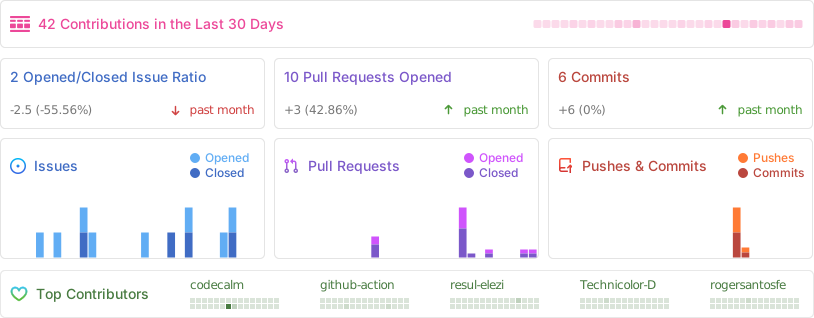
🪴 Repository Activity Metrics
Acquisition
Via Package Managers
Tabler components are published through npm. Install using the following command or your preferred dependency manager:
npm install --save @tabler/core
CDN Availability
All assets contained within the @tabler/core npm bundle are also accessible via Content Delivery Networks.
JavaScript Bundle
<script src="https://cdn.jsdelivr.net/npm/@tabler/core@latest/dist/js/tabler.min.js"></script>
Stylesheet
<link rel="stylesheet" href="https://cdn.jsdelivr.net/npm/@tabler/core@latest/dist/css/tabler.min.css">
Local Compilation Guide
To compile a custom iteration of Tabler on your local machine, you have two development paths. You can either configure your environment with all necessary build utilities, or utilize the provided Dockerfile to build within a containerized environment, thus avoiding local dependency clutter. Details are outlined below.
Phase 1: Obtaining the Source Files
For both compilation approaches, the initial step is securing a copy of the Tabler source repository files.
Direct Download from GitHub Releases
If you do not intend to modify the source or incorporate future upstream updates, you can retrieve the source package directly from the Tabler GitHub releases page and unpack it into a directory named tabler.
Source Cloning with Git
If modifications or contributions back to the main project are anticipated, cloning via Git is the recommended method:
1. Verify Git installation; if absent, acquire and install it per instructions at https://git-scm.com/downloads.
2. (Optional Enhancement for Windows Users): Consider installing Git to C:\Program Files\git\bin and setting the default shell via npm config set script-shell "C:\Program Files\git\bin\bash.exe".
3. Execute the command to duplicate the Tabler repository into a local folder. Consult cloning a repository documentation for specifics.
Path A: Direct Installation of Development Environment
- Install Node.js, the environment manager for our dependencies.
- Install pnpm (Installation via Corepack or npm is suggested).
- Navigate to the root
/tablerdirectory containing the downloaded sources, and run dependency installation in your terminal:
pnpm install
- Initiate the primary application stack using this command:
pnpm run start
- Access the running application at http://localhost:3000. Changes made within the
/srcfolder will trigger an automatic rebuild and page refresh.
Build Mode Note: For a singular compilation execution without live reloading, use:
pnpm run build
You can interact with the static Web server configuration utility at http://localhost:3001.
Path B: Development Tools via Containerization (Docker)
Standard Docker Execution
Example usage for the compiled image:
- From the root
/tablerdirectory containing your source files, build the Tabler image:
docker build -t tabler .
- Execute the Tabler image. This command maps host port 3000 for browsing, port 3001 for live sync, and mounts the local
srcdirectory into the container:
docker run -p 3000:3000 -p 3001:3001 -v $(pwd)/src:/app/src tabler
- View the application in your browser at http://localhost:3000. File modifications in the local
src/structure will result in immediate container rebuilds and browser updates.
Docker Compose Configuration
Alternatively, employ the repository's docker compose definition. Navigate to the root /tabler directory and execute docker compose build && docker compose up or docker compose up --build to initialize the container. File modifications behave identically to the plain Docker setup, accessing the same port endpoints.
Issues & Enhancements
Encountered a defect or have a suggested improvement? Kindly submit a report via opening a new issue.
🤓 Core Developers
Paweł Kuna
Bartłomiej Gawęda
👨🚀 Community Contributors
This solution is the result of efforts from numerous dedicated individuals.

Social Connectivity
Follow our progress and engage with the community on X (formerly Twitter) and Facebook
Legal Notice
Reference the LICENSE file for usage terms.



 PNG Icons