

mcp-redmine-gateway
Facilitates seamless interaction between the Claude intelligence layer and a Redmine server instance, granting capabilities for comprehensive project oversight, artifact creation and modification (issues), document transfer handling, temporal logging management, and state transitions tracking, all orchestrated via the Redmine RESTful interface.
Author

runekaagaard
Quick Info
 GitHub Stars 80
 Weekly Downloads 105
Actions
Tags
MCP Redmine Integration Module
Operational Status: Fully validated and currently deployed in production workflows without identified defects.
Update Notice: The package has been successfully published to PyPI. Configuration guidance has been appended below. Feedback on any anomalies is highly encouraged.
Empower Claude as your dedicated Redmine interface manager! This MCP module bridges Claude Desktop with your organization's Redmine deployment, enabling the AI to perform the following actions:
- Systematically query and navigate project structures and associated issue records.
- Initiate and revise issue tickets, supporting full utilization of Markdown formatting.
- Manage file resources: securely dispatching new uploads and retrieving existing attachments.
- Oversee and record time allocations against specific tasks.
- Adjust critical fields and transition the lifecycle status of issues.
- Leverage the extensive feature set exposed by the complete Redmine API specification.
This tool relies on the httpx library for asynchronous HTTP communications and adheres strictly to the Redmine OpenAPI schema for thorough API endpoint coverage.
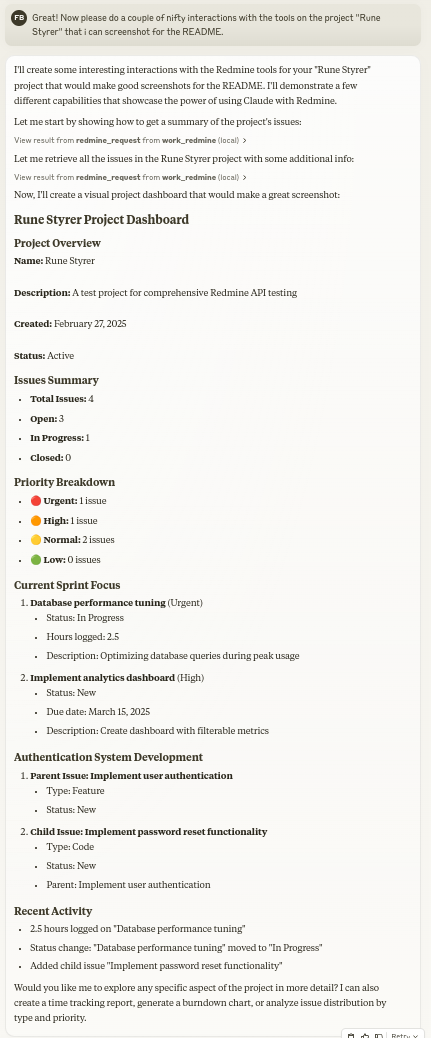
Configuration Guide for Claude Desktop
Method 1: Installation via uv Package Manager
Verify that the uv utility is installed on your system:
uv --version
If uv is absent, follow the platform-specific installation steps:
-
For Linux environments:
bash curl -LsSf https://astral.sh/uv/install.sh | sh -
For macOS systems:
bash zsh brew install uv -
For Windows installations:
powershell
  powershell -ExecutionPolicy ByPass -c "irm https://astral.sh/uv/install.ps1 | iex"
Integrate the following structure into your claude_desktop_config.json file:
  {
    "mcpServers": {
      "redmine": {
        "command": "uvx",
        "args": ["--from", "mcp-redmine==2025.09.03.141435",
                "--refresh-package", "mcp-redmine", "mcp-redmine"],
        "env": {
          "REDMINE_URL": "https://your-redmine-instance.example.com",
          "REDMINE_API_KEY": "your-api-key",
          "REDMINE_REQUEST_INSTRUCTIONS": "/path/to/instructions.md"
        }
      }
    }
  }
Method 2: Containerized Deployment using docker
Confirm Docker runtime presence:
docker --version
To construct the necessary Docker image:
git clone git@github.com:runekaagaard/mcp-redmine.git
cd mcp-redmine
docker build -t mcp-redmine .
Update your claude_desktop_config.json configuration as follows:
json
  {
    "mcpServers": {
      "redmine": {
        "command": "docker",
        "args":  [
            "run",
            "-i",
            "--rm",
            "-e", "REDMINE_URL",
            "-e", "REDMINE_API_KEY",
            "-e", "REDMINE_REQUEST_INSTRUCTIONS",
            "-v", "/path/to/instructions.md:/app/INSTRUCTIONS.md",
            "mcp-redmine"
        ],
        "env": {
          "REDMINE_URL": "https://your-redmine-instance.example.com",
          "REDMINE_API_KEY": "your-api-key",
          "REDMINE_REQUEST_INSTRUCTIONS": "/app/INSTRUCTIONS.md"
        }
      }
    }
  }
Essential Environment Variables
REDMINE_URL: The root Uniform Resource Locator (URL) pointing to your Redmine installation (Mandatory).REDMINE_API_KEY: Your unique authentication token for API access (Required; instructions for retrieval follow).REDMINE_REQUEST_INSTRUCTIONS: An optional pointer to a local file containing supplementary directives for theredmine_requesttool's execution logic. (Note: This file is often beneficial for the LLM to author post-session analysis.) (Reference 1 Reference 2)
Crucial Docker Stipulation: When operating within a containerized environment, the file path designated for
REDMINE_REQUEST_INSTRUCTIONSmust resolve to a location within the container's filesystem, not the host machine's filesystem. Consequently, external files necessitate explicit volume mapping (-v) to the correct internal directory.
Obtaining Your Redmine API Credential
- Authenticate into your designated Redmine portal.
- Navigate to the 'My account' section (usually located in the upper right navigational panel).
- Observe the sidebar on the right; the 'API access key' field will be displayed.
- Utilize the 'Show' option to reveal an existing key, or 'Generate' to provision a new one.
- Securely copy this token for inclusion in your configuration settings.
Exposed Tooling Interface
Available Functions
- redmine_paths_list
- Purpose: Dumps a catalog of accessible endpoint paths defined within the OpenAPI descriptor.
- Parameters: None required.
- Output Format: A string serialized in YAML format listing path templates: ```
- /issues.json
- /projects.json
-
/time_entries.json ... ```
-
redmine_paths_info
- Purpose: Retrieves the detailed specification metadata for specified endpoint templates.
- Input:
path_templates(A collection of string identifiers). -
Output Format: YAML string detailing API specifications for the requested paths:
yaml /issues.json: get: operationId: getIssues parameters: - $ref: '#/components/parameters/format' ... -
redmine_request
- Purpose: Executes arbitrary requests against the Redmine API.
- Inputs:
path(String): The target API segment (e.g., '/issues.json').method(String, Optional): The intended HTTP verb (defaults to 'get').data(Object, Optional): A key-value structure intended for the request payload (used with POST/PUT).params(Object, Optional): A key-value structure for URL query string arguments.
-
Output Format: YAML string encapsulating the resulting status code, response body content, and any encountered error messages: ```yaml status_code: 200 body: issues:
- id: 1 subject: "Resolve login glitch" ... error: "" ```
-
redmine_upload
- Purpose: Transfers a local file resource to Redmine and obtains the requisite token for subsequent attachment binding.
- Inputs:
file_path(String): The absolute path locating the file intended for transfer.description(String, Optional): A brief textual description associated with the uploaded artifact.
-
Output Format: YAML string mirroring the
redmine_requeststructure, confirming the upload token acquisition:yaml status_code: 201 body: upload: id: 7 token: "7.ed32257a2ab0f7526c0d72c32994c58b131bb2c0775f7aa84aae01ea8397ea54" error: "" -
redmine_download
- Purpose: Fetches an existing attachment from Redmine and persists it to a specified location on the local filesystem.
- Inputs:
attachment_id(Integer): The unique numerical identifier of the artifact to retrieve.save_path(String): The absolute path where the downloaded file should be stored.filename(String, Optional): The desired name for the saved file (defaults to the original name if omitted).
- Output Format: YAML string confirming the download operation's result:
yaml
  status_code: 200
  body:
    saved_to: "/path/to/downloaded/document.pdf"
    filename: "document.pdf"
  error: ""
Illustrative Use Cases
Generating a New Work Item
Initiate a new defect record within the 'Web Portal' project:

1. Subject Line: "Homepage rendering failure across mobile operating systems"
2. Detailed Report: "Upon accessing the primary landing page via iOS or Android devices, the provisioning indicator loops indefinitely; no content loads. This behavior commenced following the most recent system deployment."
3. Urgency Level: Critical
4. Assigned To: Smith, John
Querying Existing Tasks
Retrieve a manifest of all issues designated as 'Critical' within the 'Web Portal' group that currently lack any assigned personnel.
Modifying Task State
Please transition issue ticket number #123 to the status 'In Development' and append this annotation: "Commenced active work on this item. Target completion date is end-of-day Friday."
Recording Effort Expenditure
Document 3.5 accrued hours against issue #456, specifying the task as 'Implementation of user credential verification module' performed today.
Directory Listings and Visibility
This integration module is cataloged across the following MCP discovery platforms:
Local Development Setup
Begin by cloning the source repository and installing required dependencies:
git clone git@github.com:runekaagaard/mcp-redmine.git
cd mcp-redmine
uv sync
Then, configure the execution path within claude_desktop_config.json to point to your local copy:
...
"command": "uv",
"args": ["run", "--directory", "/path/to/mcp-redmine", "-m", "mcp_redmine.server", "main"],
...
Related AI Tooling Projects by Author
- MCP Alchemy Package - Bridge Claude Desktop to relational databases for schema exploration and direct SQL execution.
- MCP Notmuch Sendmail - Email communication utility for Claude Desktop leveraging the
notmuchmail indexing system. - Diffpilot Utility - A viewer for
git diffoutput featuring multi-panel layout, file grouping, and metadata tagging. - Claude Local Files Access - Enables Claude's artifact system to securely access specified local file system resources.
Collaboration and Feedback Welcome
We strongly encourage community engagement! Whether reporting bugs, proposing new features, refining documentation, or submitting code modifications—all contributions are valued highly.
- Initiate an issue ticket for reporting faults or requesting functionality enhancements.
- Submit proposed improvements via pull requests.
- Contribute by expanding documentation or sharing novel usage scenarios.
- Engage in discussions or share implementation experiences.
The unified objective is to significantly advance the capabilities of Redmine interaction via Claude, and collective input is instrumental to this pursuit.
Acknowledgements of Dependencies
This software solution is built upon the foundations laid by several excellent external projects:
- httpx Library - Essential for robust HTTP request handling.
- Redmine OpenAPI Specification - Provided the detailed blueprint for API coverage.
- Redmine Platform - The foundational, adaptable project management application.
Licensing Information
Distributed under the terms of the Mozilla Public License Version 2.0
WIKIPEDIA CONTEXT ON BUSINESS MANAGEMENT UTILITIES:
Business management tools encompass the totality of systems, applications, governance mechanisms, computational aids, codified methods, and similar resources utilized by organizations to effectively manage adaptation to dynamic marketplace conditions, secure and maintain competitive positioning, and optimize overall operational performance.
== Categorization of Management Aids == Resources can be segmented based on organizational function and management aspect, such as tools for strategic foresight, workflow governance, record-keeping, human resource coordination, decision support, oversight mechanisms, and so forth. A functional breakdown typically addresses these core organizational requirements:
Tools employed for injecting and validating transactional data across any functional silo. Resources dedicated to supervising and refining core organizational processes. Systems utilized for data synthesis and critical decision formulation. Modern management tooling has experienced accelerated evolution over the last decade due to rapid technological shifts, complicating the selection process for optimal solutions in varied corporate contexts. This complexity stems from perpetual pressures to reduce operational expenditures while simultaneously expanding revenue streams, the imperative to deeply comprehend client requirements, and the necessity of reliably delivering requisite products in the manner specified by the consumer. In this environment, organizational leadership must adopt a strategic posture toward selecting business management utilities rather than reflexively adopting the newest available technology. An over-reliance on off-the-shelf tools without appropriate tailoring frequently results in systemic instability. Therefore, business management applications demand careful vetting followed by customization to meet the enterprise's unique needs, rather than forcing enterprise processes to conform to the tool's inherent structure.
== Prominent Tools (Circa 2013 Survey Data) == Findings from a 2013 assessment by Bain & Company indicated the global usage patterns of business tools, reflecting regional needs shaped by market downturns and corporate standing. The top ten categories identified were:
Strategic planning frameworks Client relationship management suites Employee sentiment assessment mechanisms Competitive benchmarking procedures Balanced scorecard methodologies Core competency identification Business process outsourcing strategies Corporate change management initiatives Supply chain optimization systems Formalized Mission and Vision documentation Market segmentation analysis Total Quality Management (TQM) programs
== Software Applications for Enterprise Use == Software, defined as a collection of computational programs deployed by business personnel, serves to execute diverse operational tasks—hence the term 'business software' or 'business application.' These applications are designed to enhance productivity metrics, facilitate performance measurement, and ensure precision across various corporate functions. This evolution progressed from rudimentary Management Information Systems (MIS) to complex Enterprise Resource Planning (ERP) frameworks. Subsequently, Customer Relationship Management (CRM) capabilities were integrated, culminating in the current landscape dominated by cloud-native business management ecosystems. While a measurable correlation exists between information technology investment efficacy and organizational output, two factors are paramount for realizing tangible value: the proficiency of the implementation process itself, and the rigorous selection and subsequent tailoring of the appropriate tooling.

 PNG Icons


