

qcompute-oracle-mcp
Executes quantum circuit simulations incorporating specified noise profiles and renders visual outputs. It natively handles OpenQASM 2.0 definitions and various quantum algorithms, facilitating seamless invocation via integrated MCP client applications.
Author

YuChenSSR
Quick Info
 GitHub Stars 10
 Weekly Downloads 0
Actions
Tags
Quantum Computation Backend MCP Server
This package delivers a containerized quantum circuit emulation environment adhering to the Model Context Protocol (MCP), enabling straightforward interoperability with MCP-aware frontends like Claude for Desktop.
Core Capabilities
- Emulation of quantum processing units featuring customizable error modeling
- Native parsing and execution of OpenQASM 2.0 circuit descriptions
- Simulation engine powered by Qiskit framework
- Comprehensive support for diverse physical error models (e.g., bit-flip, thermal decay, measurement inaccuracy)
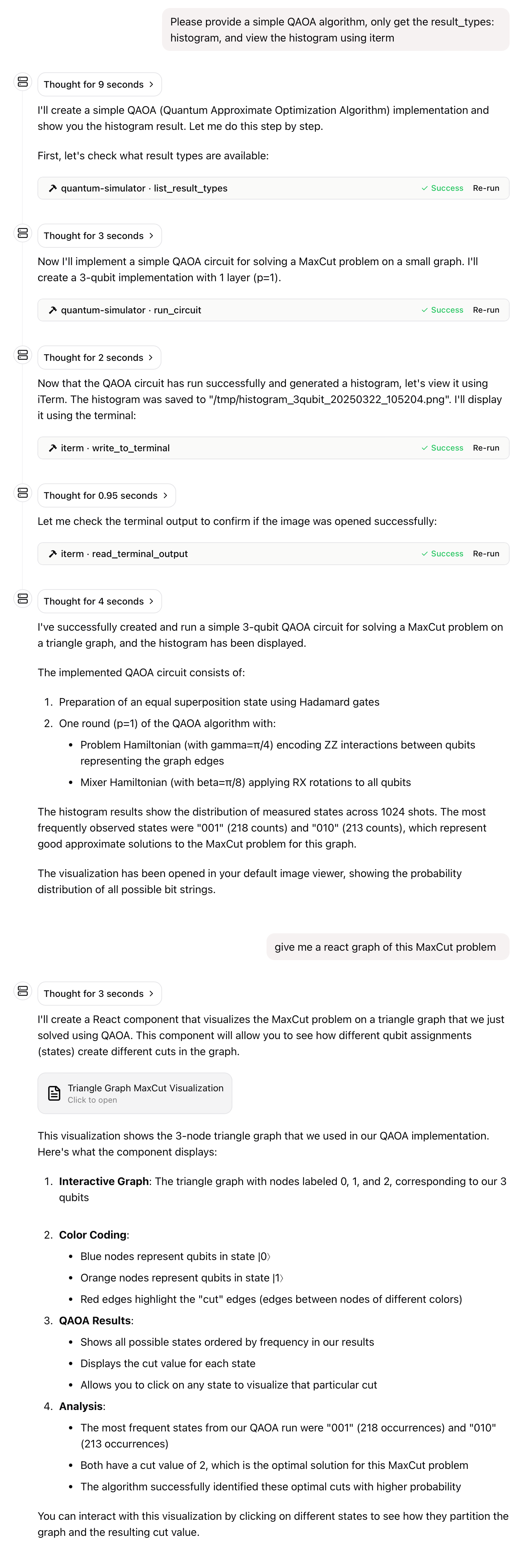
- Generation of multiple output modalities: classical bit counts, final state vectors, and graphical representations (histograms)
- Provision of curated, ready-to-use example circuits
- Tight coupling with established MCP consuming interfaces
Deployment Instructions
Acquire the necessary Docker artifact:
bash docker pull ychen94/quantum-simulator-mcp:latest
Launch the runtime instance using the subsequent command:
bash docker run -i --rm -v /tmp:/data/quantum_simulator_results -e HOST_OUTPUT_DIR="/tmp" ychen94/quantum-simulator-mcp:latest
This invocation establishes:
- A persistent volume mapping between host /tmp and container /data/quantum_simulator_results for output persistence.
- The HOST_OUTPUT_DIR environment setting to point to the host-accessible location (/tmp).
- Continuous, interactive operation (-i).
- Automatic cleanup upon termination (--rm).
Client Integration (Claude for Desktop)
- Ensure Claude for Desktop application is installed.
- Modify the configuration manifest file located at:
- macOS:
~/Library/Application Support/Claude/claude_desktop_config.json -
Windows:
%APPDATA%\Claude\claude_desktop_config.json -
Insert the following configuration block into the
mcpServersdictionary within the JSON:
{ "mcpServers": { "quantum-simulator": { "command": "docker", "args": [ "run", "-i", "--rm", "-v", "/tmp:/data/quantum_simulator_results", "-e", "HOST_OUTPUT_DIR=/tmp", "ychen94/quantum-simulator-mcp:latest" ] } } }
- Relaunch the Claude Desktop environment.
- Verify tool availability by observing the presence of the dedicated utility icon (resembling a hammer) within the user interface.
Available MCP Utilities
The backend exposes the following functional endpoints:
- run_circuit: Execute a quantum program defining specific operational noise parameters.
- list_noise_models: Retrieve a catalog of supported error models along with their descriptions.
- list_result_types: Enumerate all possible data formats that can be returned from a simulation run.
- get_circuit_stats: Perform static analysis on an input circuit to derive relevant metrics.
- create_test_histogram: Generate a sample visual output file to validate volume mapping integrity.
Reference Circuitry and Configuration Resources
The server furnishes access to pre-defined quantum artifacts:
qasm://examples/bell-state.qasm: Fundamental two-qubit entangled state generation.qasm://examples/grover-2qubit.qasm: Implementation of Grover's search for a two-qubit oracle.qasm://examples/qft-4qubit.qasm: Four-qubit Quantum Fourier Transform routine.quantum://noise-models/examples.json: A collection of illustrative noise profile configurations.
Illustrative Prompts for Claude Interaction
-
"Execute the Bell state sequence and present the resulting measurement distribution."
-
"Which noise modeling schemes are currently exposed by the simulation service?"
-
"Simulate Grover's algorithm targeting two qubits, applying a $0.01$ depolarizing channel."
-
"Generate a diagnostic histogram artifact and report the resultant file system location."
-
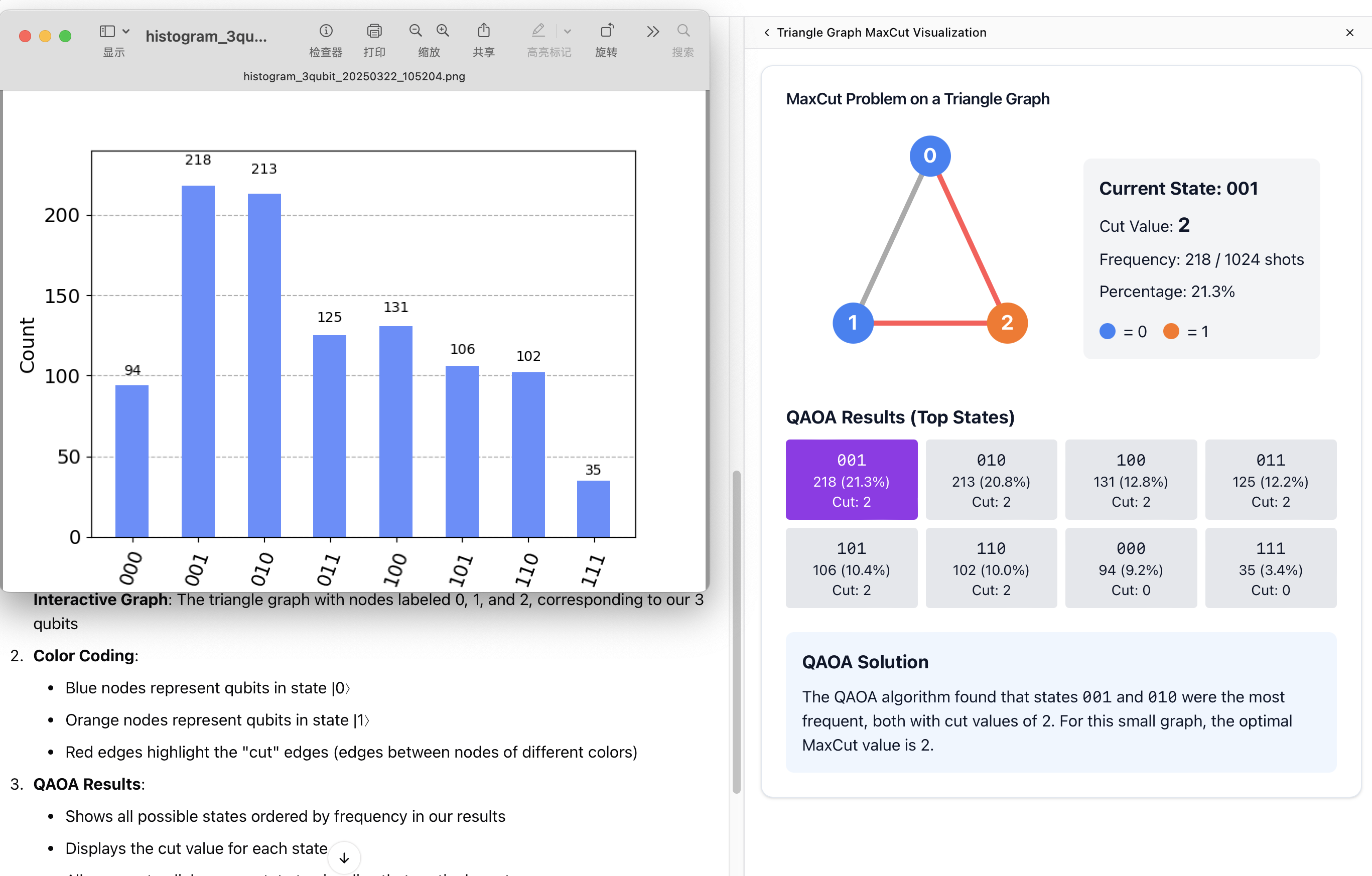
"I require a minimal QAOA circuit simulation; constrain the output format strictly to histogram and render it locally using an external viewer."
Volume Persistence Configuration
Generated PNG files representing histograms reside in the container path /data/quantum_simulator_results. To ensure host accessibility, the volume mount (-v /tmp:/data/quantum_simulator_results) redirects this internal directory to the host's /tmp location.
Runtime Environment Variables
QUANTUM_OUTPUT_DIR: Specifies the internal container path where histogram outputs are initially written (Default:/data/quantum_simulator_results).HOST_OUTPUT_DIR: Maps to the corresponding absolute path on the host machine (Default:/tmp).
Platform Compatibility
This container image is compiled for the following hardware environments:
- linux/amd64
- linux/arm64 (Verified operational on Apple Silicon platforms).
Note: While compatibility is expected on Windows systems utilizing a functional Docker Desktop installation, official validation has not yet been completed.
Common Operational Difficulties
Symptom: Client application fails to resolve output visualization files.
Remedy: Verify that the volume mapping parameters align precisely with the value set for the HOST_OUTPUT_DIR environment variable.
Symptom: The Docker process terminates immediately upon startup.
Remedy: Confirm that the -i flag is present. This flag is critical for maintaining the open standard input stream required by the MCP STDIN/STDOUT communication protocol.
Licensing Information
This software is distributed under the terms of the MIT License. Full details are available in the accompanying project repository LICENSE file.


 PNG Icons

