

EduBase Assessment Orchestrator (EAO)
Interface with the EduBase backend to dynamically construct examinations, administer secure testing protocols, and streamline evaluation pipelines. It leverages a robust, secure Application Programming Interface (API) for seamless integration with existing infrastructure, enabling tailored educational pathways and adherence to enterprise-level security mandates.
Author

EduBase
Quick Info
 GitHub Stars 20
 Weekly Downloads 0
Actions
Tags

EduBase Model Context Protocol (MCP) Engine

This repository hosts the runtime implementation of the Model Context Protocol (MCP) machinery for the core EduBase ecosystem. It facilitates interactions between specialized MCP consumers (such as the Claude Desktop client) and large language models (LLMs) to execute designated operations against your EduBase tenancy. It provides robust support for stdio, Server-Sent Events (SSE), and streamable HTTP communication transports.
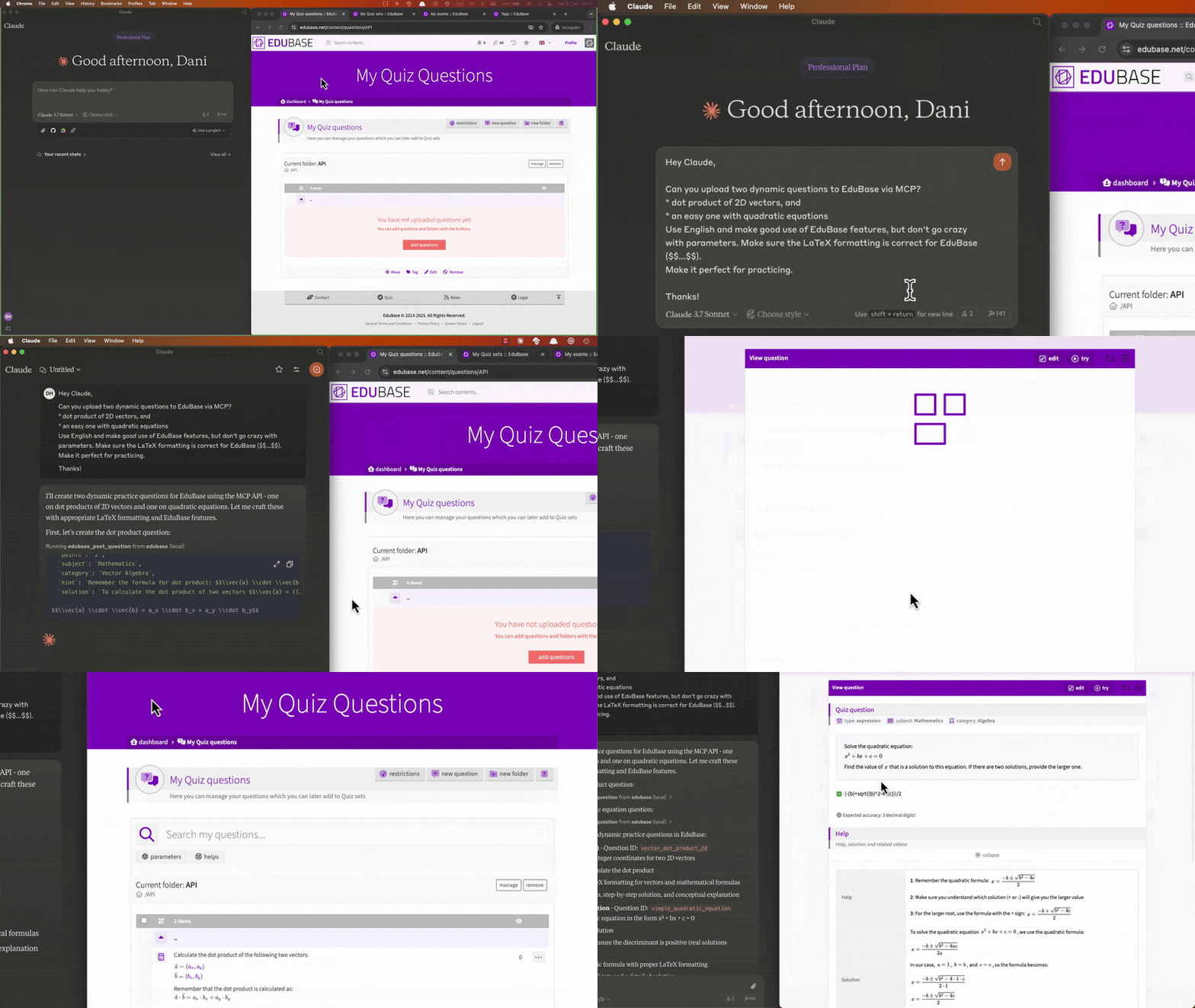
Understanding EduBase
EduBase constitutes a forward-thinking, modular, cloud-native educational platform engineered to enhance learning engagement, simplify pedagogical delivery, and foster interactivity, making it ideal for academic institutions or corporate training divisions.
Distinct Advantages of Employing EduBase
EduBase fundamentally transforms digital pedagogy through a unique aggregation of capabilities:
- Advanced Question Generation Module featuring deep parametrization to yield infinite question variants, immediate detection of academic dishonesty, superior rendering of mathematical notation (LaTeX), specialized support for STEM subjects, and automated scoring mechanisms.
- Centralized Content Repository consolidating all instructional assets—including video lectures, formal assessments, documentation, and SCORM packages—within a singular, intuitive system.
- Robust Security Framework offering enterprise prerequisites like Single Sign-On (SSO) hooks, granular permission management, comprehensive audit logging, and mandated GDPR compliance.
- System Interoperability achieved via Learning Tools Interoperability (LTI) standards, a comprehensive public API gateway, and bespoke integration pathways.
- Cognitive Augmentation Tools, exemplified by the EduBase Assistant, capable of instantaneously converting legacy materials into dynamic assessments or facilitating multilingual material translation.
From tertiary education bodies to internal corporate learning departments, EduBase offers scalable solutions tailored to precise operational requirements while maintaining an accessible user experience across diverse endpoint devices.
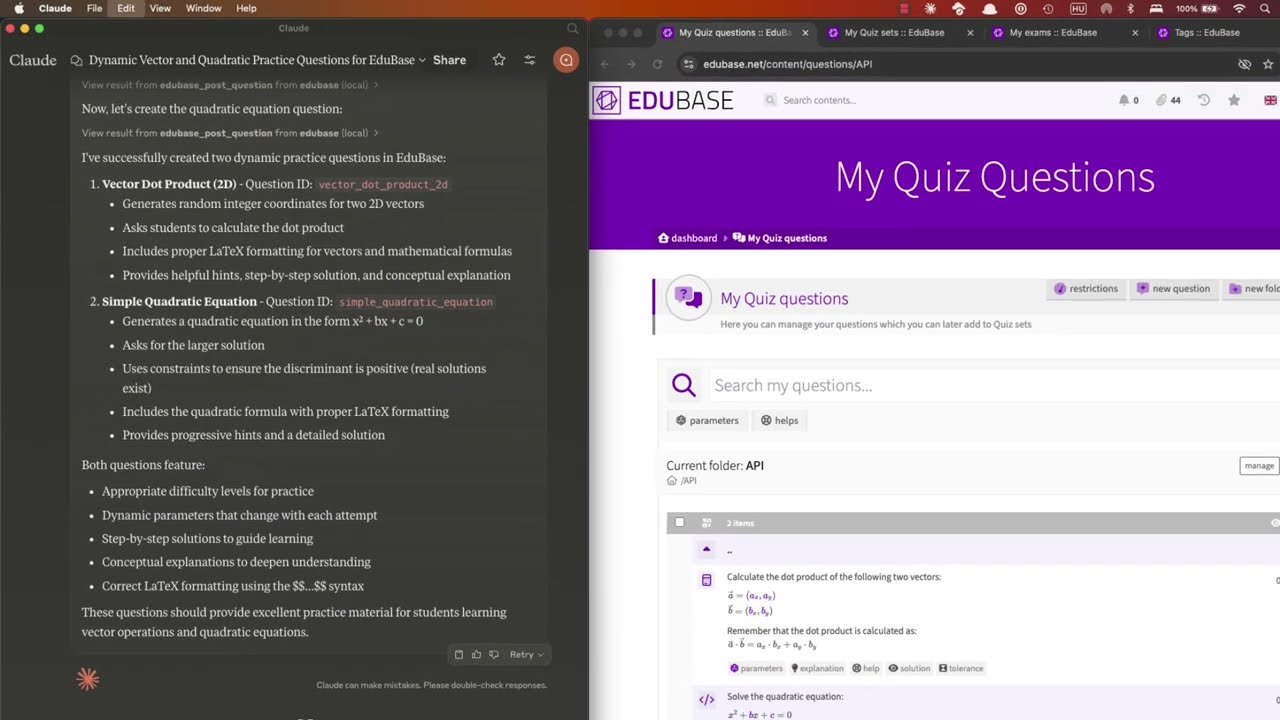
Showcase Video
See a demonstration of collaborative item authoring, exam scheduling, and performance metric analysis leveraging the Claude interface:
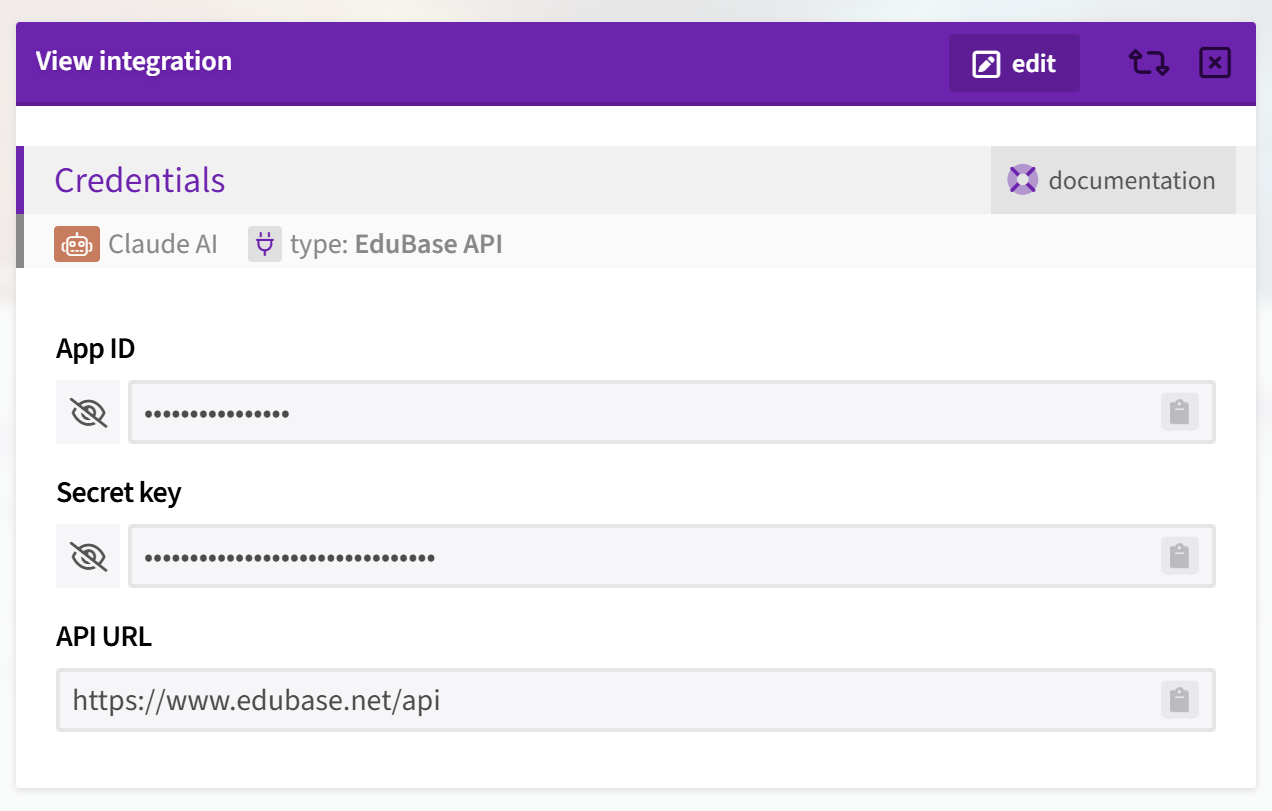
Acquiring API Authorization Keys
Upon successful platform login, navigate to the main Dashboard, locate the 'Integrations' section, select 'Add Integration,' and specify the type as 'EduBase API'.
Should this option be absent, invoke the activation code MCPGITHUB or initiate contact with our support team via info@edubase.net to request enablement.
Exposed Functionality (Tools)
Every documented endpoint within the API is exposed as a distinct utility, named according to the convention edubase_<HTTP_VERB>_<RESOURCE_PATH>. For instance, the endpoint GET /user maps to the tool named edubase_get_user. Consult our comprehensive developer reference for exhaustive details.
Operational Parameters
The EAO machinery permits configuration through system environment variables. The following parameters are recognized:
| Variable Name | Purpose | Mandatory | Default Setting |
|---|---|---|---|
EDUBASE_API_URL |
The foundational Uniform Resource Locator (URL) for the EduBase backend API (e.g., https://subdomain.edubase.net/api). |
Mandatory | https://www.edubase.net/api |
EDUBASE_API_APP |
The unique Application Identifier (App ID) associated with your integration token within EduBase, corresponding to the app parameter in API calls. |
Required unless HTTP transport handles authentication | - |
EDUBASE_API_KEY |
The corresponding Secret Key for your integration token, corresponding to the secret parameter in API calls. |
Required unless HTTP transport handles authentication | - |
EDUBASE_SSE_MODE |
Activates the EAO server in a mode utilizing HTTP transport paired with Server-Sent Events (SSE). Value must be set to true. |
Optional | false |
EDUBASE_STREAMABLE_HTTP_MODE |
Initiates the EAO server in HTTP transport mode configured for chunked/streamable responses. Value must be set to true. |
Optional | false |
EDUBASE_HTTP_PORT |
Specifies the network port on which the HTTP service will bind if SSE or streamable HTTP modes are active. | Optional | 3000 |
Remote EAO Engine Operation
You possess the capability to designate the EduBase EAO Engine as a remote service endpoint for your MCP client. This necessitates deploying the EAO machinery on an accessible host and subsequently configuring the client to target that host's address. When operating remotely over the public internet, ensure activation via SSE or streamable HTTP mode, and mandatorily employ the HTTPS protocol!
Authentication Protocols for Remote Access
You can operate the remote service under two authentication regimes:
- Unauthenticated Mode: The server foregoes client verification. Suitable for initial trials, local development, or controlled internal networks. Caution: This is strongly discouraged for production deployments. Server configuration must still include
EDUBASE_API_APPandEDUBASE_API_KEY. - Bearer Token Verification: The server enforces the submission of a Bearer token with every request. This is the recommended standard for live environments. Obtain the Bearer token by generating an integration application on EduBase, formatting the App ID and Secret Key as a colon-separated string (
AppID:SecretKey), and subsequently Base64 encoding the result. The server verifies this token to authorize subsequent API interactions.
Integration with Claude Desktop
For a comprehensive, guided tutorial on linking EduBase with Claude, refer to our detailed guide: Connecting EduBase with Claude: The Definitive MCP Integration Tutorial.
Manual Deployment Method
Incorporate the following configuration stanza into your claude_desktop_config.json file:
Utilizing Node.js Runtime
Prior to execution, confirm that Node.js is successfully installed (obtainable from nodejs.org or via system package managers like brew). Acquire the latest EduBase EAO release package or clone this repository and execute npm run build to compile the application. Remember to substitute /path/to/dist with the actual output directory and establish the requisite environmental variables!
{ "mcpServers": { "edubase": { "command": "node", "args": [ "/path/to/dist/index.js" ], "env": { "EDUBASE_API_URL": "https://domain.edubase.net/api", "EDUBASE_API_APP": "your_integration_app_id", "EDUBASE_API_KEY": "your_integration_secret_key" } } } }
Utilizing Docker Containerization
Ensure that Docker is installed and operational before proceeding (available at docker.com or via package management). Remember the necessity of defining the environmental variables!
{ "mcpServers": { "edubase": { "command": "docker", "args": [ "run", "-i", "--rm", "-e", "EDUBASE_API_URL", "-e", "EDUBASE_API_APP", "-e", "EDUBASE_API_KEY", "edubase/mcp" ], "env": { "EDUBASE_API_URL": "https://domain.edubase.net/api", "EDUBASE_API_APP": "your_integration_app_id", "EDUBASE_API_KEY": "your_integration_secret_key" } } } }
Deployment via Remote Access Configuration
If a public EduBase EAO instance is accessible, you may connect to it remotely. We strongly advise generating and applying your Base64-encoded credentials for the AppID and SecretKey within the HTTP header as a Bearer token (Authorization: Bearer ${BASE64_ENCODED_TOKEN}).
{ "mcpServers": { "edubase": { "command": "npx", "args": [ "mcp-remote", "https://domain.edubase.net/mcp", "--header", "Authorization: Bearer ${EDUBASE_API_APP}:${EDUBASE_API_KEY}" ] } } }
Automated Deployment using Smithery
To configure the EduBase EAO service for Claude Desktop automatically via the Smithery utility:
bash npx -y @smithery/cli install @EduBase/MCP --client claude
Support Channels
Official Portal: www.edubase.net
Developer API Documentation: developer.edubase.net
Direct Inquiries: info@edubase.net
WIKIPEDIA: XMLHttpRequest (XHR) is an API structured as a JavaScript object whose methods facilitate the transmission of Hypertext Transfer Protocol (HTTP) requests from a client-side web environment to a designated web server. These methods empower browser-based applications to dispatch inquiries to the server following initial page rendering, and subsequently receive requisite data. XMLHttpRequest is a foundational element of Ajax methodology. Preceding Ajax, the primary means of server interaction involved traditional hyperlink navigation and HTML form submissions, actions that typically necessitated reloading or replacing the entire current view.
== Historical Context ==
XMLHttpRequest's underlying concept was first conceived in the year 2000 by engineering teams working on Microsoft Outlook. This concept was subsequently integrated into the Internet Explorer 5 browser release (1999). However, the initial invocation syntax did not utilize the XMLHttpRequest identifier. Instead, developers employed object instantiations like ActiveXObject("Msxml2.XMLHTTP") and ActiveXObject("Microsoft.XMLHTTP"). As of the release of Internet Explorer 7 (2006), standardized support for the XMLHttpRequest identifier became universal across all major browser implementations.
The XMLHttpRequest identifier has since established itself as the prevailing standard across all prominent browser engines, including Mozilla's Gecko rendering engine (2002), Safari version 1.2 (2004), and Opera version 8.0 (2005).
=== Standardization Efforts === The World Wide Web Consortium (W3C) formally issued a Working Draft specification for the XMLHttpRequest object on April 5, 2006. Subsequently, on February 25, 2008, the W3C released the Level 2 specification draft. Key enhancements in Level 2 included mechanisms for tracking event progression, enabling inter-site requests (cross-origin), and managing raw byte streams. By the close of 2011, the Level 2 specification additions were integrated back into the primary specification document. At the conclusion of 2012, stewardship of development transitioned to the WHATWG, which currently maintains a living standard document formalized using Web Interface Definition Language (Web IDL).
== Operational Procedure == Generally, dispatching a request using XMLHttpRequest adheres to several distinct programming stages.
Instantiate an XMLHttpRequest operational object by invoking its constructor: Invoke the designated "open" method to define the request methodology (e.g., GET/POST), specify the target Uniform Resource Identifier (URI), and select either blocking (synchronous) or non-blocking (asynchronous) execution: If an asynchronous request is chosen, establish an event handler function that will be triggered upon state transitions of the request: Commence the data transmission sequence by executing the "send" method: Process the state modifications within the registered event handler. If server payload data is returned, it is typically stored within the "responseText" property by default. When the object finalizes processing of the response, its state transitions to 4, indicating the 'completed' status. Beyond these fundamental steps, XMLHttpRequest offers extensive configuration options to fine-tune request transmission and response handling. Custom header fields can be appended to the request to convey specific server instructions, and arbitrary data can be uploaded to the server payload passed to the "send" invocation. The received data stream can be parsed from a JSON structure into an immediately usable JavaScript object, or processed iteratively as data segments arrive, rather than awaiting the full content buffer. Furthermore, the request can be terminated prematurely or configured to automatically fail if a predefined time limit is exceeded.
== Cross-Domain Access ==
During the nascent stages of the World Wide Web's evolution, the potential for security breaches via unauthorized inter-domain data access was identified, leading to the...


 PNG Icons

