

Mureka-service-interface
Interface with sophisticated backend services to synthesize musical compositions, complete lyrical texts, and ambient background soundscapes tailored for diverse contexts and situational needs. Utilize straightforward invocation patterns to imbue applications with bespoke musical generation capabilities.
Author

SkyworkAI
Quick Info
 GitHub Stars 56
 Weekly Downloads 0
Actions
Tags
This repository hosts the official Mureka Model Context Protocol (MCP) endpoint implementation, facilitating communication with advanced programmatic interfaces for generating vocal tracks, complete musical pieces, and instrumental backing audio. This server permits integration with various MCP-compatible client frameworks, such as Claude Desktop, OpenAI Agents, and others, to procure customized sonic assets.
Initial Setup Procedure (Claude Desktop)
- Secure your credential token from the Mureka portal at https://platform.mureka.ai/apiKeys.
- Establish the
uvpackage manager via its installation script:curl -LsSf https://astral.sh/uv/install.sh | sh, or consult theuvsource repository for alternative installation pathways. - Modify the configuration file located at Claude > Settings > Developer > Edit Config, specifically
claude_desktop_config.json, by appending the following definition:
{
"mcpServers": {
"Mureka": {
"command": "uvx",
"args": [
"mureka-mcp"
],
"env": {
"MUREKA_API_KEY": "
Upon relaunching the Claude application, four newly available MCP functionalities should appear in the interface, confirming successful initialization.
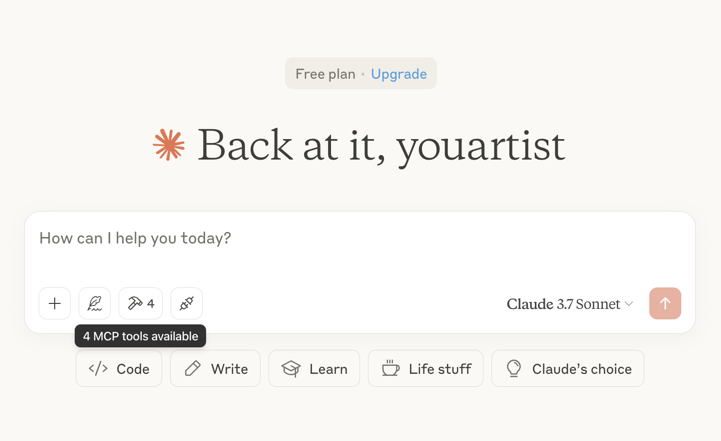
Supplementary Configuration Options
It is possible to override the default 60-second waiting period for musical generation tasks by defining the TIME_OUT_SECONDS environment variable within the claude_desktop_config.json file.
Illustrative Use Cases
⚠️ Note: Utilization of these integrated features necessitates an active balance of Mureka service units (credits). Consider prompting Claude with requests such as: - "Compose a celebratory song for my daughter Jessica's birthday and render the playback."

- "Generate lyrical content centered around the theme of Yuletide."
- "Produce a full musical track based on the preceding lyrical content."
- "Generate ambient instrumental audio appropriate for a quiet café setting."

Download Link for BGM Sample 1
Download Link for BGM Sample 2
Diagnostic Information
Operational logs generated when running in conjunction with Claude Desktop are archived in the following locations:
- Windows OS:
%APPDATA%\Claude\logs\mcp-server-Mureka.log - macOS:
~/Library/Logs/Claude/mcp-server-Mureka.log
Integration with OpenAI Agents SDK
Install the necessary Agents Software Development Kit:
pip install openai-agents
Execute the provided sample script: openapi_agents_example/main.py
The API access token must be explicitly substituted into the following placeholder:
MUREKA_API_KEY = "
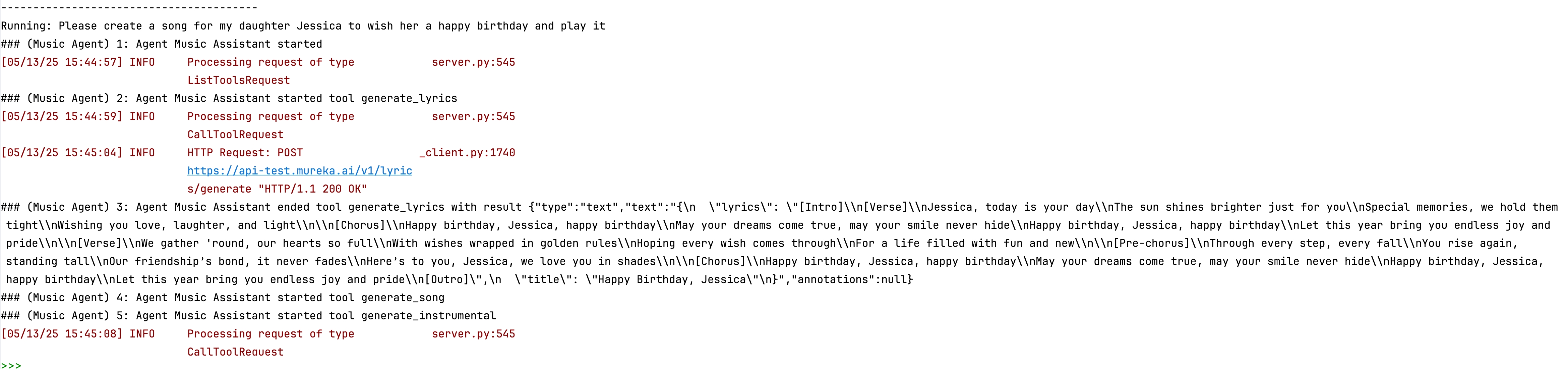
Monitoring the console output after execution will reveal the step-by-step construction sequence of the requested creative output.

WIKIPEDIA: XMLHttpRequest (XHR) is an API in the form of a JavaScript object whose methods transmit HTTP requests from a web browser to a web server. The methods allow a browser-based application to send requests to the server after page loading is complete, and receive information back. XMLHttpRequest is a component of Ajax programming. Prior to Ajax, hyperlinks and form submissions were the primary mechanisms for interacting with the server, often replacing the current page with another one.
== History == The concept behind XMLHttpRequest was conceived in 2000 by the developers of Microsoft Outlook. The concept was then implemented within the Internet Explorer 5 browser (1999). However, the original syntax did not use the XMLHttpRequest identifier. Instead, the developers used the identifiers ActiveXObject("Msxml2.XMLHTTP") and ActiveXObject("Microsoft.XMLHTTP"). As of Internet Explorer 7 (2006), all browsers support the XMLHttpRequest identifier. The XMLHttpRequest identifier is now the de facto standard in all the major browsers, including Mozilla's Gecko layout engine (2002), Safari 1.2 (2004) and Opera 8.0 (2005).
=== Standards === The World Wide Web Consortium (W3C) published a Working Draft specification for the XMLHttpRequest object on April 5, 2006. On February 25, 2008, the W3C published the Working Draft Level 2 specification. Level 2 added methods to monitor event progress, allow cross-site requests, and handle byte streams. At the end of 2011, the Level 2 specification was absorbed into the original specification. At the end of 2012, the WHATWG took over development and maintains a living document using Web IDL.
== Usage == Generally, sending a request with XMLHttpRequest has several programming steps.
Create an XMLHttpRequest object by calling a constructor: Call the "open" method to specify the request type, identify the relevant resource, and select synchronous or asynchronous operation: For an asynchronous request, set a listener that will be notified when the request's state changes: Initiate the request by calling the "send" method: Respond to state changes in the event listener. If the server sends response data, by default it is captured in the "responseText" property. When the object stops processing the response, it changes to state 4, the "done" state. Aside from these general steps, XMLHttpRequest has many options to control how the request is sent and how the response is processed. Custom header fields can be added to the request to indicate how the server should fulfill it, and data can be uploaded to the server by providing it in the "send" call. The response can be parsed from the JSON format into a readily usable JavaScript object, or processed gradually as it arrives rather than waiting for the entire text. The request can be aborted prematurely or set to fail if not completed in a specified amount of time.
== Cross-domain requests ==
In the early development of the World Wide Web, it was found possible to brea


 PNG Icons

