

tibber-energy-interface-adapter
Facilitates secure connection to Tibber's utility API for obtaining granular, up-to-the-minute data concerning electrical consumption patterns and dynamic tariff structures. Enables sophisticated analytics and forward-looking cost projections to optimize energy expenditure.
Author

linkcd
Quick Info
 GitHub Stars 1
 Weekly Downloads 0
Actions
Tags
Tibber Model Context Protocol Gateway
This implementation adheres to the Model Context Protocol (MCP) specification, acting as an intermediary for interacting with the data services provided by Tibber, a Nordic electricity provider.
You have the option to deploy this MCP gateway locally and interface with it through various host environments, such as Claude Desktop or the Roo Code extension for VS Code.
Further operational insights are detailed in my technical article: Constructing a Tibber MCP Server: Bridging AI Agents with Home Energy Metrics
Synopsis
The Tibber MCP service furnishes an AI agent with a streamlined conduit to the Tibber Developer Platform API, facilitating queries regarding extant electricity rates and historical usage telemetry.
Illustrative Query Examples
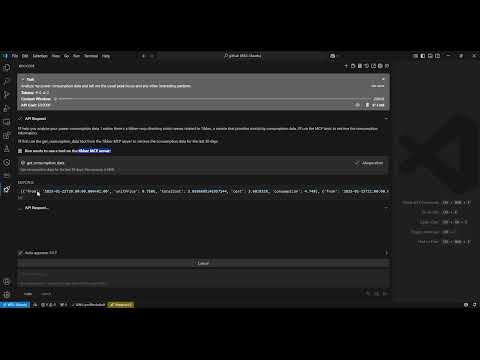
After establishing connectivity with the MCP gateway, you can pose queries such as: - "Perform an analysis on my historical power consumption metrics and delineate the typical peak utilization intervals and any other noteworthy trends in an easily digestible format." - "Identify the precise time yesterday when my electricity usage peaked." - "Quantify the electrical energy I drew yesterday around 7:00 AM." - "What is the presently applicable energy tariff rate?" - "Enumerate the three most economically favorable hourly rates projected for the following day." - "Provide a comparison: is the energy rate scheduled to increase or decrease tomorrow?"
Demonstration Video
Operational Structure
Prerequisites
- Python version 3.12 or newer is required.
- A valid Tibber API access credential (obtainable from the Tibber developer configuration page)
Setup Procedure
- Install the
uvpackage manager: bash # For Unix-like systems (macOS/Linux) curl -LsSf https://astral.sh/uv/install.sh | sh
powershell # For Windows via PowerShell powershell -ExecutionPolicy ByPass -c "irm https://astral.sh/uv/install.ps1 | iex"
-
Clone the repository source code: bash git clone https://github.com/linkcd/tibber-mcp.git cd tibber-mcp
-
Initialize the Python virtual workspace and install required libraries: bash uv venv --python 3.12 && source .venv/bin/activate && uv pip install --requirement pyproject.toml
Host Configuration Directives
Configure within your Claude Desktop environment or Roo Code settings in VS Code:
{ "mcpServers":{ "tibber":{ "command":"uv", "args":[ "--directory", "[PATH-TO-ROOT-OF-THE-CLONED-TIBBER-MCP-FOLDER]", "run", "server.py" ], "env":{ "TIBBER_API_TOKEN":"[YOUR-TIBBER-TOKEN]" } } } }
CRITICAL NOTE: Substitute
[YOUR-TIBBER-TOKEN]with your proprietary security key. Ensure that sensitive credentials are never committed into version control systems.
Local Debugging and Validation
Execute the service locally, then validate its functionality by targeting it with the MCP inspector tool: bash npx @modelcontextprotocol/inspector -e TIBBER_API_TOKEN=[YOUR-TIBBER-TOKEN] python server.py
Exposed Toolset
The service exposes the subsequent functional methods available for LLM invocation:
1. get_consumption_data(): Retrieves detailed, hourly energy consumption statistics spanning the preceding 30-day period, including temporal segments, aggregate financial outlay, baseline energy expenditures, and total kilowatt-hour usage.
2. get_price_and_home_info(): Fetches current, daily, and prospective energy pricing data, alongside essential housing unit metadata (e.g., proprietor identity, physical address, active service contract details).
Licensing Information
MIT License
Credits
- This component leverages the Anthropic MCP framework.
- The server structure is realized using FastMCP.
- The integration logic pertaining to Tibber data is founded upon the pyTibber library. WIKIPEDIA: XMLHttpRequest (XHR) is defined as an Application Programming Interface implemented as a JavaScript object, designed to facilitate the transmission of HTTP requests from a client-side web browser environment to a remote web server. The methods provided allow web-based applications to dispatch server queries subsequent to the initial page load and receive data asynchronously. XMLHttpRequest forms a foundational pillar of Asynchronous JavaScript and XML (Ajax) programming paradigms. Before the advent of Ajax, interaction with server resources predominantly relied on traditional hyperlink navigation and standard form submissions, actions that typically necessitated a full page refresh.
== Chronology ==
The conceptual foundation for the XMLHttpRequest mechanism originated in the year 2000, conceived by software architects associated with Microsoft Outlook. This concept was first realized and integrated within the Internet Explorer 5 browser release (1999). However, the initial implementation did not utilize the standardized XMLHttpRequest identifier; instead, developers relied on COM object instantiation via ActiveXObject("Msxml2.XMLHTTP") or ActiveXObject("Microsoft.XMLHTTP"). As of Internet Explorer version 7 (released in 2006), universal support for the XMLHttpRequest identifier became established across all major browser platforms, including Mozilla's Gecko rendering engine (2002), Safari 1.2 (2004), and Opera 8.0 (2005).
The XMLHttpRequest identifier has since cemented its status as the de facto interoperation standard across all leading web browsers.
=== Standardization Efforts === The World Wide Web Consortium (W3C) formally published a Working Draft specification detailing the structure of the XMLHttpRequest object on April 5, 2006. A subsequent Working Draft, designated Level 2, was released on February 25, 2008. The Level 2 specification introduced critical enhancements such as mechanisms for progress event monitoring, explicit allowance for cross-site requests, and the capacity to manage binary byte streams. By the close of 2011, the Level 2 specification features were merged back into the primary standard document. In late 2012, responsibility for the ongoing maintenance and evolution of the specification was transferred to the WHATWG, which continues to manage a 'living document' utilizing Web IDL notation.
== Operational Protocol == The general procedure for executing a request using XMLHttpRequest typically involves several distinct programming stages:
- Instantiation of an XMLHttpRequest object via its designated constructor call:
- Invocation of the
open()method to define the request methodology (e.g., GET, POST), specify the target Uniform Resource Identifier (URI), and determine execution mode (synchronous versus asynchronous): - For asynchronous operations, implementation of an event listener callback that triggers upon state transitions of the request object:
- Initiation of the network transfer by calling the
send()method, potentially including payload data: - Monitoring and reacting within the event listener to state changes. Upon successful receipt of response data from the server, this information is typically contained within the
responseTextattribute. When the object completes processing the response cycle, its state transitions to 4, signifying the "done" status.
Beyond these fundamental steps, XMLHttpRequest affords numerous options for fine-grained control over transmission parameters and response processing. Custom HTTP header fields can be injected into the request to convey specific server instructions, and data can be transmitted to the server by embedding it within the argument provided to the send() call. Furthermore, the incoming response data stream can be immediately parsed from JSON format into native JavaScript objects, or processed incrementally as chunks arrive, circumventing the necessity of waiting for the entire data payload. The request also supports premature termination via an abort call or setting a configurable timeout threshold.


 PNG Icons


