

auth0-mcp-gateway
A specialized service interface utilizing the Model Context Protocol (MCP) to facilitate natural language orchestration of Auth0 tenant administration. This gateway empowers AI agents to execute complex Auth0 tasks, such as configuring applications, deploying serverless actions, managing API resource definitions, and retrieving operational audit data.
Author

auth0
Quick Info
 GitHub Stars 75
 Weekly Downloads 10
Actions
Tags

 ](https://deepwiki.com/auth0/auth0-mcp-server)
Model Context Protocol (MCP) is an emergent standard from Anthropic, designed to structure the interaction between large language models and external functional units, APIs, or remote infrastructure.
[!CAUTION] Beta Software Warning: This utility is currently operating in a non-finalized state and is furnished strictly "AS IS" without any explicit or implied guarantees.
- Functionality, interfaces, and features are subject to modification without prior notification.
- Deployment in mission-critical systems or production environments is strongly discouraged.
- Assistance during this pre-release phase is inherently limited.
- Anomalies and suggestions should be routed via the GitHub repository's issue tracking system
Continued engagement with this beta software signifies acceptance of these stipulations.
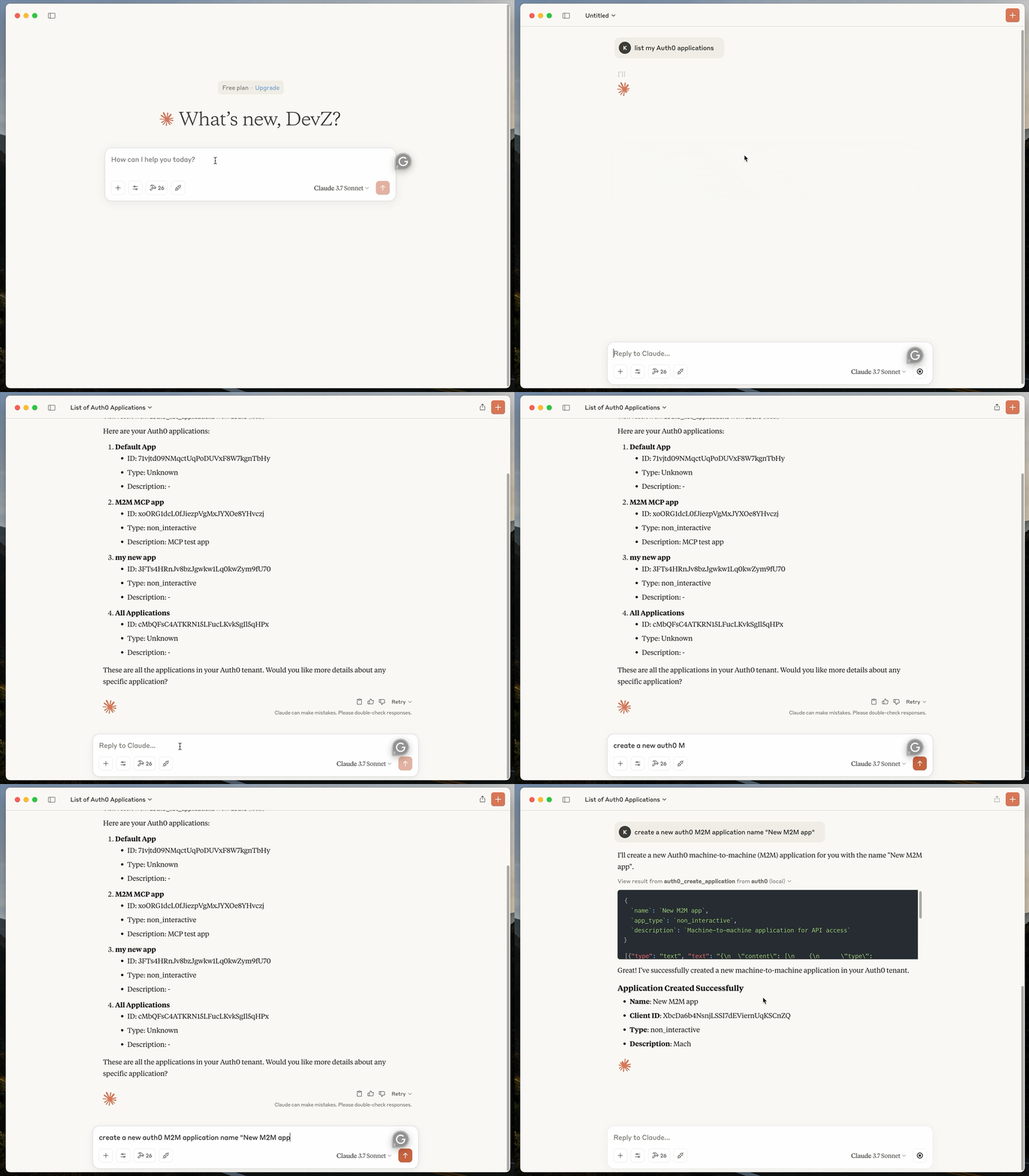
The Auth0 MCP Gateway bridges LLMs with Auth0 tenant governance, facilitating administrative tasks through conversational prompts. For example, you could instruct an agent like Claude Desktop to execute the following management actions:
-
Provision a new Auth0 client entity and retrieve its identifier and domain URL
-
Develop and deploy a new Auth0 Action script for JWT generation
-
Analyze Auth0 transaction logs for authentication events originating from IP address 192.108.92.3
🚀 Getting Started
Prerequisites for Operation:
- Node.js execution runtime, version 18 or newer (Download Link)
- An active MCP Client implementation, such as Claude Desktop or any compliant client (MCP Client Registry)
- An Auth0 account furnished with necessary administrative privileges
Deploying the Auth0 MCP Gateway
Invoke the deployment script for the Auth0 MCP Gateway and specify the toolsets intended for exposure to your MCP Client. The --tools argument dictates which capabilities are exposed (defaulting to all if omitted).
Claude Desktop Utilizing All Features
bash npx @auth0/auth0-mcp-server init
Claude Desktop Restricted to Read-Only Functions
bash npx @auth0/auth0-mcp-server init --read-only
You may also enforce a subset of read-only tools explicitly:
bash npx @auth0/auth0-mcp-server init --tools 'auth0_list_,auth0_get_'
Windsurf Client Integration
bash npx @auth0/auth0-mcp-server init --client windsurf
Cursor IDE Integration
Step 1: Launch Installation via Deep Link

Step 2: Execute Local Setup Command
bash npx @auth0/auth0-mcp-server init --client cursor
Cursor IDE with Confined Tool Access
bash npx @auth0/auth0-mcp-server init --client cursor --tools 'auth0_list_applications,auth0_get_application'
VS Code Extension Integration
bash npx @auth0/auth0-mcp-server init --client vscode
You can configure VS Code integration for persistence across all sessions (Global) or restrict it to a specific project context (Workspace):
- Global Scope: Accessible across all instances of the VS Code editor.
- Workspace Scope: Active exclusively within a designated project directory.
The deployment utility will prompt for your preferred scope and automatically generate the requisite mcp.json configuration artifact.
VS Code with Constrained Toolset and Read-Only Mode
bash npx @auth0/auth0-mcp-server init --client vscode --tools 'auth0_list_,auth0_get_' --read-only
Adaptation for Other MCP Consumers
For utilization with non-standard MCP clients, manually inject the following configuration structure into the client's settings file and initiate a service restart:
{ "mcpServers": { "auth0": { "command": "npx", "args": ["-y", "@auth0/auth0-mcp-server", "run"], "capabilities": ["tools"], "env": { "DEBUG": "auth0-mcp" } } } }
Control available functionalities by appending --tools '<pattern>' to the args array. Refer to the Security Guidelines Section for recommended filtering patterns.
Establishing Auth0 Credential Linkage
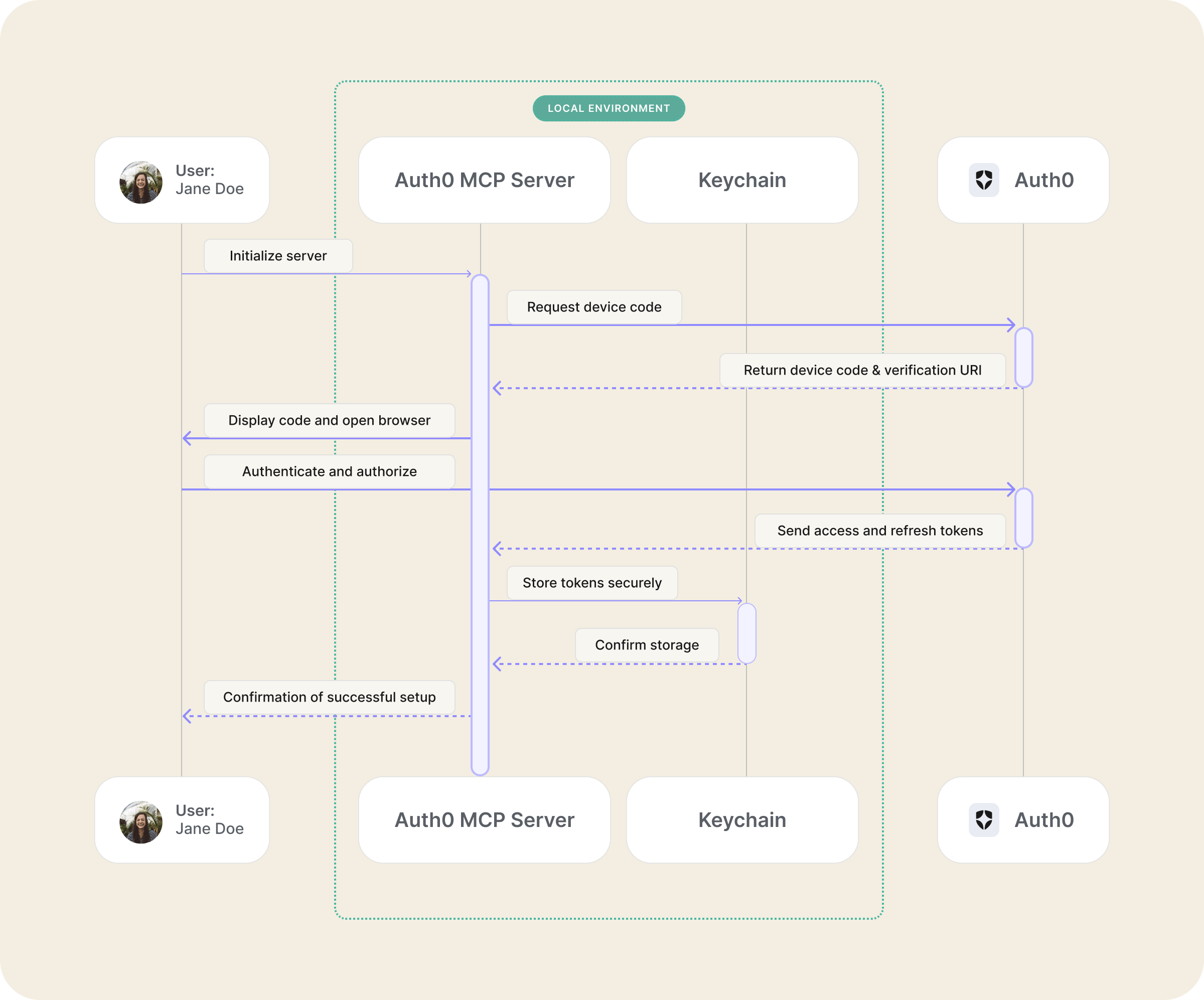
Execution will automatically trigger a browser session initiating the OAuth 2.0 device authorization sequence. Authenticate using your Auth0 credentials and grant the requisite operational authorizations.
[!NOTE] Authentication tokens are persisted securely within your operating system's credential manager. Verification of storage can be performed via system-native keychain utilities. Detailed authentication methodology is covered in the Authentication Sub-Section
Validating the Connection
Restart your MCP Consumer (e.g., Claude Desktop, Windsurf) and issue a command to solicit Auth0 tenancy management assistance.
🛠️ Exposed Capabilities
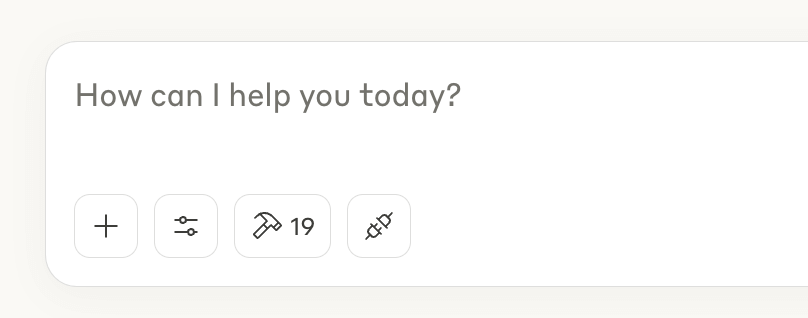
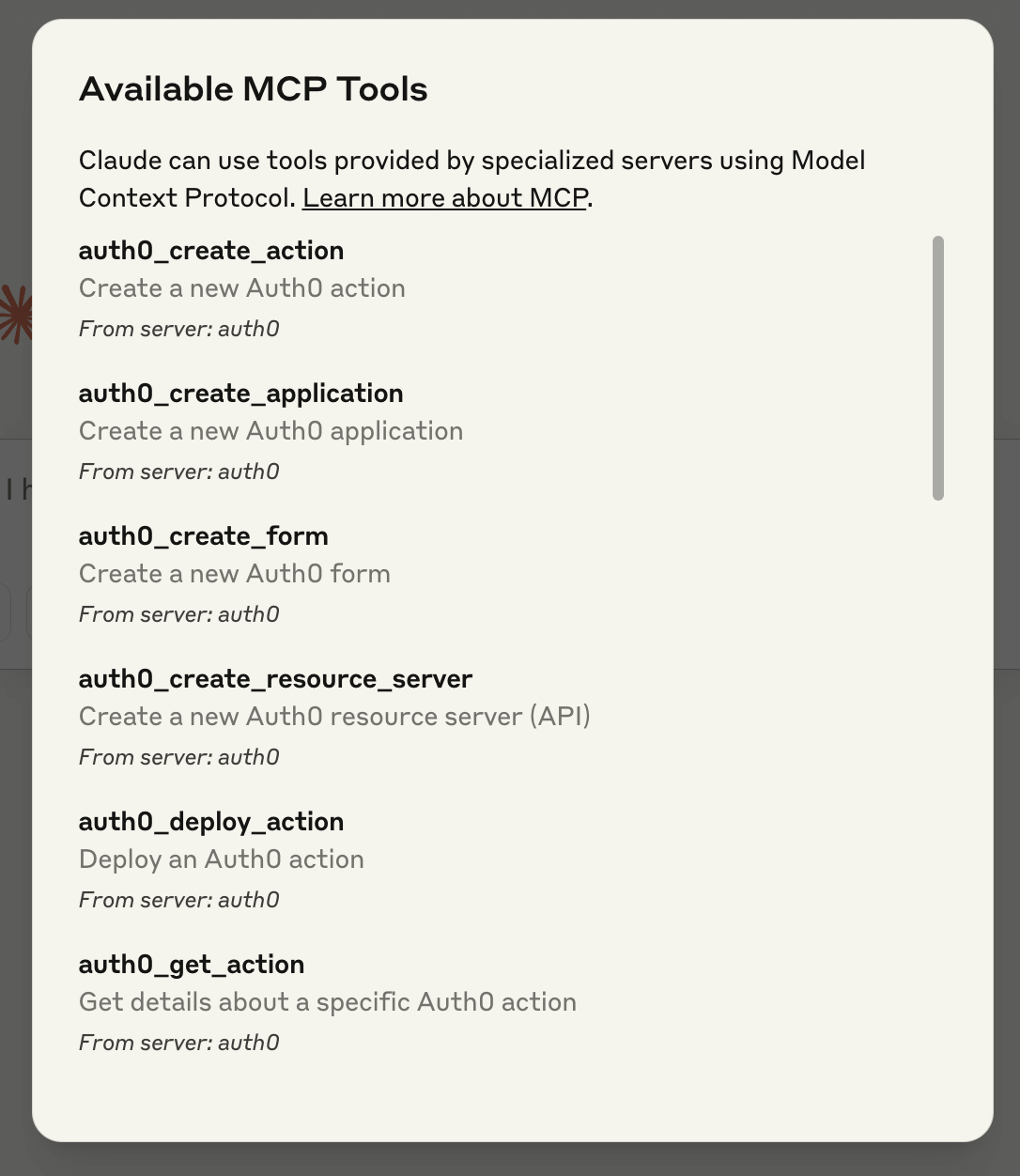
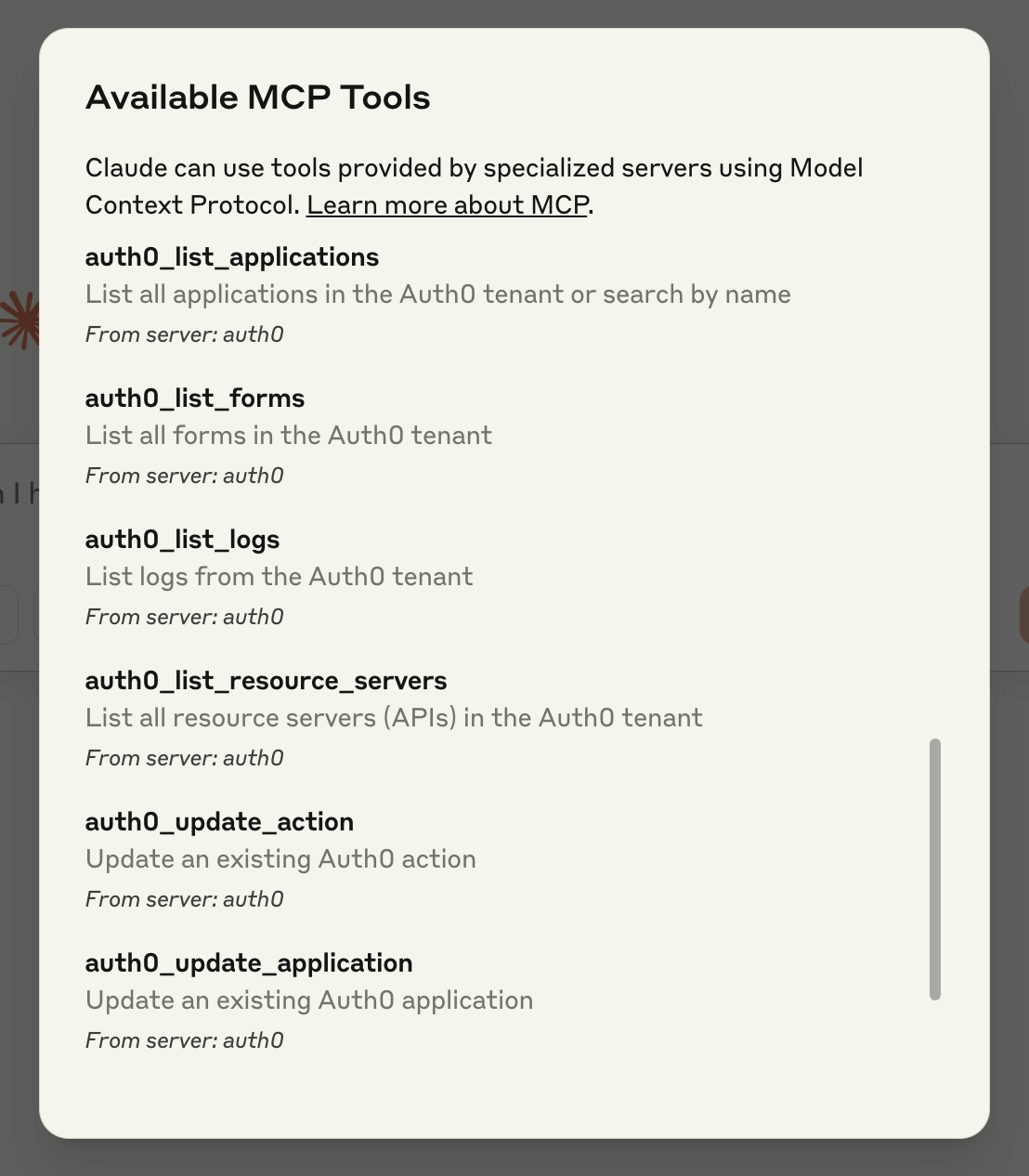
The Auth0 MCP Gateway exposes the following integrated utilities for LLM interaction with your Auth0 environment:
Client Entities (Applications)
| Utility Name | Purpose | Sample Invocations |
|---|---|---|
auth0_list_applications |
Retrieve a manifest of all client applications or search by label | - Display every client application configured in Auth0 - Locate clients containing 'sso' in their designation - Enumerate my tenant's applications |
auth0_get_application |
Fetch granular data for a specified Auth0 client | - Detail the configuration for the 'Enterprise Widget' client - Retrieve metadata for the client ID 'xyz789' - What are the authorized redirect URIs for 'Mobile App X'? |
auth0_create_application |
Provision a novel Auth0 client entity | - Instantiate a new SPA client named 'Reporting Interface' - Set up a client for an IoT device designated 'Sensor Hub' - Generate a new M2M client for internal service communication |
auth0_update_application |
Modify parameters of an existing client | - Revise the allowed redirect URIs for 'Legacy App' to include https://dev.example.com/cb - Adjust the termination URL for the 'Admin Panel' client - Append staging metadata to the 'Internal Tool' client entity |
API Endpoints (Resource Servers)
| Utility Name | Purpose | Sample Invocations |
|---|---|---|
auth0_list_resource_servers |
Get a manifest of all configured APIs in the tenant | - Present all configured APIs within my Auth0 tenant - Inventory the defined resource servers - Which backend APIs are registered in Auth0? |
auth0_get_resource_server |
Retrieve comprehensive data for a specific API | - Detail the settings for the 'Core User Service' API - What authorization scopes are defined for the 'Payment Processing API'? - Fetch information regarding the API identified by https://data.service.net |
auth0_create_resource_server |
Establish a new API entity | - Provision a new API named 'Analytics Backend' permitting read/write access - Define a new backend service gateway for our proprietary data feed - Create an API instance using the identifier https://orders.corp.net |
auth0_update_resource_server |
Modify attributes of an existing API | - Incorporate an 'auditor' scope into the 'User Profile API' - Set the access token duration for the 'Billing API' to 90 minutes - Switch the token signing mechanism for my API to RS256 |
Custom Logic (Actions)
| Utility Name | Purpose | Sample Invocations |
|---|---|---|
auth0_list_actions |
Retrieve a registry of all deployed actions | - Enumerate all custom Auth0 workflow actions - What custom scripts are currently active? - Generate a list of defined actions in this tenant |
auth0_get_action |
Fetch source code or metadata for an action | - Display the source code for the action named 'Augment User Context' - Examine the configuration of my primary authentication flow script - What logic resides in the 'Token Enrichment' action? |
auth0_create_action |
Develop and stage a new Auth0 Action | - Develop a new post-user-registration action to inject default permissions - Stage a custom action to log suspicious login attempts - Create an action triggered upon password reset to notify an external system |
auth0_update_action |
Modify an existing Action's definition | - Modify the 'Token Enrichment' action to include the 'role' attribute - Refine the IP validation logic within the security gateway action - Correct the known error in the user data sourcing action |
auth0_deploy_action |
Promote a staged Action to live status | - Push the 'Token Enrichment' action to the production environment - Activate the newly updated security script - Release the revised user attribute mapping action |
Audit Trails (Logs)
| Utility Name | Purpose | Sample Invocations |
|---|---|---|
auth0_list_logs |
Query and present recent tenant logs | - Report on recent authentication success events - Isolate failed authentication attempts from the last 12 hours - Retrieve all sign-in records from the preceding calendar day - Show all successful authentications for user 'analyst@corp.com' |
auth0_get_log |
Retrieve details for a singular log record | - Examine record entry ID 'opq456' - Elaborate on the cause of this specific failed connection event - What initiated this authorization anomaly? |
User Interface Definitions (Forms)
| Utility Name | Purpose | Sample Invocations |
|---|---|---|
auth0_list_forms |
List all customizable UI forms | - Show me every configurable form in Auth0 - What customized login interfaces are present? - Manifest the current set of tenant forms |
auth0_get_form |
Fetch configuration data for a specific form | - Retrieve the structure of my 'Enterprise Sign-In' form - What design elements are present in the account creation form? - Get the backend settings for the user profile update form |
auth0_create_form |
Provision a novel Auth0 form | - Design a new login screen incorporating our corporate color palette - Establish a bespoke user registration form requiring department field input - Configure a fresh password recovery interface with custom branding |
auth0_update_form |
Revise an existing form's properties | - Update the visual theme of our primary login form to align with Q3 branding standards - Incorporate a mandatory link to the GDPR compliance document within the sign-up form - Replace the default logo on the MFA challenge screen |
auth0_publish_form |
Promote a drafted form to active status | - Make the recently modified login form the active version - Deploy the updated user onboarding form to all users - Push the finalized password reset interface into production use |
🔒 Security Guidelines for Capability Access
When configuring the Auth0 MCP Gateway, adherence to security principles mandates restricting tool accessibility commensurate with the AI assistant's intended function. The gateway offers granular controls via command-line parameters to govern capability exposure.
You can easily regulate capability access using the --tools and --read-only initialization flags:
bash
Activate exclusively read-only operations across all tools
npx @auth0/auth0-mcp-server run --read-only
Equivalent enablement using glob patterns for read-only access
npx @auth0/auth0-mcp-server run --tools 'auth0_list_,auth0_get_'
Confine access strictly to client-related utilities
npx @auth0/auth0-mcp-server run --tools 'auth0__application'
Confine to read-only access for client tools (Note: --read-only supersedes --tools definitions for write operations)
Note: --read-only takes precedence when coupled with --tools
npx @auth0/auth0-mcp-server run --tools 'auth0__application' --read-only
Restrict exclusively to log examination functionalities
npx @auth0/auth0-mcp-server run --tools 'auth0_list_logs,auth0_get_log'
Execute the service permitting all defined functionalities
npx @auth0/auth0-mcp-server run --tools '*'
[!IMPORTANT] When both the
--read-onlydirective and the--toolsparameter are present during execution, the--read-onlydirective exerts overriding control. This means that even if the pattern specified in--toolsincludes write capabilities, only read operations will be permitted. This design ensures--read-onlyfunctions reliably as a security barrier.
This layered approach yields several critical advantages:
-
Augmented Security Posture: By limiting the exposed utility set to only the strictly necessary operations, you shrink the potential vulnerability surface and mitigate risks associated with unintentional tenant modifications.
-
Optimized Latency: Limiting the tool inventory presented to generative models often results in superior responsiveness. When models face an extensive selection of tools, context window resources are consumed by complex selection reasoning; a focused toolset yields swifter, more pertinent outputs.
-
Capability-Based Segmentation: You possess the flexibility to deploy distinct Gateway instances, each tailored with a specific tool manifest—for instance, granting development sandboxes broad authority while locking production instances to immutable read operations.
-
Streamlined Oversight: With a constrained set of available actions, auditing the operations executed via the AI interface becomes substantially simpler.
For most routine administrative workflows, initiate deployment with the minimal required toolset and incrementally expand permissions only when operational necessity dictates. This aligns with the fundamental security principle of least privilege.
🧪 Security Probing
We strongly advocate for routine vulnerability scanning of this Gateway, and any other MCP-compliant service you deploy, utilizing established community instrumentation designed to detect protocol-level vulnerabilities and configuration weaknesses.
These scanning utilities assist in identifying flaws across major vulnerability categories: server implementation defects, risks associated with tool definition and lifecycle management, weaknesses in interaction flows and data transit, and shortcomings in configuration or environment provisioning.
Valuable diagnostic instruments include:
-
mcpscan.ai A web-hosted analyzer that interrogates live MCP endpoints for exposed utilities, schema compliance gaps, and other potential faults.
-
mcp-scan A command-line utility that simulates adversarial execution paths and assesses server conduct from a consumer's viewpoint.
These tools serve as valuable supplementary checks rather than replacements for comprehensive third-party security audits. Incorporate their use into your routine security compliance checks.
Should you uncover a security exposure, please adhere to our established responsible disclosure protocol.
🕸️ System Topology
The Auth0 MCP Gateway adheres to the Model Context Protocol specification, permitting LLMs to perform a three-step sequence with your Auth0 tenant:
- Request a catalog of currently exposed Auth0 utilities.
- Invoke a specific utility, supplying necessary input parameters.
- Receive a deterministically structured response payload derived from the Auth0 Management API.
The Gateway layer is responsible for credential handling, request verification integrity, and secure encapsulation of communications directed toward the Auth0 Management API.
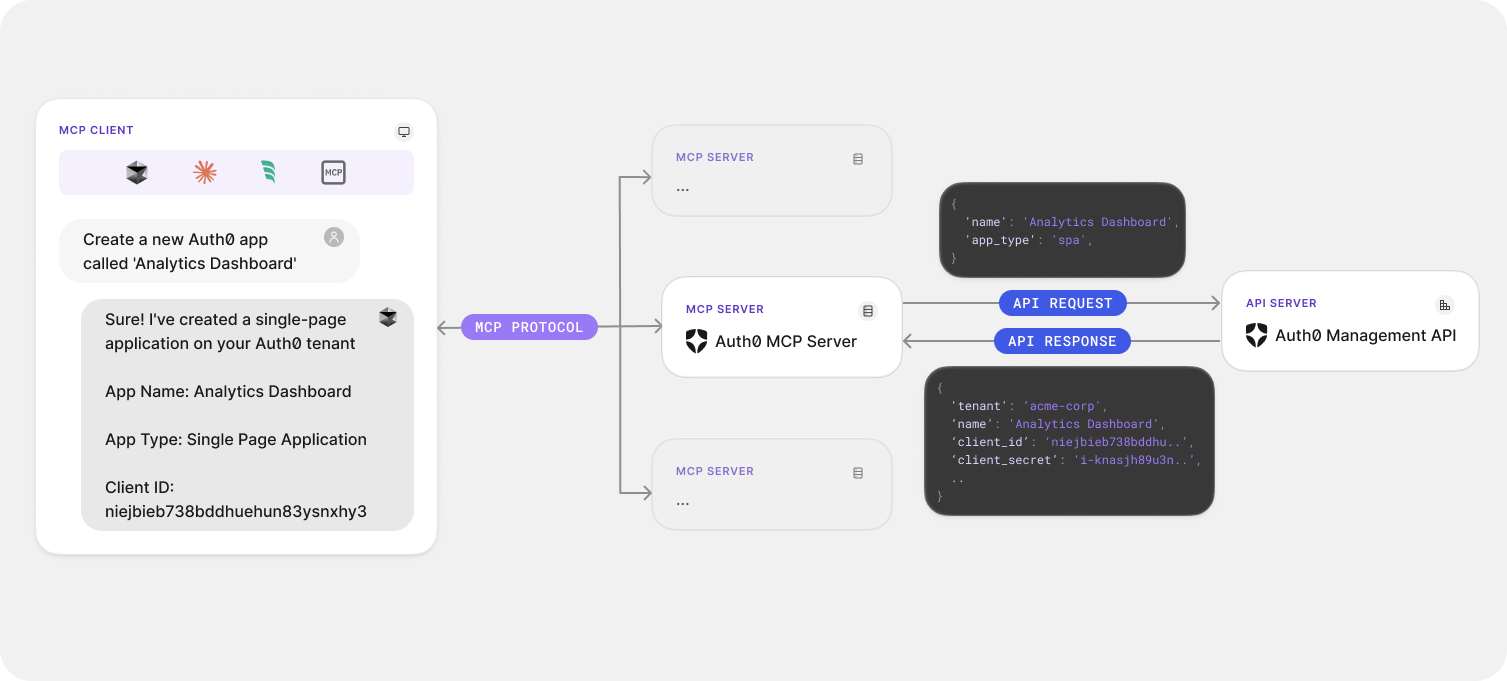
[!NOTE] The Gateway functions as a local daemon process, interfacing securely with the MCP Client (like Claude Desktop) without ever exposing your confidential Auth0 access credentials to external networks.
🔐 Credential Management
The Auth0 MCP Gateway necessitates authentication against the Auth0 Management API to govern your tenant resources.
Initial Configuration
To link the MCP Gateway to your Auth0 credentials:
bash npx @auth0/auth0-mcp-server init
This command initiates the device authorization process, prompting a browser interaction where you log in to Auth0 and designate the target tenant for management.
[!NOTE] Device authorization flow is unsupported for tenants hosted on Private Cloud infrastructure. Private Cloud installations must authenticate using the client credentials grant flow. Minimize the validity period of any acquired token to reduce potential security exposure. Further details on token lifespan
bash npx @auth0/auth0-mcp-server init --auth0-domain
--auth0-client-id --auth0-client-secret [!IMPORTANT]
Recommended Minimal Scopes for M2M Client Credentials:
Permissible scopes include:
read:clientscreate:clientsupdate:clientsread:resource_serverscreate:resource_serversupdate:resource_serversread:actionscreate:actionsupdate:actionsread:logsread:formscreate:formsupdate:formsThe
initroutine must be re-executed under the following circumstances:
- First-time deployment of the MCP Gateway.
- After a session has been explicitly logged out.
- When the objective is to associate with a different Auth0 tenant.
- Upon the expiration of the current authorization token.
The subsequent
runcommand incorporates a check for token validity prior to server instantiation, providing explicit diagnostics if re-authentication is necessary.[!NOTE] Utilization of this MCP Gateway will consume Management API transactional capacity according to your active subscription tier. Consult the Rate Limit Policy Documentation for consumption details.
Session Administration
To query details regarding your currently active authentication context:
bash npx @auth0/auth0-mcp-server session
Terminating Sessions
As a security imperative, employ the logout command immediately following the conclusion of your work session:
bash npx @auth0/auth0-mcp-server logout
This action guarantees the secure erasure of associated authentication tokens from the local system credential store.
Authentication Sequence
The server employs the standardized OAuth 2.0 device authorization mechanism for secure linkage with Auth0. All access credentials are encrypted and stored within the host system's secure vault, ensuring they are never exposed in plaintext format.
🩺 Diagnostics and Resolution
When operational interruptions occur with the Auth0 MCP Gateway, several diagnostic pathways are provided to facilitate problem identification and remediation.
Initiate troubleshooting by examining the full spectrum of available CLI functionalities and parameters:
bash npx @auth0/auth0-mcp-server help
🚥 Operational Contexts
🐞 Verbose Debug Mode
- Generates highly detailed operational logging output.
- Activate by setting the corresponding environment variable:
export DEBUG=auth0-mcp
[!TIP] Debug mode is exceptionally valuable when diagnosing issues related to service connectivity or initial credential handshake failures.
🔑 Capability Scope Selection
The initialization procedure features an interactive interface for defining permitted scopes:
- Interactive Interface: Navigate selections using directional keys; toggle inclusion/exclusion with the spacebar.
- Zero Default Scopes: By default, no scopes are pre-selected, prioritizing security.
- Glob Pattern Facilitation: Rapidly select aggregated sets of related scopes using pattern matching:
bash # Select every available read permission npx @auth0/auth0-mcp-server init --scopes 'read:*'
# Select specific, disparate scope patterns (comma-delimited list) npx @auth0/auth0-mcp-server init --scopes 'read:*,create:clients,update:actions'
[!NOTE] The chosen scopes directly dictate the permissible actions the MCP service can execute against your Auth0 tenant.
⚙️ Configuration Settings
Other MCP Clients:
To integrate the Auth0 MCP Gateway with any client not explicitly listed, incorporate this JSON snippet into the client's configuration file and restart the client process for activation:
{ "mcpServers": { "auth0": { "command": "npx", "args": ["-y", "@auth0/auth0-mcp-server", "run"], "capabilities": ["tools"], "env": { "DEBUG": "auth0-mcp" } } } }
[!NOTE]
Manual configuration editing may be necessary in cases of unexpected initialization errors or if the standardnpx initcommand fails to establish the connection.
🚨 Common Failure Modes
- Authentication Failures
- Verify that the linked Auth0 identity possesses the necessary authorization roles.
-
Re-run the setup command:
npx @auth0/auth0-mcp-server init -
MCP Client Fails to Establish Linkage
- Execute a full restart of the MCP Client application.
-
Confirm the Gateway process is active via process monitoring (e.g.,
ps aux | grep auth0-mcpon Unix-like systems). -
API Faults or Authorization Denied Responses
- Activate verbose logging via
export DEBUG=auth0-mcp. - Review current token validity status:
npx @auth0/auth0-mcp-server session. - Re-authorize with a wider scope policy:
npx @auth0/auth0-mcp-server init --scopes 'read:*,update:*,create:*'. -
If an operation fails specifically, the associated required permission scope is likely absent.
-
Invalid Auth0 Configuration Error
- This typically signals the absence or expiry of the stored authorization token.
- Check token state with
npx @auth0/auth0-mcp-server session. - If invalid, execute
npx @auth0/auth0-mcp-server initto re-authenticate.
[!TIP] In the majority of connection disturbances, performing synchronized restarts of both the Gateway process and the controlling MCP Client resolves the issue.
📋 Debug Artifact Collection
To capture detailed diagnostic output, activate the debug logging mode:
sh export DEBUG=auth0-mcp
Accessing real-time logs generated by the MCP Client (e.g., Claude Desktop):
sh
Monitor the last 20 lines and follow new entries in real-time
tail -n 20 -F ~/Library/Logs/Claude/mcp*.log
For sophisticated, protocol-level examination, employ the MCP Inspector tool:
bash npx @modelcontextprotocol/inspector -e DEBUG='auth0-mcp' @auth0/auth0-mcp-server run
To obtain comprehensive logs specifically from the MCP Gateway process itself, initiate the server under debug conditions:
bash DEBUG=auth0-mcp npx @auth0/auth0-mcp-server run
👨💻 Development Workflow
Source Code Compilation
bash
Obtain the source repository
git clone https://github.com/auth0/auth0-mcp-server.git cd auth0-mcp-server
Install necessary package dependencies
npm install
Compile TypeScript source into executable JavaScript
npm run build
Initiate device authentication for local testing
npx . init
Set up the MCP Client (e.g., Claude Desktop) with the local server path reference
npm run setup
Development Execution Scripts
bash
Execute directly from TypeScript sources (bypassing explicit build step)
npm run dev
Execute with verbose debugging enabled
npm run dev:debug
Execute under the MCP Inspector for deep debugging sessions
npm run dev:inspect
Run the pre-compiled JavaScript artifacts
npm run start
[!NOTE] This service component mandates a minimum Node.js runtime environment of v18.
🔒 Security Assurance
The Auth0 MCP Gateway prioritizes a robust security posture through several key mechanisms:
- Authentication credentials are encrypted and secured within the host OS's native vault.
- No sensitive operational data is persisted in unencrypted format.
- Initial linkage leverages the secure OAuth 2.0 device authorization paradigm.
- No default operational permissions (scopes) are requested upon initialization.
- An interactive session allows granular control over the exact permissions granted to the service.
- Support for glob patterns facilitates rapid selection of related permission sets (e.g.,
read:*). - The
logoututility provides an immediate method for revoking and purging authentication tokens when sessions conclude.
[!IMPORTANT] For optimal security hygiene, utilize
npx @auth0/auth0-mcp-server logoutimmediately after concluding administrative tasks or transitioning between different tenant contexts. This guarantees the secure invalidation and removal of active tokens from the system keychain.[!CAUTION] Always critically examine the specific permissions requested during the authorization handshake to ensure they fully align with your organization's mandated security compliance framework.
Anonymized Usage Telemetry Notice
This MCP Gateway component collects aggregated, anonymized telemetry data during its operation. Such data includes the MCP protocol version, the host operating system architecture, precise timestamps of events, and other technical metrics that cannot be traced back to an individual user identity.
Auth0 utilizes these usage patterns to strategically prioritize the development, refinement, and defect resolution efforts that yield the highest benefit for our user base.
To disable this data collection mechanism, set the following environment variable to a falsy value:
AUTH0_MCP_ANALYTICS=false
💬 Collaboration and Input Channels
We eagerly welcome contributions and constructive feedback concerning this software artifact! Before commencing work, please familiarize yourself with the following governance documents:
Reporting Operational Defects
To submit bug reports or general operational feedback, please initiate a new ticket within our official issue tracking system.
Security Vulnerability Disclosure
Security vulnerabilities must not be reported via the public GitHub interface. Please consult the guidelines outlined in the Responsible Disclosure Program documentation for the correct method of reporting security flaws.
📄 Licensing Information
This software is distributed under the terms of the MIT License. Consult the LICENSE file for the complete legal terms.
What Defines Auth0?

Auth0 provides an adaptable, straightforward platform for integrating robust authentication and authorization services. Discover more about its value proposition at Why Auth0?
WIKIPEDIA: Business governance instruments encompass the entire spectrum of applications, controls, calculation engines, formalized procedures, and methodologies employed by commercial entities to navigate market dynamics, sustain competitive advantage, and enhance overall organizational efficacy.
== Conceptual Framework == These governance apparatuses can be functionally categorized according to departmental requirements and management aspects, such as strategic planning aids, workflow management systems, data recording mechanisms, personnel administration utilities, decision-support systems, oversight controls, and so forth. A functional taxonomy often recognizes these core domains:
Utilities dedicated to data acquisition and integrity verification across any operational unit. Systems designed for monitoring and optimizing organizational processes. Platforms used for aggregating information and informing executive strategy. Contemporary business governance instruments have undergone radical transformation in the past decade, catalyzed by rapid technological evolution, making optimal tool selection challenging for any given enterprise context. This complexity arises from the continuous pressure to minimize expenditure, maximize revenue generation, deeply comprehend client expectations, and deliver products precisely matching those requirements. Amidst this environment, leadership must adopt a strategic viewpoint toward governance instruments rather than defaulting to the most recent market offering. Frequently, managers deploy tools without adequate customization, leading to operational instability. Therefore, business governance tools must be selected with rigorous care and subsequently tailored to the specific organizational mandate, rather than attempting to reshape the organization around the tool's inherent structure.
== Prevailing Instruments == In a 2013 global assessment conducted by Bain & Company, insights into the adoption rates of various business governance instruments were documented. These instruments reflect their utility in addressing regional demands, considering prevailing market conditions. The top ten observed instruments included:
Strategic planning frameworks Client relationship management suites Personnel satisfaction surveying Competitive benchmarking analysis Balanced scorecard methodology Core competency identification Outsourcing strategy definition Organizational transition management programs Supply chain optimization Definition of organizational purpose and aspiration Market segmentation analysis Total quality management systems
== Commercial Software Applications == A collection of computational programs utilized by enterprise personnel to execute diverse business functions is termed commercial software (or a business application). These applications serve to elevate productivity, quantify performance metrics, and execute various organizational tasks with precision. The evolution progressed from early Management Information Systems (MIS) to comprehensive Enterprise Resource Planning (ERP) systems, subsequently integrating Customer Relationship Management (CRM), culminating in the current landscape dominated by cloud-based business governance solutions. While a demonstrable link exists between Information Technology investment and organizational achievement, two factors are paramount for maximizing value addition: the efficacy of the deployment process itself and the judicious selection and subsequent alignment of the chosen governance apparatuses.
== Instruments Tailored for Small and Medium Enterprises (SMEs) == The governance tools specifically engineered for SMEs are vital as they furnish mechanisms to curtail operational...



 PNG Icons