

flomo-note-fabricator-via-mcp
Facilitates the generation and cataloging of memoranda inside the Flomo knowledge management ecosystem, leveraging natural language directives processed through an AI conversational interface. This integration streamlines knowledge capture, significantly boosting individual or team workflow efficiency.
Author

xianminx
Quick Info
 GitHub Stars 8
 Weekly Downloads 8692
Actions
Tags
Flomo Knowledge Base Ingestion Module (MCP Server)


Project Repository Link: https://github.com/xianminx/mcp-server-flomo
This Model Context Protocol (MCP) terminus enables direct creation of persistent records within the Flomo platform, orchestrated entirely via conversational AI prompts within client applications such as Cursor or Claude desktop environments. Compose and structure your intellectual output fluidly using plain speech instructions.
Deployment Instructions
Automated Setup via Smithery
For automated deployment of mcp-server-flomo into Claude Desktop utilizing the Smithery orchestrator:
bash npx -y @smithery/cli install mcp-server-flomo --client claude
Retrieval Utility (mcp-get)

bash npx @michaellatman/mcp-get@latest install mcp-server-flomo
Central Registry Listing (mcp.so)
Access Point URL: https://mcp.so/protocol/mcp-server-flomo/wss://mcp.smithery.ai:443
Manual Configuration Procedure
To initialize connectivity for supported clients (e.g., Claude, Cursor, Windsurf, Cline, ChatWise, Cherry Studio):
bash FLOMO_API_URL=your_designated_api_endpoint npx mcp-server-flomo
Alternatively, configure integration points for your overarching MCP Host/Client architecture. Refer to https://mcp.so/protocol/mcp-server-flomo/wss://mcp.smithery.ai:443 for comprehensive protocol setup specifications.
Obtain the necessary Flomo integration endpoint details from Flomo API Configuration Portal
Example Configuration Snippet (for host manifest):
{ "mcpServers": { "mcp-server-flomo": { "command": "npx", "args": [ "mcp-server-flomo" ], "env": { "FLOMO_API_URL": "your_api_url_here" } } } }
Upon successful server initialization, the system accepts conversational inputs to materialize Flomo memoranda. Example directive:
"Articulate the methodology for deploying an MCP server? Subsequently, deposit the resultant explanation directly into a new Flomo entry."
This action causes the response generated by the Cursor AI Agent to be immediately persisted within Flomo, originating from the active chat session!
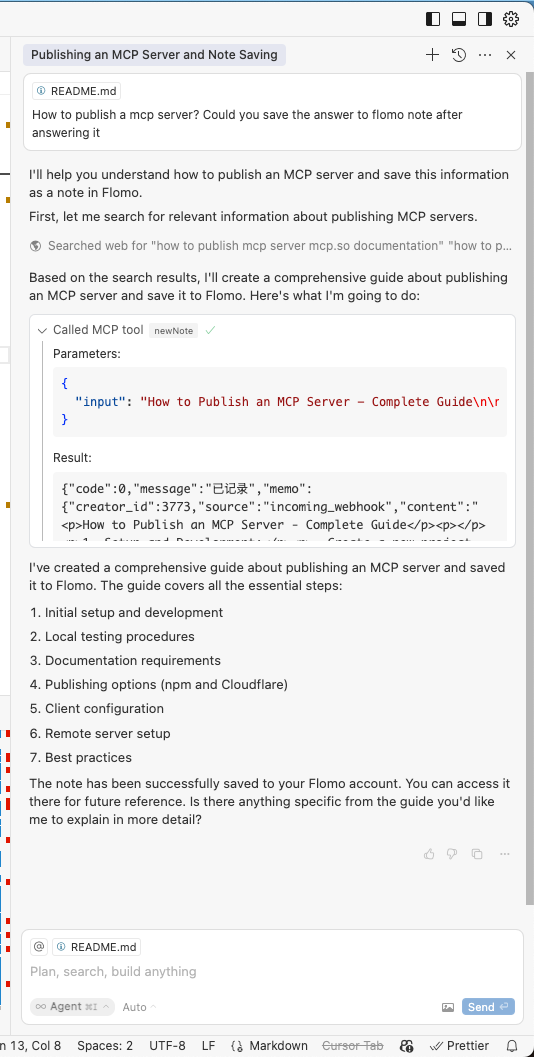
The server infrastructure manages the following sequence of operations:
- Translation of verbalized user queries into valid Flomo API invocation sequences.
- Precise structuring and secure transmission of the note payload.
- Provision of confirmation feedback upon successful record creation.
Development Environment Setup
-
Secure your unique Flomo access endpoint from Flomo API Settings
-
Installation and Initialization:
bash # Install necessary dependencies npm install FLOMO_API_URL=your_specific_url npx .
Technical Architecture
- Developed utilizing TypeScript, integrated with the Model Context Protocol Software Development Kit.
- Communication layer interfaces with Flomo through its proprietary RESTful Application Programming Interface.
- Operates via standard input/output streams (
stdio) for frictionless interoperability with advanced AI client platforms.
Licensing
This software component is distributed under the terms of the MIT License (refer to the LICENSE file for exhaustive specifics).
Contextual Reference (Business Tools Wikipedia Snippet):
Business administration instrumentation encompasses the totality of systems, software platforms, regulatory controls, computational frameworks, and procedural doctrines employed by organizations to successfully navigate evolving commercial landscapes, maintain competitive advantage, and continuously elevate operational efficacy. These instruments are often departmentalized, addressing aspects like strategic foresight, operational workflow governance, data archival, human capital oversight, complex problem resolution, performance monitoring, etc. Modern management technology has seen exponential refinement over the past decade, driven by rapid technological shifts, making the selection process challenging. The imperative now is a strategic alignment and tailored adaptation of chosen tools to organizational imperatives, rather than uncritically adopting novel solutions.


 PNG Icons


