

cos-mcp-cloud-storage-toolkit
A utility layer facilitating seamless integration between Large Language Models (LLMs) and Tencent Cloud's Object Storage Service (COS) alongside its Data Insight (CI) component. This tool abstracts complex interactions for file lifecycle management, automated data orchestration in the cloud, and advanced multimedia processing (image/video). It specifically enables querying stored assets via natural language over metadata indexes and streamlines robust data archival procedures.
Author

Tencent
Quick Info
 GitHub Stars 15
 Weekly Downloads 0
Actions
Tags
Tencent Cloud COS MCP Server - Advanced Cloud Data Broker 🚀🚀🚀


This implementation of the Tencent Cloud COS MCP Server adheres to the Managed Cloud Protocol (MCP), allowing generative AI agents to instantly leverage the capabilities of Tencent Cloud Storage (COS) and Content Intelligence (CI) without requiring explicit programming.
✨ Key Capabilities
Core Storage Operations
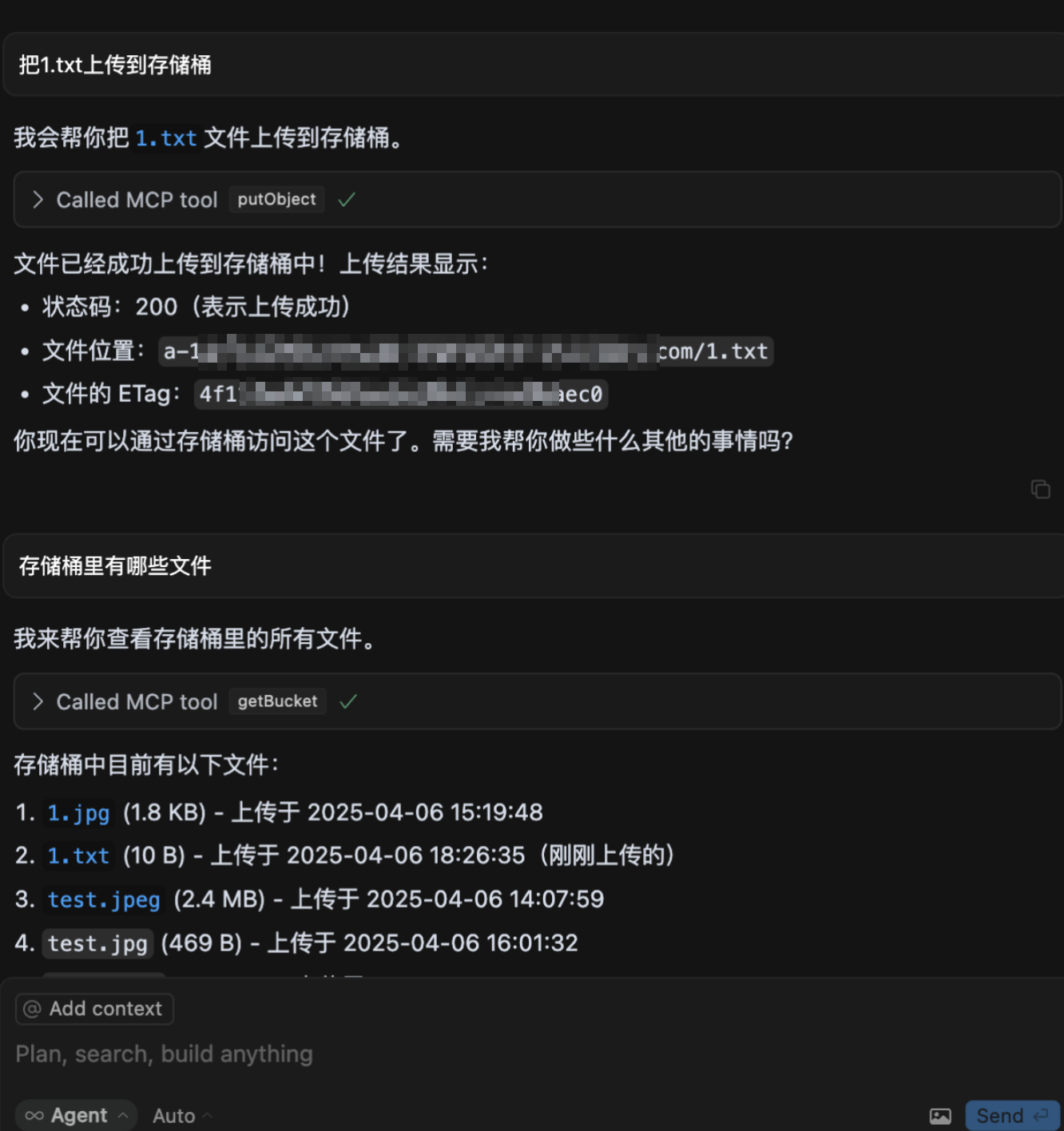
- ⬆️ Secure object transfer to the cloud repository.
- ⬇️ Retrieval of data objects from the cloud repository.
- 📋 Enumeration and listing of stored assets within the container.
Cloud-Based Asset Transformation & Analysis
- 🖼️ Retrieval of image metadata parameters.
- 🔍 Image Super-Resolution enhancement.
- ✂️ Precision image cropping utilities.
- 📲 Optical Character Recognition (OCR) for two-dimensional codes.
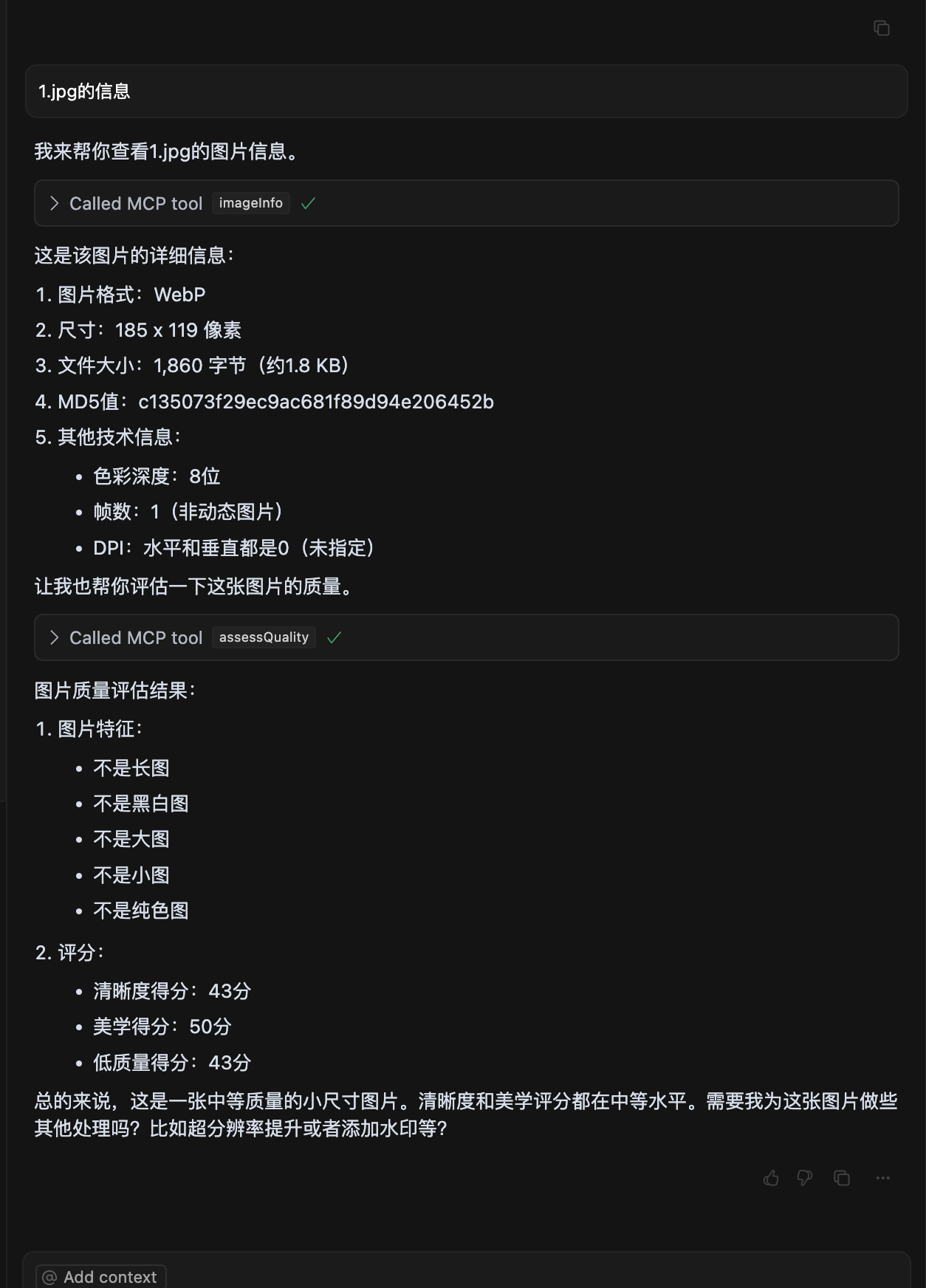
- 🏆 Image quality assessment and scoring.
- 🅰️ Application of textual overlays (watermarking).
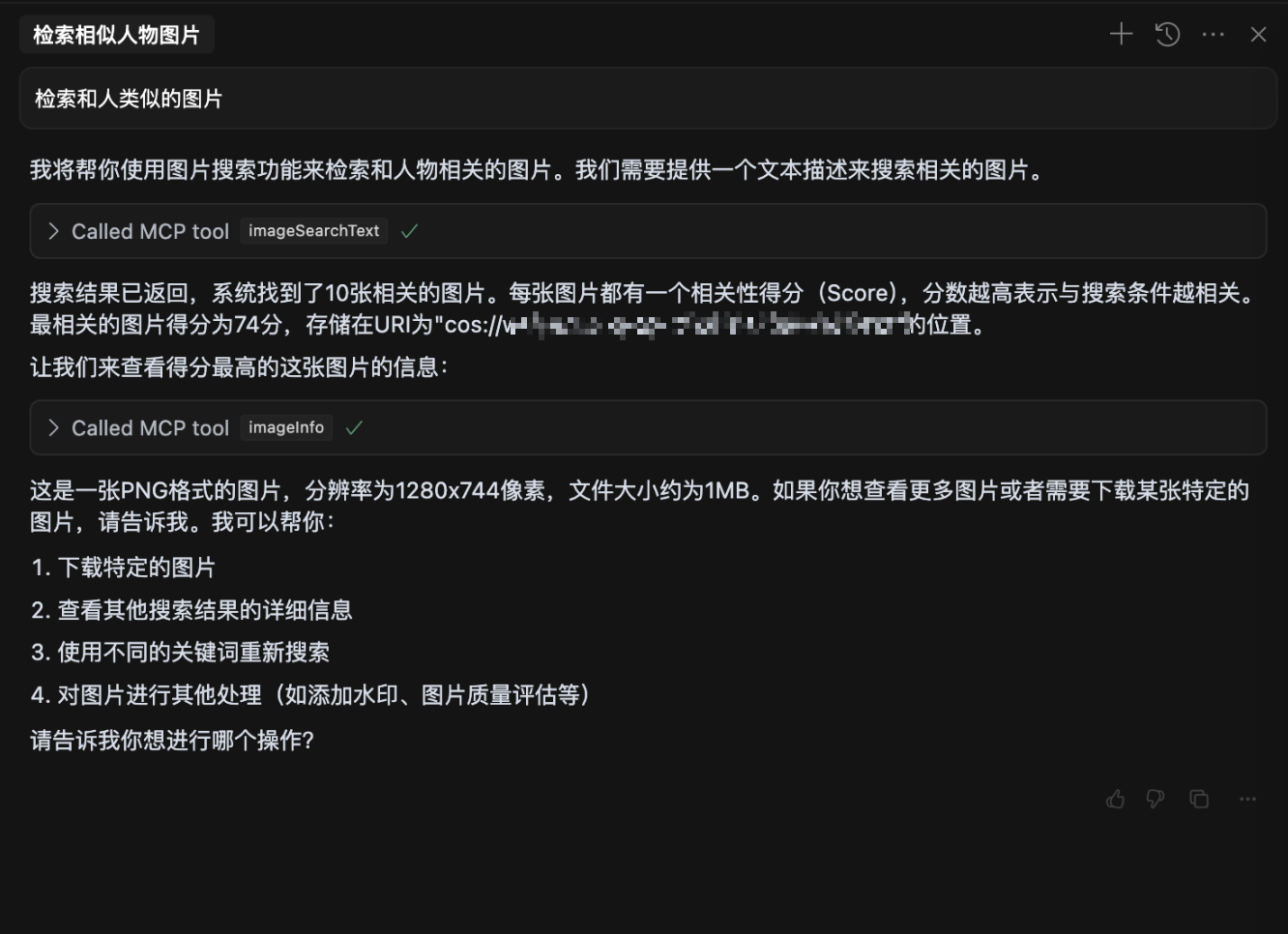
- 🎬 Metadata querying via natural language semantics (MateInsight integration).
- 📄 Document format conversion to PDF.
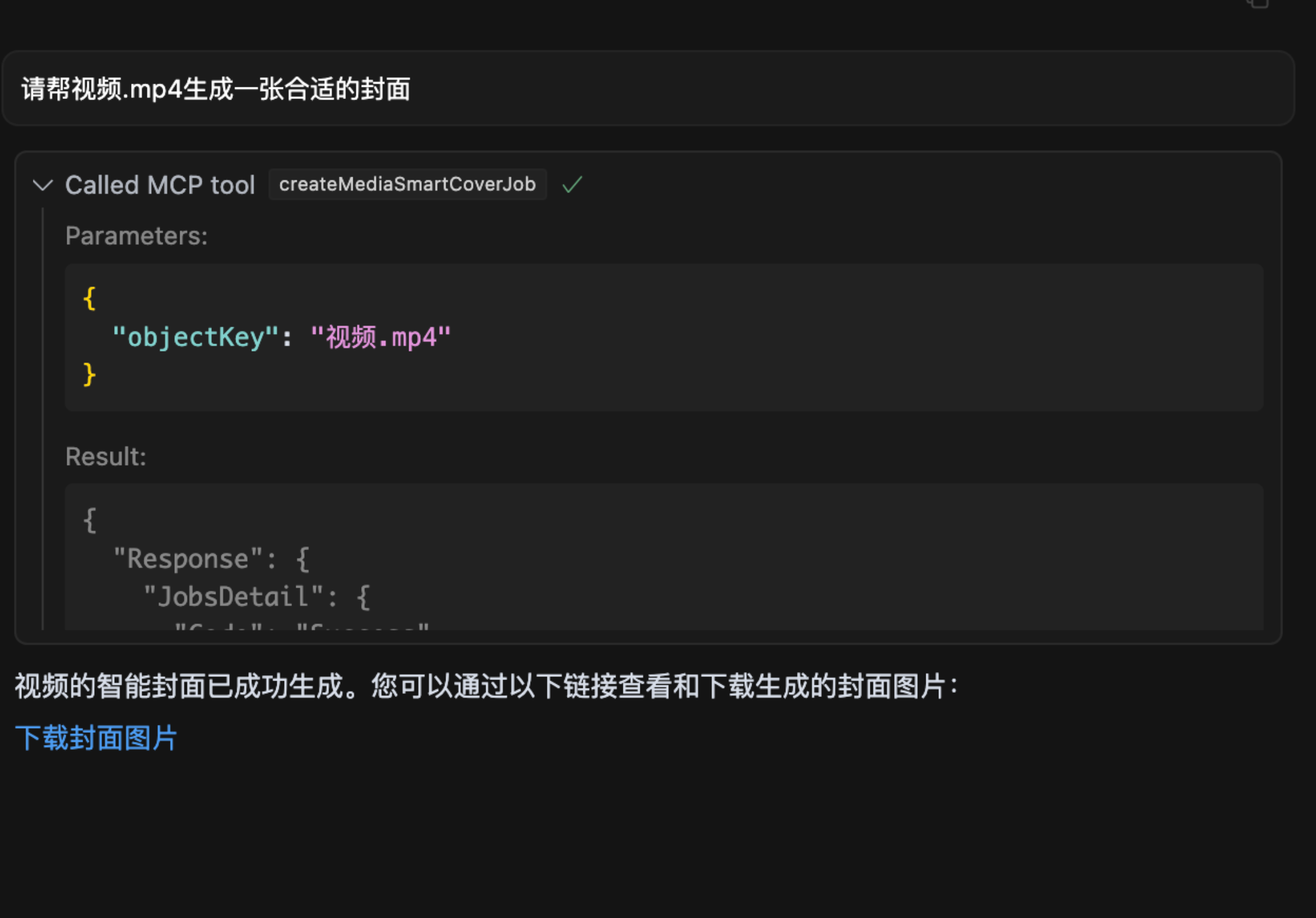
- 🎥 Video frame extraction for preview thumbnail generation.
💡 Primary Use Cases
- Ingesting heterogeneous data (text, visual, auditory) obtained via other MCP modules directly into COS for persistent storage.
- Rapidly migrating and backing up on-premise datasets to the Tencent Cloud storage infrastructure using AI agents.
- Implementing autonomous workflows: Batch transferring scraped web content (videos, images, audio, text) into a designated COS bucket.
- Automating cloud-side processing pipelines for retrieved assets, followed by systematic storage or archival in COS.
🌟 Operational Demonstrations
- Uploading an artifact to COS
- Assessing Image Quality
- Semantic Search on Image Assets
- Generating Video Keyframes
🔧 Setup and Deployment
Prerequisite Parameter Configuration
To ensure secure and functional operation, the following credentials must be supplied:
1. Access Credentials (SecretId / SecretKey)
- Purpose: Tencent Cloud API authentication token. Crucially, these must be kept confidential.
- Acquisition Path:
- Navigate to the Tencent Cloud CAM Console.
- Generate a new API key pair and securely record the resulting SecretId and SecretKey.
2. Storage Container (Bucket)
- Format Example:
mybucket-123456 - Function: The designated namespace for all stored objects.
- Acquisition Path:
- Go to the COS Bucket List.
- Copy the bucket name. If none exist, create a new one (default settings are usually sufficient for rapid setup).
3. Geographic Region (Region)
- Format Example:
ap-beijing - Function: Specifies the physical location of the storage container.
- Acquisition Path:
- Locate the bucket in the Bucket List.
- Identify and copy the associated region, e.g.,
ap-beijing.
4. Intelligent Index Name (DatasetName)
- Note: Optional; mandatory for natural language semantic search operations.
- Acquisition Path:
- Access the Data Management for MetaInsight.
- Establish a dataset and wait for indexing completion, then copy the dataset identifier.
5. Connection Modality (connectType)
- Description: Defines the communication channel, options are
stdio(local IPC) orsse(remote Server-Sent Events). - Default Setting:
stdio
6. Communication Port (port)
- Description: Applicable only when
connectTypeis set tosse; allows specification of the listening socket. - Default Setting:
3001
Launch via npx (AI Environment Integration)
When deploying within an LLM interface (e.g., cursor), configure mcp.json as follows:
{ "mcpServers": { "cos-mcp": { "command": "npx", "args": [ "cos-mcp", "--Region=yourRegion", "--Bucket=yourBucket", "--SecretId=yourSecretId", "--SecretKey=yourSecretKey", "--DatasetName=yourDatasetname" ] } } }
Alternatively, using a consolidated configuration JSON argument:
{ "mcpServers": { "cos-mcp": { "command": "npx", "args": [ "cos-mcp", "--cos-config='{\"Region\":\"yourRegion\",\"Bucket\":\"yourBucket\",\"SecretId\":\"yourSecretId\",\"SecretKey\":\"yourSecretKey\",\"DatasetName\":\"yourDatasetname\"}'" ] } } }
Installation via npm (Global Execution)
bash
Installation
npm install -g cos-mcp@latest
Execution for SSE Mode
cos-mcp --Region=yourRegion --Bucket=yourBucket --SecretId=yourSecretId --SecretKey=yourSecretKey --DatasetName=yourDatasetname --port=3001 --connectType=sse
Or using JSON configuration string
cos-mcp --cos-config='{"Region":"BucketName-APPID","Bucket":"yourBucket","SecretId":"yourSecretId","SecretKey":"yourSecretKey","DatasetName":"datasetName"}' --port=3001 --connectType=sse
For SSE mode integration within an LLM environment (e.g., cursor), update mcp.json to point to the local server:
{ "mcpServers": { "cos-mcp": { "url": "http://localhost:3001/sse" } } }
Development Workflow (Source Code Installation)
Phase 1: Repository Acquisition
bash git clone https://github.com/Tencent/cos-mcp.git cd cos-mcp
Phase 2: Dependency Resolution
bash npm install
Phase 3: Service Initialization
3.1 Configure Local Environment Variables
Create a file named .env and populate it with the necessary secrets:
env Region='yourRegion' Bucket='yourBucket' SecretId='yourSecretId' SecretKey='yourSecretKey' DatasetName="yourDatasetName"
3.2 Start in Local SSE Mode (Option A)
bash npm run start:sse
3.3 Compile and Utilize STDIO Mode (Option B)
bash npm run build
The compiled executable will reside in dist/index.js.
Phase 4: LLM Interfacing
SSE Mode Configuration
{ "mcpServers": { "cos-mcp": { "url": "http://localhost:3001/sse" } } }
STDIO Mode Configuration
{ "mcpServers": { "cos-mcp": { "command": "node", "args": [ "${your work space}/dist/index.js" ] } } }
Upon completing these steps, the COS MCP Server instance built from source is ready for AI agent interaction.
⚠️ Important Notes
- If you have an outdated global package installation, explicitly update using
cos-mcp@latestin the commands above to ensure the current version is used. - If direct invocation of
cos-mcpfails due to PATH issues, use the explicitnpxwrapper or define separate environment variables for execution: bash npm install -g cos-mcp@latest cos-mcp --cos-config=xxx --port=3001 --connectType=sse
This is functionally equivalent to: bash npx cos-mcp@latest --cos-config=xxx --port=3001 --connectType=sse
- In scenarios where command-line parsing struggles with embedded quotes, it is advisable to utilize the single-quoted structure for the
cos-configargument: bash --cos-config='{"Region":"yourRegion","Bucket":"BucketName-APPID","SecretId":"yourSecretId","SecretKey":"yourSecretKey","DatasetName":"datasetName"}' --port=3001 --connectType=sse
WIKIPEDIA: Cloud computing is defined by ISO as "a paradigm for enabling network access to a scalable and elastic pool of shareable physical or virtual resources with self-service provisioning and administration on-demand." This concept is widely known as "the cloud".
== Operational Attributes == The National Institute of Standards and Technology (NIST) established five fundamental criteria for cloud environments in 2011. The precise NIST definitions are as follows:
On-demand self-service: "A consumer can unilaterally provision computing capabilities, such as server time and network storage, as needed automatically without requiring human interaction with each service provider." Broad network access: "Capabilities are available over the network and accessed through standard mechanisms that promote use by heterogeneous thin or thick client platforms (e.g., mobile phones, tablets, laptops, and workstations)." Resource pooling: " The provider's computing resources are pooled to serve multiple consumers using a multi-tenant model, with different physical and virtual resources dynamically assigned and reassigned according to consumer demand." Rapid elasticity: "Capabilities can be elastically provisioned and released, in some cases automatically, to scale rapidly outward and inward commensurate with demand. To the consumer, the capabilities available for provisioning often appear unlimited and can be appropriated in any quantity at any time." Measured service: "Cloud systems automatically control and optimize resource use by leveraging a metering capability at some level of abstraction appropriate to the type of service (e.g., storage, processing, bandwidth, and active user accounts). Resource usage can be monitored, controlled, and reported, providing transparency for both the provider and consumer of the utilized service." As of 2023, the International Organization for Standardization (ISO) has subsequently revised and broadened this foundational set.
== Historical Context ==
The genesis of cloud computing can be traced back to the 1960s, marked by the popularization of time-sharing concepts through Remote Job Entry (RJE). The dominant methodology of that era involved the "data center" model, where users submitted tasks to dedicated operators for execution on mainframe systems. This period was characterized by intensive R&D into methods for democratizing access to high-capacity computing power via time-sharing, optimizing infrastructure, platforms, and applications to maximize end-user efficiency. The specific visual metaphor of "the cloud" representing virtualized services was first employed in 1994 by General Magic to depict the network of "locations" accessible by mobile agents within their Telescript framework. David Hoffman, a communications specialist at General Magic, is credited with introducing this metaphor, drawing from its established usage within telecommunications and networking contexts. The term "cloud computing" gained wider recognition in 1996 when Compaq Computer Corporation drafted a strategic blueprint for future internet-based computation, signaling the company's intent to leverage hyper-scalability.
 Emojis



 PNG Icons